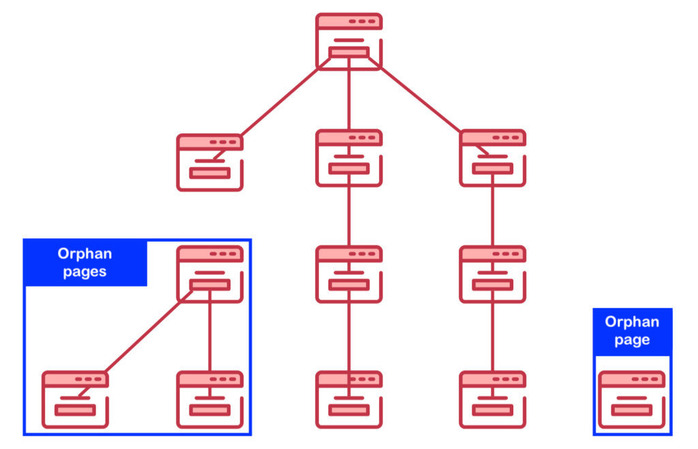
In SEO, most site owners obsess over keywords, backlinks, and content quality — yet quietly lose visibility to something far simpler: orphan pages.
An orphan page is any page on your website that has no internal links pointing to it. That means search engines (and users) have no direct path to discover it through your site’s normal navigation or crawl flow. Even if the page is indexed, it’s often disconnected from your site’s topical authority, meaning it contributes little to your rankings.
Let’s explore why orphan pages are such a silent SEO killer, how to find them, and the best ways to fix them without breaking your site structure.
What Are Orphan Pages and Why They Matter
Think of your website as a city, and every page as a building. Internal links are the roads connecting those buildings. When a page has no links leading to it, it becomes a dead-end — even if it technically exists on the map.
Orphan pages can come from:
- Old campaigns or landing pages that were never removed.
- Test or staging pages accidentally made public.
- Product or category pages that were unlinked after inventory changes.
- Blog posts not included in any tag, category, or sitemap.
The issue? Search engines rely on internal links to understand which pages are important. Without links, orphan pages:
- May not be crawled or indexed efficiently.
- Don’t pass or receive link equity (PageRank).
- Reduce crawl budget efficiency.
- Lead to inconsistent user experiences.
In short — every orphan page is wasted potential SEO value.
How to Detect Orphan Pages
You can’t fix what you can’t find. Identifying orphan pages requires combining crawl data and analytics data to see what’s missing from your internal structure.
Here’s how to do it step-by-step:
- Crawl your site using tools like Screaming Frog, Sitebulb, or Ahrefs Site Audit. Export a list of all URLs found through internal links.
- Compare that list with your sitemap.xml and Google Analytics or Google Search Console data.
- URLs that appear in Analytics or your sitemap but not in your crawl report are likely orphaned.
- Segment the results: Live orphan pages (still active and accessible). Redirected or deleted pages. Legacy campaign pages or expired content.
- Verify accessibility: Check each orphan page’s status code (200, 301, 404). Make sure it’s not blocked by robots.txt or a noindex tag.
This process reveals every page that search engines can’t reach through your main navigation or link structure.
How to Fix Orphan Pages
Once identified, orphan pages need to be evaluated before being reconnected. Not every orphan deserves resurrection — some are better off retired.
Step 1: Evaluate page quality
- Does it serve a useful purpose for users?
- Is it still relevant, accurate, or valuable?
- Does it duplicate other pages?
If yes, keep it. If not, redirect or delete it.
Step 2: Reintegrate valuable pages
- Add contextual links from related pages (e.g., blogs, service pages, product listings).
- Include it in navigation menus or category pages if it fits a broader topic.
- Update your XML sitemap to ensure Google discovers it faster.
Step 3: Consolidate where appropriate
If multiple orphan pages target similar topics, merge their content into a single, stronger page. Use 301 redirects from old URLs to the new one to preserve authority.
Step 4: Build a monitoring system
Use a crawler or SEO audit tool monthly to catch new orphan pages early — especially after:
- Site migrations
- CMS updates
- Content pruning
URL rewrites or category restructuring
Common Mistakes to Avoid
- Overlinking every page just to eliminate orphans — this can confuse crawl priority.
- Forgetting about noindexed or disallowed pages — orphan status still matters for user navigation.
- Neglecting new pages after redesigns — ensure all new URLs are internally linked before publishing.
A clean, connected structure helps Google understand the relationships between pages and pass authority efficiently.
Pro Tip: Use Internal Linking Strategically
Fixing orphan pages isn’t just about linking randomly — it’s about building meaningful connections.
- Link from high-authority pages (like top-performing blogs) to newly connected ones.
- Use descriptive anchor text to signal relevance.
- Maintain a logical hierarchy — homepage → category → subpage → blog/post.
This not only resolves orphan issues but also strengthens your site’s topical clusters and crawl depth.
Final Thoughts
Orphan pages don’t make noise — they just silently sap your SEO performance. Every unlinked page represents lost visibility, authority, and traffic potential.
By routinely auditing for orphan pages, cleaning outdated URLs, and weaving high-value pages back into your internal linking structure, you’ll create a healthier, more discoverable site that search engines love to crawl.

