Thin content and Thin URLs are two common causes of poor indexing, crawl inefficiencies, and lost search visibility.
- Thin content refers to pages with little or no value, while thin URLs are low quality or duplicate URLs created by parameters, filters, pagination, or weak website structure.
- At scale, thin pages and thin URLs waste crawl budget, dilute ranking signals, and prevent important content from being discovered or indexed by search engines.
- Detect thin content issues by reviewing content depth, similarity, Search Console indexing reports, organic performance, and user engagement signals.
- Fix thin content by expanding, merging, or improving pages. Fix thin URLs by simplifying URL structures, using canonical tags correctly, and strengthening internal linking.
- Thin content hurts perceived quality, while thin URLs hurt visibility. Addressing both is essential for better indexing, crawl efficiency, and long term SEO performance of your website.
When content on your website does not get indexed despite all efforts, you may tend to think that the specific content could be “thin” in nature. In some cases, it is worth noting that the content may not be actually “thin” in nature but it is the URL which could be “thin” which is resulting in poor indexing.
Thin content refers to webpages that provides little or no value to users. These pages often contain low quality content, poorly written text, duplicated information, boilerplate templates and other useless things which does not help anyone. Pages with thin content exists primarily for search engines rather than real users.
Thin URLs are URLs that lead to “low value” or “near duplicate” pages, often created through filters, query parameters, faceted navigation, pagination, or containing different tracking parameters, without offering any meaningful differences in content from the original URL.
When search engines find a lot of “thin content” or “thin URLs” on your website, they must spend a good amount of crawl budget in deciding what to crawl, what to ignore and what to index. This may lead to important pages being crawled less frequently while the majority of crawl budget is spent crawling and trying to index “thin content” and “thin urls”, which at the end of the day do not translate to any value or business.
In addition to crawling and indexing issues, “thin pages” on your website can dilute ranking signals and clutter a site’s overall indexation footprint. Addressing these issues helps search engines focus on your most important content and improves long term SEO visibility.
What Is Thin Content?
Thin content refers to web pages that offer little to no original value to users.
These pages exist purely to capture traffic rather than to genuinely inform users, solve a problem, or provide a meaningful user experience. While the term is often associated with short word counts, thin content is really about lack of usefulness, not just length of the content.
Here are some common examples of thin content-
- Auto generated or scraped pages – Pages created programmatically or pulled from other websites without meaningful edits, insights or original commentary. These pages often repackage existing information with minimal variation, offering nothing new to users.
- Category or archive pages with no unique descriptions – Pages that list products, services, or blog posts but include only generic headings or boilerplate text. Without contextual explanations, comparisons, or guidance, these pages fail to add value beyond navigational intent.
- Duplicate or near identical service pages – Multiple pages targeting different keywords or locations but using essentially the same copy with minor word swaps (e.g city names or service variations). Search engines treat this as redundant rather than relevance.
- Short blog posts – Brief articles that restate or “re-hash” commonly known facts, summarize existing content without analysis, or fail to answer search intent fully. Even if written by a human author, these posts may be considered thin if they don’t provide depth, perspective, or actionable insights.
- Pages created primarily for search engines rather than users – Content written to rank for a keyword but lacking real substance, such as vague advice, overused phrases, or filler paragraphs that don’t meaningfully support the topic.
- Outdated content – Pages that were once useful but haven’t been updated to reflect current information, best practices and user expectations. Stale content can effectively become thin over time.
How to Detect Thin Content on Your Website
If your website has a lot of pages that Google is denying to “index”, it is a good idea to perform a “thin content audit” and identify weak or filler pages which could be thin in nature. Identifying thin content is the first step toward fixing indexation and quality issues, if you are unable to find a reason why certain pages on your website are consistently not getting indexed in Google.
While there’s no single metric that defines a “thin” page, a combination of content depth, uniqueness, and performance signals can quickly highlight problematic areas.
Step 1 – Analyze indexation report in Google Search Console
Use the Pages report in Google Search Console to identify URLs marked as:
- Crawled – currently not indexed.
- Discovered – currently not indexed.
- Duplicate – Google chose different canonical than user.
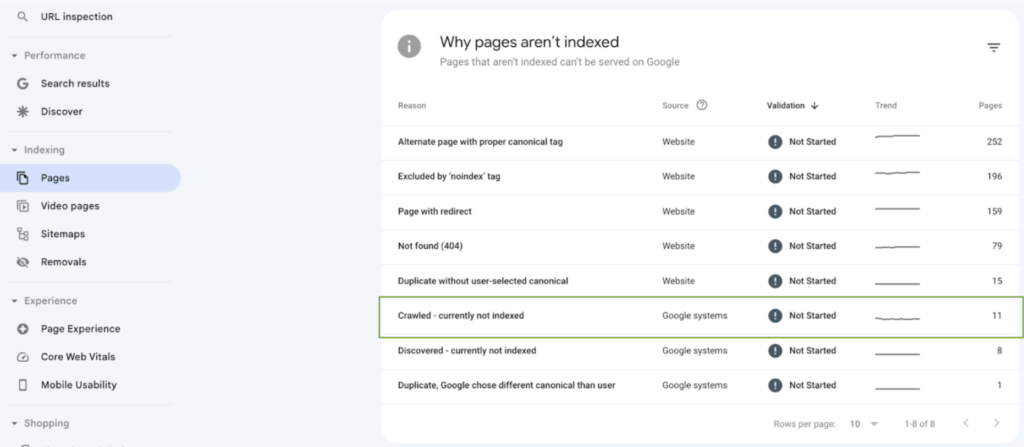
These statuses often indicate pages that Google has evaluated these pages but decided not to index them for a given reason which could be related to low quality, duplication, or lack of enough value.
Step 2 – Compare Word Count and Content Similarity
I completely agree. Word count is not the “only” indicator of thin content. A page with less number of words can contain useful information and should not be classified as “thin” in nature, just because it is short and concise.
But what is important to note is – pages with low volume of content have a higher probability of falling in the “thin content” bucket. If the page has less amount of textual information, it really helps to check once more whether the content of the page is communicating any “value” to the user or not.
Thin Content Detection Checklist: Word Count, Content Similarity and Usefulness
Use the checklist below to identify pages that may be contributing to thin content and indexation issues.
- Enough Original Text? – Does the page contain enough original text to clearly explain its purpose and value? Or is the content of the page created from text copied from other parts of the website?
- Idential to other pages? – Is the page’s content largely identical to other pages, with only minor changes (keywords, locations, product names)?
- Shared template? – Does the page rely on a shared template without meaningful sections that are unique in nature?
- Multiple URLs? – Are multiple URLs publishing the same product, category, or service descriptions?
- Outdated content? – Has the page’s content not been updated for a long time (e.g 2 years)? Is the content outdated in nature?
- List of Links? – Is the page primarily a list of items or links with little or no explanation?
- Location pages? – Do location or service pages differ only by a single modifier (city, state, keyword)?
- Low word count? – Are there many pages with very low word counts compared to similar URLs on the site?
- Is it useful? – Would this page still be useful if search engines did not exist?
- Can it be improved? – Could the page be improved by adding unique insights, explanations, or supporting content?
If several boxes are checked for a page or an entire section of the website – it is a strong signal that the content should be improved, consolidated, canonicalized, or removed from the index.
Step 3 – Check organic performance and engagement signals
Once you’ve identified pages that may be low quality based on content depth or duplication, the next step is to evaluate how those pages actually perform in organic search.
Performance and engagement data can help validate whether a page is providing real value to users or simply existing without any purpose or meaningful impact.
- Get the impressions and clicks count of these pages from Google search console for the last 16 months.
- Get the total organic traffic these pages have received from Google Analytics 4.
- Look at metrics such as Bounce rate, Average engagement time and key events to understand user engagement.
Pages that consistently receive little to no organic traffic, extremely low impressions, or rarely appear in search results may indicate that search engines have already deprioritized them due to low perceived value.
Key signals to look for include:
- Very low or declining impressions over time, suggesting the page is not being considered relevant for search queries.
- Few or no organic clicks, even when impressions exist, which may indicate poor relevance or unappealing titles and descriptions.
- Minimal engagement metrics such as short time on page, low scroll depth, or quick exits, which can signal that users are not finding what they are looking for.
Let’s take couple of examples to understand how to read data in Google search console and spot possible thin content issues.
Here is an example performance of a page from Google search console
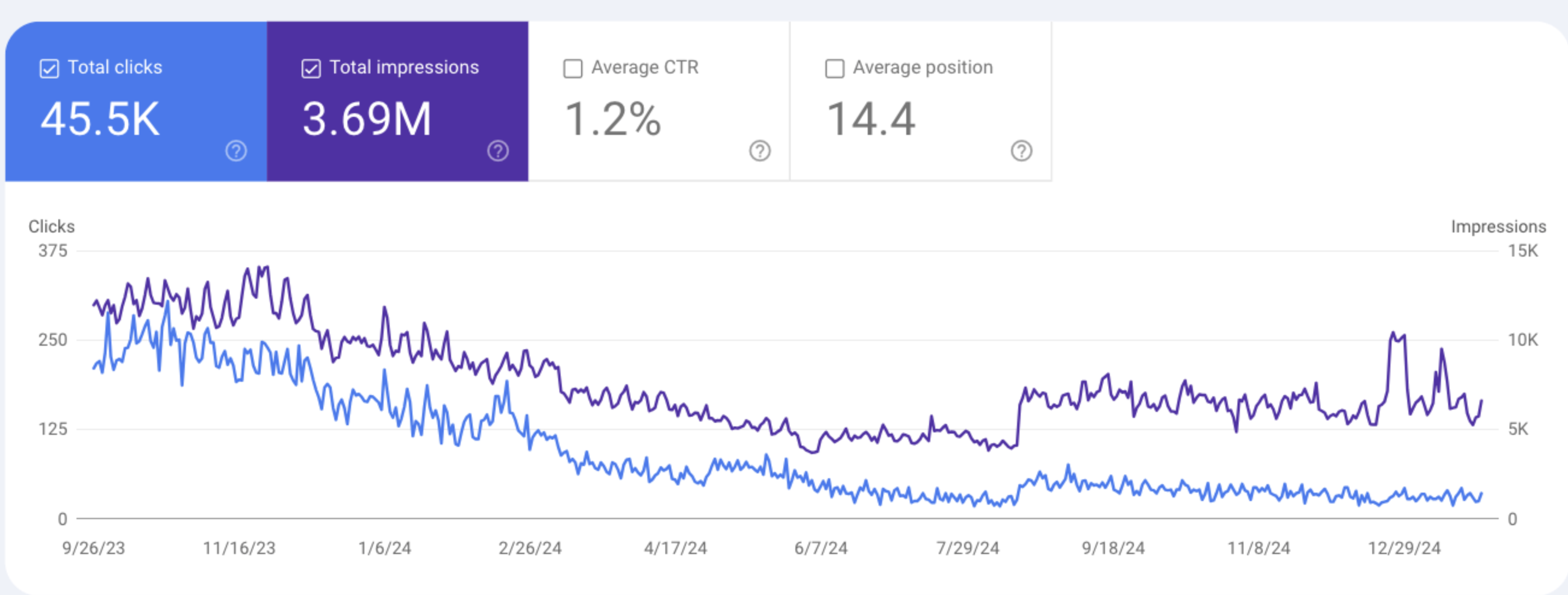
We can clearly see that impressions and clicks have considerably reduced overtime. This, however, does not mean that the content is “thin” in nature. What this means is that this page is not performing as strongly in Google search, as it was performing before. There could be various reasons why this is happening – maybe the information of this page is outdated or maybe there are other pages created by competing website which are giving more upto date and relevant information.
The action to take in such situations is
- Content review: Thoroughly review the content of your page and see if the information is accurate and up to date.
- Competitor analysis: Do a competitor analysis to see if other websites have created better content than your page.
- Update old content – If required update the content of your page to make it better than competiton.
Now let’s take a look at another page’s performance in Google search console
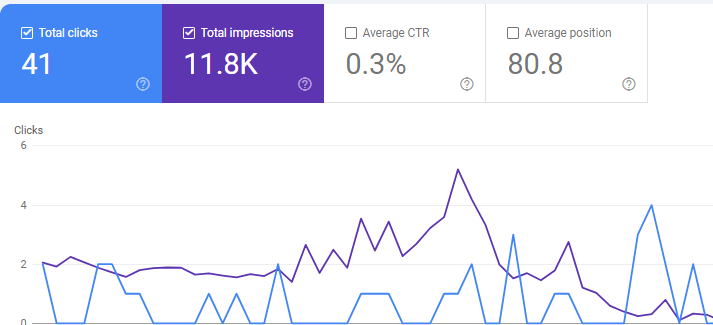
Here we see a different trend.
The page has consistently gotten impressions but not enough clicks. The impressions and clicks have deteriorated over time. Out of nearly 12,000 impressions – only 41 clicks, and that too follows a downward trend.
In such situations, this page is to be closely investigated for thin content issues. A gradual decline in clicks and impressions is normal and understandable but when you see a large impression count and very few clicks – it just means that users are not finding enough value in the page’s content and noone is click through them from Google search results – resulting in low traffic and poor engagement.
It’s important to remember that performance alone doesn’t define content quality.
New pages, seasonal content, or highly niche pages may naturally receive limited traffic. However, when large groups of pages show the same pattern – low visibility on Google search, low engagement, and no clear purpose – it is a strong indicator of thin or unhelpful content at scale.
Use this data to prioritize which pages you want to act first.
Step 4 – Take Action on Thin Content
After identifying thin content and reviewing performance and engagement signals, the final step is deciding what action to take. Not every low performing page should be deleted, since some pages can be improved by adding content while others are better consolidated or removed from the index entirely. The right approach depends on the page’s intent, value, and role within your site.
Below are common use cases and the recommended actions for each
1. Improve pages that show user interest but lack Content depth
What to do:
- Improve and expand the content with original insights, explanations, FAQs, or examples.
- Match the content of the page to the search intent it is attracting.
- Improve internal linking from other sections of the website to this page.
- Re-write sections of the content to increase it’s value.
- Improve headings, content formatting, and give more clarity to readers.
Example: If you have category pages on your website which only a short description of the product, here are some steps you can take to improve the content of “thin” category pages.
- Create buying guides and link the category page from each buying guide. This will not only create more contextually relevant content on your website, but will create a more coherent “content cluster” which will help the category page rank well in search engines.
- Increase the textual content of the category page by introducing new sections such as “Who is this product for?”, “When to use?”, “how to use the product” and so on. This not only creates more contextually relevant information, but it also improves the overall readability of the page and adds value to the content of the page.
- If the category page is showing commercial intent, link to other relevant products which users may find interesting. On the other hand, if the category page is showing “informational intent”, create informational content such as blogs, case-studies, videos and use these content pieces to expand the content of the category page.
- Re-write the meta title and meta description of the category page to make it more useful and meaningful. An optimun length of meta title should be 65 characters while an optimum length of meta description should be 16o characters.
2. Consolidate overlapping or duplicate pages
What to do:
- Merge the strongest content into a single, comprehensive page.
- Redirect weaker or redundant pages (301 redirect) to the consolidated version.
- Update internal links to point to the new primary page.
Example: Let’s say you have multiple “location specific pages” on your website targetting the same service offering.
example.com/service/lawn-cleaning/new-york
example.com/service/lawn-cleaning/houston
Instead of keeping all the useless “thin content” on your website, a better strategy would be to create a single page
And in that consolidated page, you list out all the locations (boston, new york, houston) where you are providing your services. Additionally, you would like to place a 301 redirect from the older “thin” pages to the new one.
3. Noindex pages that must exist but don’t need visibility in SERPs
What to do:
- Identify navigational and functional pages on your website which do not have enough content on them.
- For example – search result page, login page, paginated URLs, category, archive, tag and other “cluster” pages which exist just for the sake of navigational aid and do not contain unique content or any added value.
- Add a noindex directive using the robots meta tag to ensure these pages are not indexed by search engines.
- Keep these pages accessible via internal links if users still need them.
- Do not link to these pages if there isn’t a compelling reason to do so. You do not want your website’s link equity to flow through these “navigational pages” if they aren’t supposed to perform in search engine result pages.
4. Delete Pages that are no longer required
A system needs cleanup and housekeeping, every once in a while. A website is not an exception.
Just because you spent a lot of time creating those content few years ago, does not mean you should keep them forever. If something is not adding any value, and if there is no way to improve it or consolidate it, you are better off getting rid of that page from your website, which would otherwise keep contributing towards “thin content” and make your overall website look “thin” in nature.
Example: Old campaign pages, PPC landing pages, empty tag archives,or auto generated URLs that no longer serve users or contribute towards your business goal.
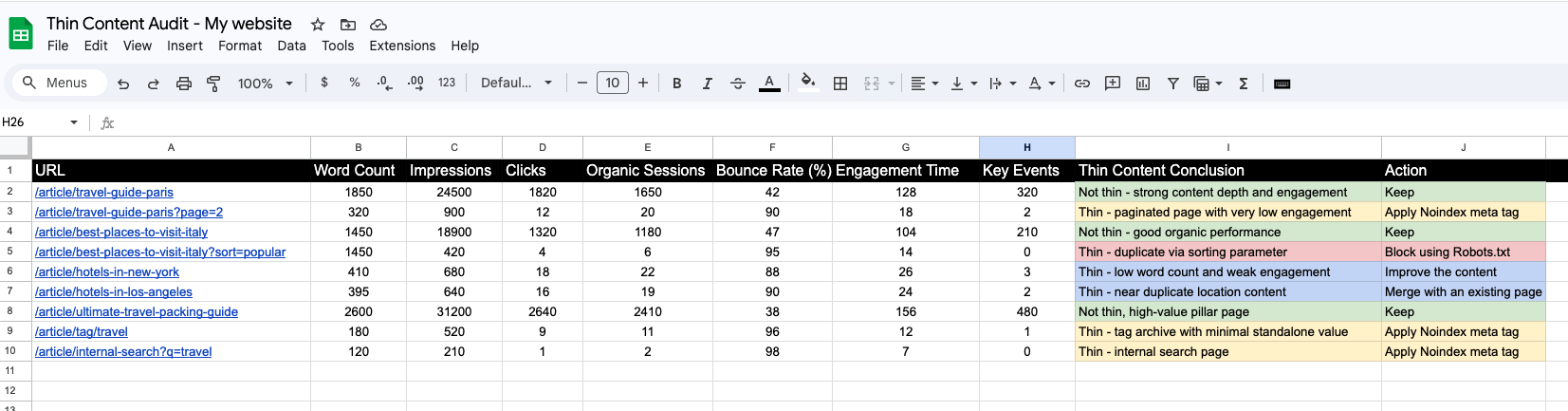
Here is how your excel report should look like when you have finished doing a proper “thin content audit” on your website, after taking into consideration data from Google search console and Google Analytics 4.
When “Thin URLs” Causes Indexation Problems
Not all indexation problems are caused by poor content or “thin content”. Sometimes, it is the URL structure and other configuration elements on your website which gives rises to indexation issues.
A thin URL is not necessarily a low quality page on your website. Instead, a thin URL is that page on your website which has useful content but search engines have decided to crawl another version of the same page due to the presence of something else in the URL strucutre.
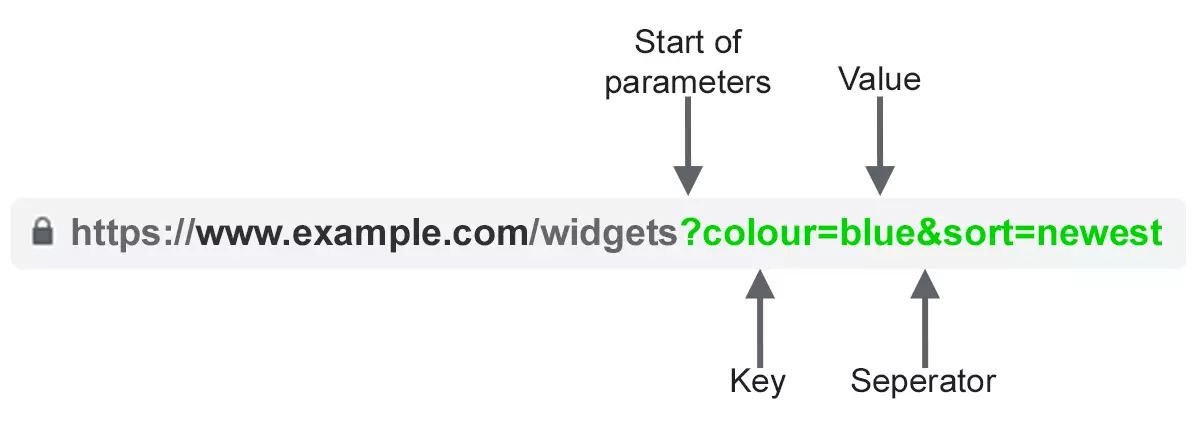
Thin URLs commonly arise from site architecture and URL management decisions rather than content creation. Some of the most frequent causes include:
URL Parameters – Duplicate or unnecessary URL parameters, such as sorting, filtering, tracking, or session IDs, which create multiple URLs for the same content.
A page exists at https://www.example.com/article but the same content is also accessible from this URL with a query parameter – https://www.example.com/article?sort=latest
In this case, the URL with the query parameter is classified as a “thin URL”.
Solution: The solution here is to block the query parameter URL from robots.txt to ensure that “thin URL” is not crawled and indexed, so that Google can crawl/index the original URL and displays the same in search results.
Excessive crawl depth – When important pages are buried four or more clicks away from the homepage, making it harder for crawlers to reach that page and prioritize crawling.
An important page exists at https://www.example.com/article/ultimate-travel-packing-guide but it is buried deep in the site structure (4+ clicks away), so it is difficult for crawlers to reach it.
In this case, the page may behave like a “thin URL” because it receives weak internal signals and is difficult to discover.
Solution: Add stronger internal links from high-importance pages (homepage, category hubs, related articles), and include the page in navigational elements (breadcrumbs or “related content” modules) to reduce crawl depth and improve discoverability.
URL Variants – Multiple URL variants serving the same content, such as trailing-slash vs. non-slash URLs, HTTP vs. HTTPS, or uppercase vs lowercase URL paths.
The same content is accessible via multiple URL variants, such as https://example.com/article and https://www.example.com/article/ (one has a trailing slash and the other does not)
In this case, the alternate versions are considered “thin URLs” because they duplicate the same content and split ranking signals.
Solution: Choose one preferred version and 301 redirect all other variants to it. Also ensure the canonical tag points to the preferred URL so search engines consolidate indexing and link equity correctly.
Missing Canonical Tags – Incorrect or missing canonical tags, which prevent search engines from consolidating duplicate URLs into a single preferred version.
A filtered page exists at https://www.example.com/article?filter=popular but it has no canonical tag, so search engines can’t determine the preferred version.
In this case, the URL may be treated as a “thin URL” because it appears duplicate or untrusted due to missing canonical and URL consolidation signals.
Solution: Add a canonical tag that points to the correct primary URL (for example, https://www.example.com/article). If the filtered page should be indexable, self-canonicalize it and ensure the content is meaningfully unique.
Weak Internal Linking – Weak or inconsistent internal linking, where specific pages on your website receive few or no contextual links from important sections of the site, leaving them effectively isolated.
A useful page exists at https://www.example.com/article/travel-guide-paris but it receives few or no internal links from important pages, and is only linked from deep paginated pages.
In this case, the URL can be perceived as “thin” because it lacks internal link authority and appears isolated or orphaned within the site.
Solution: Add contextual internal links from relevant high-value pages (destination hubs, related guides, navigation modules), and ensure the page is reachable within a few clicks so crawlers can discover and prioritize it.
These issues don’t necessarily mean your content lacks value but they do make it harder for search engines to discover pages efficiently, understand their importance, and consolidate ranking signals correctly. Fixing thin URL problems often leads to significant indexation and visibility improvements, even without changing the underlying content in a page that has been affected.
Fixing Thin Content and Thin URLs
Thin content and thin URLs are often treated as the same problem, but they impact SEO in very different ways.
Thin content is a quality issue since it fails to satisfy user intent. Thin URLs are a technical visibility issue – they prevent search engines from discovering, crawling, or consolidating pages that are otherwise valuable and have useful content.
For thin content, the solution is to improve usefulness by consolidate overlapping pages, expanding pages that have shallow content and genuinely improve the content with examples, visuals, FAQs, and original insights that clearly justify each page’s existence in search results.
For thin URLs, the focus should be on structural clarity and consolidation. Simplify URL structures, eliminate unnecessary parameters, and use canonical tags correctly to avoid duplication of content. Strengthen internal linking so important pages receive clear authority signals, include key URLs in XML sitemaps, and ensure they aren’t accidentally blocked by robots.txt or noindexed through the Robots meta tag.
Thin content hurts perceived quality. Thin URLs hurt discoverability. Knowing the difference determines whether Google can fully evaluate your site’s value or overlook it entirely. To improve indexation and rankings sustainably, audit both your content depth and your website’s technical architecture because even the best content cannot rank if search engines cannot find pages and understand them clearly.

