
Title tags play an important role in how users perceive and click on search results, and small mistakes can significantly lower click through rates even when pages rank well in Google search results.
- Common title tag mistakes are – truncation, keyword stuffing, poor keyword placement, and generic wording. This reduces clarity and make results easier to ignore.
- Over optimized or repetitive titles look spammy, while vague or robotic titles fail to stand out in competitive search results.
- Placing important keywords early and keeping titles concise helps improve both visibility and relevance.
- Titles that ignore search intent often fail to convert clicks, leading to lower CTR and higher bounce rates.
- Optimizing title tags for clarity, intent, and appeal is one of the fastest ways to increase organic traffic without improving rankings.
The title tag is often the first thing users see in search engine result pages. Even when a page ranks well, a poorly written title tag can drastically reduce click through rate, resulting in lost traffic traffic to competitors ranking below you. In many cases, low CTR isn’t a ranking problem at all – it’s a presentation problem.
If user’s aren’t convinced with what they see what it means – they won’t click!
Common title tag mistakes such as duplication, truncation, keyword stuffing, or lack of “value” make search results harder to understand and less appealing to users. When titles fail to match search intent or don’t clearly communicate value, users simply skip over them, regardless of how relevant the underlying content may be.
In this article, we’ll break down the most common title tag mistakes that hurt click through rate (CTR). We will also take examples to understand why such mistakes occur and discuss ways to fix them. By writing optimized title tags and aligning them with user intent and search behavior, you can improve click through rates, attract more qualified traffic and unlock more value from your existing rankings, without needing to rank higher in search engine result pages.
1. When Google Truncates the Content of Title Tag
Google displays title tags within a limited visual space, typically around 50-60 characters or 580-600 pixels on desktop. When a title tag content exceeds this limit, Google truncates it with an ellipsis (“…”). In some situations, Google may decide to re-write the title tag content entirely.
When the title tag content is truncated, it may remove important keywords, brand name, value propositions and “hooks” necessary for users to click through the link to visit your website. When a Title tag content is truncated, the result looks “less compelling”, which increases the probability of users to ignore it.
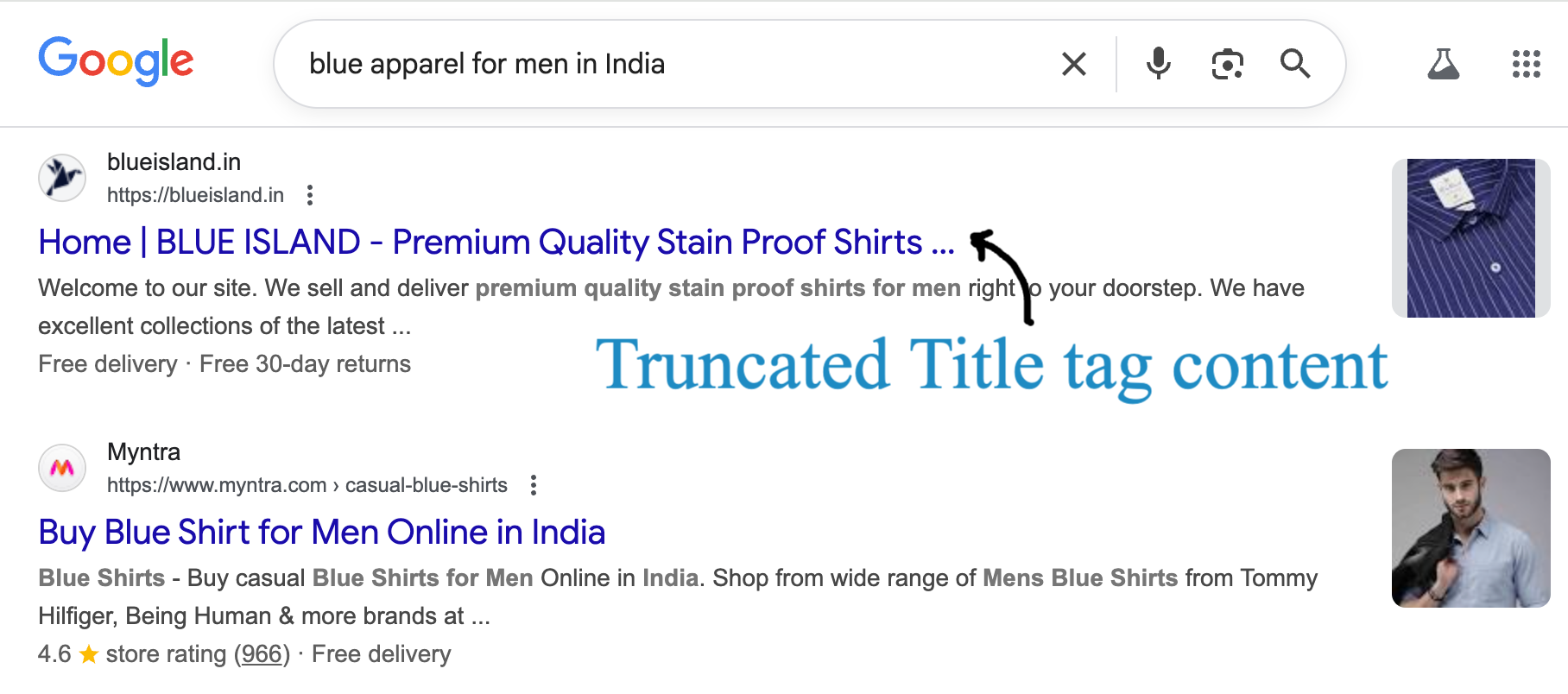
Given below is an example of title tag truncation in Google search results. The first result is using a “Long title tag” content and hence, after a given number of characters the content of the title tag is truncated and not fully shown.
The second result, however, displays a complete title tag content and no truncation occurs since the character limit of the title tag content is well within the maximum limit of 65 characters.
How to fix title tag truncation in Search engine result pages
- Keep titles under 65 characters or 580 pixels wide.
- Place your most important keywords at the beginning of the title tag content
- Use concise, readable phrasing that communicates value immediately.
Think of your title tag as an ad headline. It should be short, focused, and instantly informative because if users can’t read it in full, they probably won’t click it.
2. Keyword Stuffing: When Optimization Turns Spammy
In the early 2000’s, keyword stuffing used to work and was considered a common SEO tactic. But not anymore, and today it is considered a clear signal indicating low quality content – both to search engines and users.
Title tags overloaded with repeated keywords looks spammy, unnatural and turns users off. Keyword stuffed content is hard to read, is unreliable and users would most often skip them and choose content that reads well and looks reliable.
Example of Keyword stuffing in Meta title
- Keyword stuffing – Buy Running Shoes | Running Shoes for Men | Running Shoes Online
- No Keyword stuffing – Buy Men’s Running Shoes Online | Free Shipping & Best Prices
How to write title tags without keyword stuffing
- Include one or two keywords – Include one main keyword and a secondary phrase that feels natural.
- Avoid repetition and overuse – Prioritize clarity and intent over keyword repetition.
- Make it human – Add emotional or value-driven hooks like “Free Returns” or “Expert Reviews.”
Your goal is to make the content of the title tag human in order to attract clicks, and not just match every possible search term that users may type to find your content.
In the unlikely event that a page with keyword stuffed meta data ranks in Google, it will soon lose it’s rankings. Why? Because of poor user experience signals. If the page does not receive enough clicks, have high bounce rates, high dwell times and poor engagement time, search engines will eventually figure out that this page is not meeting user expectations.
And hence, that page with keyword stuffed content will no longer rank highly in search results.
3. Poor Keyword Placement
Users typically scan the content in search results and not read everything word by word.
The first few words in the content of a title tag hold more importance, than words that appear later in the title tag content. This makes keyword placement a critical factor for visibility and relevance. When your primary keyword is pushed to the end, it’s easier to miss, more likely to be truncated, and less effective at matching user intent.
Even if the content is relevant, poor keyword placement can weaken both rankings and click through rates. Users have to work harder to understand what the page is all about, hence it is recommended to put your important keywords earlier in the meta title tag content.
Example:
- Poor Keyword Placement: Shop Now for Quality Products | Men’s Running Shoes.
- Good Keyword Placement: Men’s Running Shoes | Quality Sports Footwear Online.
Here are two good examples of poor keyword placement in title tags.
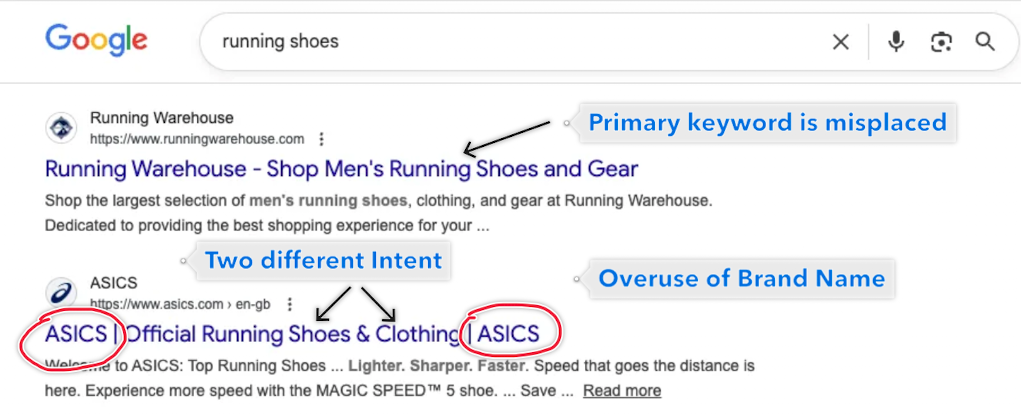
The first result is clearly not targeting the main keyword “Running shoes” properly, since it uses the brand name at the start of the title tag and uses the primary keyword much later in the title tag content. Users who scan the search results may not see the main keyword they have searched for (“running shoes”) and may choose not to click this result at all. All of this happens subconsiously and within a few seconds.
The second result is clearly overusing the brand nane beyond need. The brand name – ASICS is not only used twice, it has an incorrect placement too – right at the start of the meta title tag. Users who do not recognise this brand name or aren’t familiar with the business may not understand what that means and may choose to skip this listing altogether. Another drawback of this title tag content is that it is clubbing two intent together – “Running shoes” and “Clothing”, which are two different products and two different search intent.
How to ensure optimum keyword placement in meta title content
- Place the target keyword within the first few words.
- Keep brand names at the end, separated by a pipe (|), unless your brand itself is a needed search trigger.
This simple shift in the position of primary keywords often improves both rankings and click through rates, since users immediately see what they searched for.
4. Generic Titles That Don’t Grab Attention
When a title tag is generic, vague, or uninteresting, it fades into the background of the search results and goes unnoticed.
Search engine result pages are quite competitive where multiple listings are targeting the same keywords. Titles that sound robotic, vague, or overly formal give users no reason to choose your result over others. Since most users skim the SERPs in seconds, a forgettable title often means a missed click.
Example:
- Generic Title Tag: Digital Marketing Services – ABC Agency
- Focussed Title Tag: Increase Lead Generation with Proven Digital Marketing Services | ABC Agency
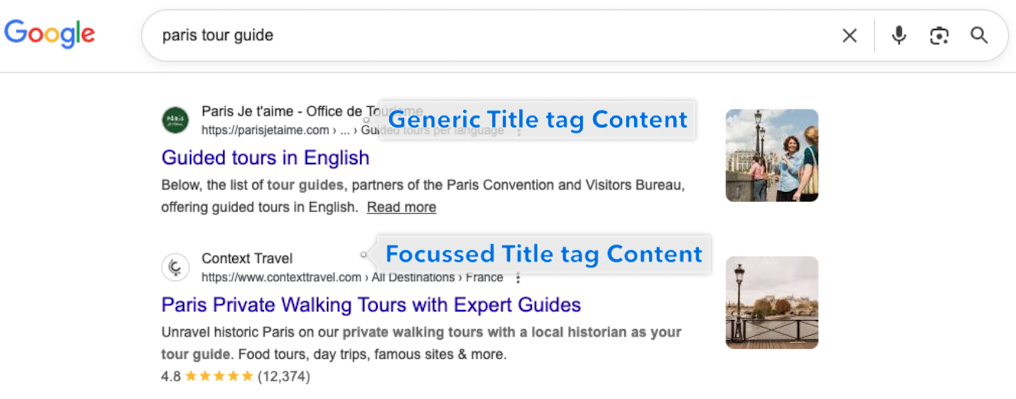
Given below is an example from an SERP result page which shows the difference between generic title tag content and focussed title tag content. The first result is clearly generic in nature, it says “Guided tours in English”. It does not capture the search intent properly and does not convey the fact that these guided tours cover Paris as a location.
The second SERP snippet, however, is more focussed in nature. It clearly communicates the words “Paris”, “Expert guides” and “Walking”, giving users clear information on what they can expect if they visit that page.
How to ensure your title tag content is not generic and it grabs user attention
- Use action oriented language such as “Grow,” “Boost,” “Learn,” or “Discover” to encourage engagement.
- Highlight a specific benefit or outcome, not just the service or topic that you are covering.
- Incorporate differentiators where appropriate.
- Test and refine titles using Google Search Console data to identify which variations attract more clicks.
- Even small emotional cues like curiosity, exclusivity, or urgency can make your title more clickable.
5. Ignoring Search Intent and Relevance
A title tag can look perfectly optimized from an SEO standpoint but still fail to attract clicks if it doesn’t match what the user is actually looking for.
Search intent whether informational, transactional, or navigational, plays an important role in determining which titles perform well in search results and gets clicks from users. When the content of a title tag conflicts with intent, users instinctively skip it and choose something else which closely aligns with their search intent. In the worst case, if they do click and visit your website they’re may not find what they were looking for and bounce quickly, sending negative engagement signals.
Example:
If the query is “how to fix a leaking tap”
- Ignores Search Intent – “Buy Tap Repair Tools Online” – this ignores the search intent completely.
- Covers Search Intent – “How to Fix a Leaking Tap in 5 Easy Steps | DIY Plumbing Guide” – matches what the user is looking for — a tutorial, not a sales pitch.
How to Match Title Tags with Search Intent
- Analyze the intent behind your target keyword by reviewing the current top ranking results.
- Match the format users expect, such as guides for informational queries, comparisons for research based searches, or offers for transactional intent.
- Use language that mirrors real search phrasing, rather than forcing commercial terms where they don’t belong.
- Avoid mixing intents (for example, informational queries with sales driven titles).
When intent and title match perfectly, CTR improves and bounce rates drops.
Title tags may be small in size, but they have an outsized impact on how your pages perform in search results. Even well-ranked pages can struggle to attract clicks if their titles are truncated, stuffed with keywords, poorly structured, generic, or misaligned with what users are actually searching for. By thinking of title tags not just as SEO elements but as your first impression in the search results, you can craft headlines that both match user intent and spark curiosity or action.
Optimizing title tags for clarity, relevance, and appeal is one of the fastest ways to improve click-through rates without chasing higher rankings. When your titles clearly communicate value, align with intent, and stand out from the competition, users are far more likely to click through the link and stay engaged with your content. Invest the time to refine your titles, test variations with real data, and treat every title as a conversion opportunity.

