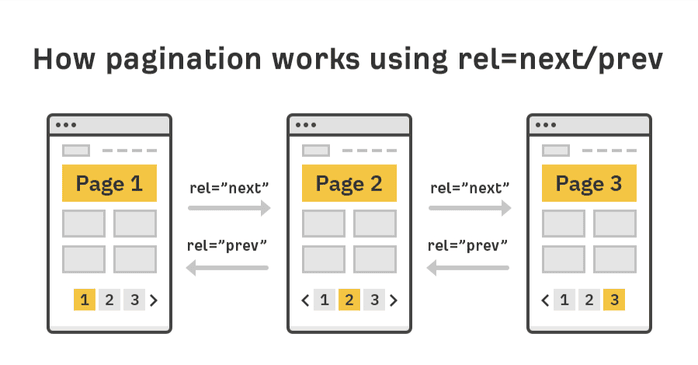
Pagination helps users navigate large content sets spread over paginated pages, but it can create SEO issues if search engines can’t crawl and understand the relationship between pages.
- Poor pagination can lead to duplicate content issues, split link equity, and important items on deeper pages being missed or not indexed.
- rel=”next” and rel=”prev” were historically used to indicate page sequences but Google no longer uses them for indexing. They can still help other systems so solid internal linking remains essential.
- Use self referencing canonical tags on each paginated URL and avoid canonicalizing everything to Page 1 unless pages truly repeat content.
- Follow SEO friendly patterns: clean, consistent URLs, unique titles and meta descriptions, strong sequential pagination links, and short crawl depth.
- Avoid common pitfalls like canonical to Page 1 everywhere, infinite scroll without crawlable pagination URLs, and duplicated meta titles and descriptions.
Pagination is the practice of splitting a large volume of content across multiple pages instead of displaying everything on a single page. You’ll encounter paginated pages almost everywhere online – on blogs, e-commerce category pages, forums, and search result listings.
Typically, paginated pages will distribute content into pages like –
https://example.com/page/2
https://example.com/page/3
and so on and so on.
There are broadly two ways paginated content is shown.
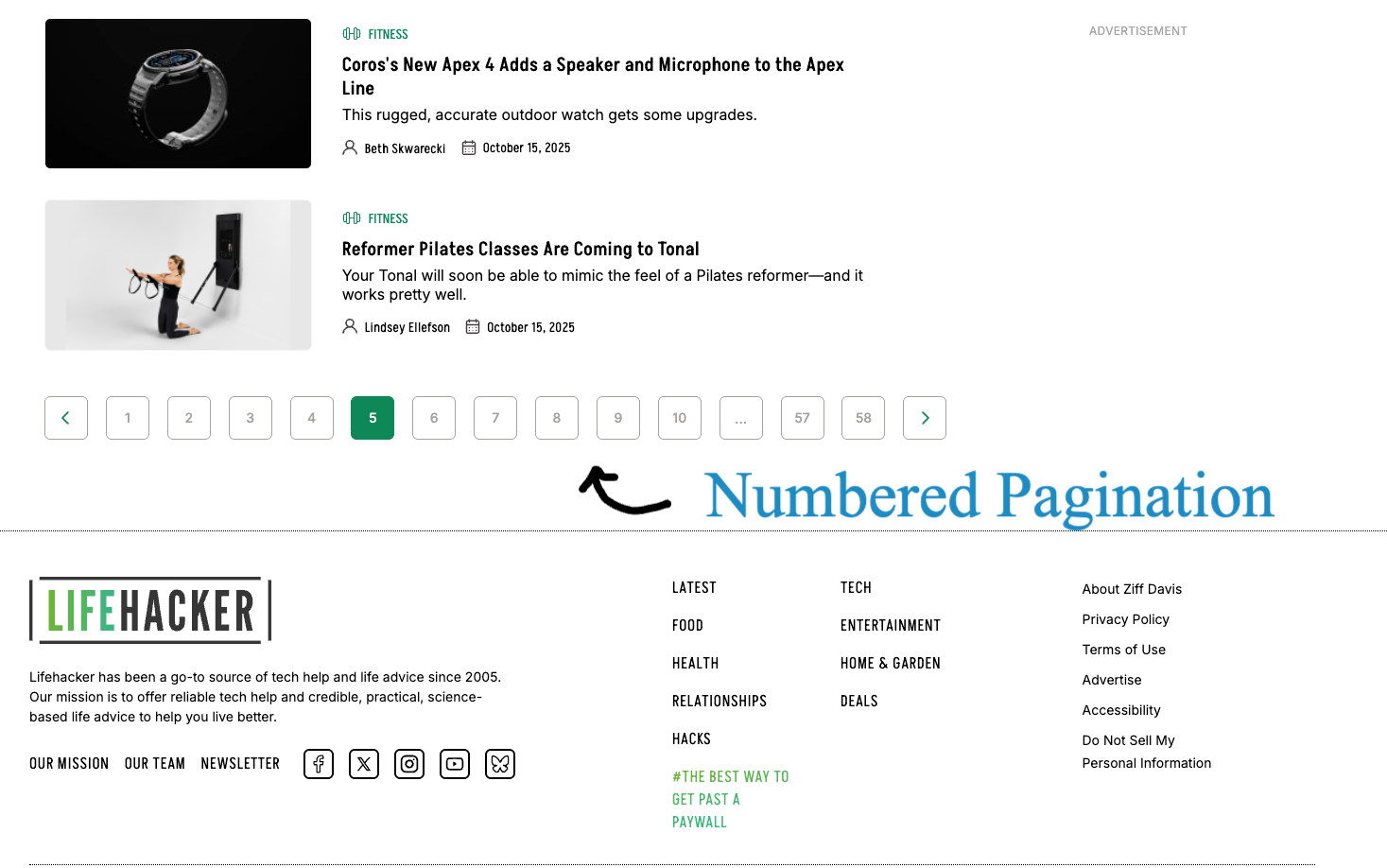
A. Numbered Pagination Links – This format displays a series of page numbers, allowing users to jump directly to a specific page.
For example, in this Lifehacker category page for Fitness, we can see a classic numbered pagination where all the fitness related content is spread across paginated pages, each one designated by a specific number. This approach has the advantage that if users want to go back to an older article, they can quickly skip the initial few pages and directly click on a given number such as “10”.
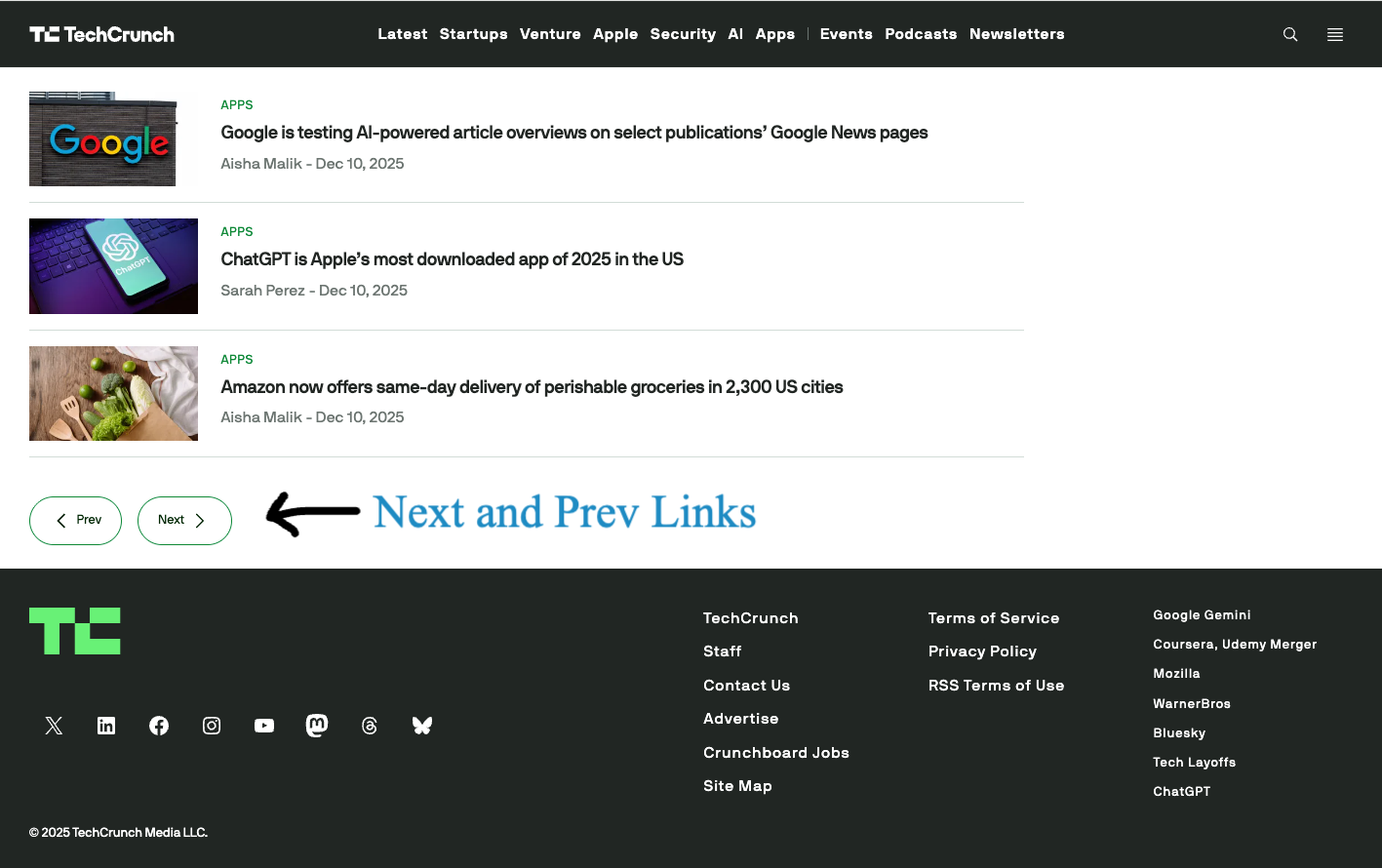
B. Next and Previous Buttons – In this approach, users move sequentially through content using Next and Previous buttons, without seeing all page numbers.
For example, in this Techcrunch category page, articles are organised into paginated pages using “Next” and “Previous” buttons. A small disadvantage of this approach is that users may have to click more and wait for each page to load, before they can click “next” once again to navigate to a specific page which may have the content they are looking for.
Pagination helps in improving user experience by breaking up large amount of content into smaller, easier-to-navigate pages.
But if implemented incorrectly, pagination can create serious SEO issues.
Search engines may struggle to crawl deeper pages, too much pagination can split link authority across multiple URLs, index only the first page, or even flag similar paginated pages as duplicate content, which could potentially weaken your website’s overall visibility in search results.
In this article, we’ll walk you through pagination best practices for SEO.
You’ll learn how to structure URLs for paginated content, use canonical tags correctly, and create internal links that search engines can crawl efficiently. We’ll also cover common pagination mistakes that can dilute ranking signals or prevent pages from being indexed – so your paginated content performs well in search results without sacrificing user experience.
Why Pagination Matters for SEO
Pagination may have a direct impact on how search engines crawl and rank content of your website in search engine result pages.
Search engines generally prioritize content that are easy to find and can be crawled easily.
If your paginated content is difficult for search engines to find and crawl – it is very much likely that search engines will “choose” to crawl them less “frequently” or choose not to crawl them at all. This could result in a situation where a lot of your website content is not indexed at all – which could result in loss of traffic and loss in business.
Another important nuance with paginated pages is that often paginated pages will share the same meta information e.g they will have similar or “near-idential” titles, meta descriptions, headings, and layouts. When such a situation arises, search engines may struggle to interpret their relationship and value of each page – especially if no clear pagination signals are provided.
The question search engines will ask is
- Why do so many URLs exist?
- Why do so many URLs have the same title tag and meta description content?
- What individual value each page provides to users?
- How are these paginated pages related to each other?
When crawling and indexing your website’s content, Search engines may sometimes struggle when multiple pages have similar meta title content, meta description content, and similar content in the body of the page.
Without proper guidance and context, search engines might:
- Index only the first page in the series.
- Treat later pages as duplicates.
- Miss important content buried deep in the series.
Proper pagination signals help search engine crawlers understand that Page 1, Page 2, and Page 3 are part of the same sequence, and not separate pages or topics.
The Role of “rel=next” and “rel=prev” in Pagination
Historically, Google had recommended adding rel=”next” and rel=”prev” links in the head section of a page which contains paginated content. This was considered the standard practice to indicate Google and other search engines which URLs belong to the same paginated series and should be considered related to each other.
Given below is an example implementation of “rel=next” and “rel=prev”
Let’s assume you have 4 pages on your website with the following URLs
- https://www.example.com/article&page=1
- https://www.example.com/article&page=2
- https://www.example.com/article&page=3
- https://www.example.com/article&page=4
To Implement correct pagination markup using “rel=next” and “rel=prev”, here is what you needed to do.
- On the <head> section of of Page 1 (
https://www.example.com/article?page=1), include the below code to indicate Google and other search engines the second page in the series.<link rel=”next” href=”https://www.example.com/article?page=2″ /> - On the <head> section of Page 2 (
https://www.example.com/article?page=2), include the below code to indicate Google and other search engines the first and third page in the series.<link rel=”prev” href=”https://www.example.com/article?page=1″ />
<link rel=”next” href=”https://www.example.com/article?page=3″ /> - On the <head> section of Page 3 (
https://www.example.com/article?page=3), include the below code to indicate Google and other search engines the second and fourth page in the series.<link rel=”prev” href=”https://www.example.com/article?page=2″ />
<link rel=”next” href=”https://www.example.com/article?page=4″ /> - Finally, on the <head> section of the last page (
https://www.example.com/article?page=4, include the below code to indicate Google and other search engines, the previous page in the series.<link rel=”prev” href=”https://www.example.com/article?page=3″ />
In March 2019, Google confirmed through it’s documentation that it no longer relies only on rel=”prev” and rel”next” as indexing signals anymore. In it’s documentation Google said that it now treats paginated URLs as normal content and does not depend on those link attributes for indexing decisions.
Should you stop using rel=”prev” and rel=”next”?
Does this mean you should stop using rel=”prev” and rel=”next” on paginated pages? Not necessarily.
While Google has stated that it no longer relies on these tags to understand or index paginated content, other search engines, browsers, and accessibility tools can still make use of them.
Because these tags help define logical relationships between pages in a series and don’t cause any harm when implemented correctly, there is little reason to remove them. Keeping rel=”prev” and rel=”next” in place can still support better structure, accessibility, and cross engine compatibility, even if Google itself no longer treats them as a ranking or indexing signal for paginated content.
In Short, you should keep the rel=next and rel=prev tags as it is – keeping them will cause no harm as it actually helps other systems understand your paginated content better
Using Canonical Tags in a Paginated Series
The conceptual idea behind this approach is to think we are telling search engines that page 1 in the series is the “actual url” which should be crawled and indexed, while the other pages in the series are simply an “extension” of the “original page”, and need not be crawled and indexed.
But there is a serious flaw in this assumption.
Googlebot and other search engine bots will apply their own intelligence to figure out what should be crawled and indexed, and what we tell them are not hard rules, but directives only.
When you canonicalise each page in a paginated series to the main page, you are basically telling Google to treat all subsequent pages as “duplicates”. This can lead to loss of valuable indexed content (like product variants, blog archives, a specific paginated page with useful information and so on).
The Correct practice of using canonical tags is:
- Each paginated page should self-canonicalize. Page 2 canonicalises to itself, not Page 1.
- Only use a canonical to Page 1 when subsequent pages truly repeat and reuse the content of page 1 ( this is quite rare in a real world pagination use case).
This ensures Google indexes all pages individually while understanding they belong to a continuous set.
Let’s see an example implementation of using canonical tags along with rel=”next” and rel=”prev” tags
If you have a series of 3 paginated pages with the below urls
- https://www.example.com/article?page=1
- https://www.example.com/article?page=2
- https://www.example.com/article?page=3
Here is the content of canonical tags and rel=”next” and rel=”prev” tags for each page
Page 1
<link rel=”canonical” href=”https://www.example.com/article?page=1″ />
<link rel=”next” href=”https://www.example.com/article?page=2″ />
Page 2
<link rel=”canonical” href=”https://www.example.com/article?page=2″ />
<link rel=”prev” href=”https://www.example.com/article?page=1″ />
<link rel=”next” href=”https://www.example.com/article?page=3″ />
Page 3
<link rel=”canonical” href=”https://www.example.com/article?page=3″ />
<link rel=”prev” href=”https://www.example.com/article?page=2″ />
When canonical tags are used correctly, they help ensure that every page in a paginated series remains eligible for indexing, while avoiding unnecessary duplication of content and preserving the overall SEO value of the entire content set.
Best Practices for SEO Friendly Pagination
Implementing correct pagination is all about creating a clear, consistent URL structure that search engines can crawl and users can navigate. The following best practices align closely with Google’s official recommendations for paginated or incremental content.
1. Use clear, consistent URL patterns
Paginated URLs should follow a predictable and logical structure that clearly indicates sequence of the pages and it should also indicate that these URLs belongs to a “Family”
For example, the below URL set clearly indicates a coherent structure and that these URLs are part of a single “family of content”
/article/page/2/
/article/page/3/
However, the below URLs do not indicate they below to a single family. The URL strucutre is not consistent, one of the URLs has a query parameter and another URL is not part of the same directory as the other urls in the set
/article/page/2/?sort=none@filter=true
/article/business/page/3/
Avoid mixing URL formats such as query parameters on some pages and directories on others. Ensure all paginated URLs are crawlable and indexable – check your website’s robots.txt file and robots meta tag implementations and validate you aren’t blocking bots from crawling or indexing all the urls in the family of paginated content.
2. Create Unique Meta Title and Meta Descriptions for Paginated Content
Make sure each paginated page has a unique title and a unique meta description content. Paginated pages may often share similar or “near-idential” content, but their metadata should not be identical. Add pagination context to titles and descriptions without repeating keywords excessively.
- Good example – Best Footwear for women – page 1, Best footwear for women – page 2.
- Bad example – Best Footwear for women (repeated across every paginated page).
Treat every paginated page as a standalone page on your website, and it is considered a good practice to ensure every page on your website has a unique meta title and meta description content. You can use our tools to check meta title and meta description across your website pages in bulk.
3. Link Pages Sequentially
To help search engines understand the relationship between paginated pages, ensure that each page links to the next (and previous) pages using standard HTML <a href> links. These links allow crawlers like Googlebot to discover subsequent pages naturally and follow the pagination sequence without relying on additional signals.
Pro tip: – The best approach is to display all relevant pagination links across the entire series, allowing users to jump to any specific page from wherever they are. This improves usability by giving visitors more control over navigation, and it also helps search engines and crawlers better understand the overall structure and relationships within your paginated content.
In addition, it’s a good practice to link back to the first page of the collection from all subsequent pages. This reinforces Page 1 as the starting point of the series and signals to search engines that it’s often the most appropriate landing page for users entering from search results.
Sequential linking also improves crawl efficiency, especially for larger collections, by providing a clear and predictable path through the content.
By combining sequential pagination links with a clear link back to Page 1, you help search engines understand both the structure and hierarchy of your paginated content—improving discoverability without confusing crawlers or users
Common Mistakes to Avoid
Even well intentioned pagination setups can harm SEO if a few key details are overlooked. Watch out for these common mistakes related to website pagination setups:
- Canonicalizing every page to Page 1: Pointing all paginated pages’ canonical tags to Page 1 signals to search engines that deeper pages are duplicates. This often results in those pages being ignored or dropped from the index, reducing visibility for content that exists beyond the first page.
- Using infinite scroll without crawlable pagination: Infinite scroll can create a great user experience, but if it isn’t paired with crawlable, link-based pagination, search engines may never reach deeper content. Always provide static URLs and HTML links that allow crawlers to access every page in the series.
- Duplicate titles and meta descriptions: Reusing the same titles and meta descriptions across paginated pages makes it harder for search engines to differentiate them and can confuse users in search results. Add clear pagination context to metadata of each page so that each one is distinct from the rest.
Pagination doesn’t have to be an SEO liability. When implemented with clarity and consistency, it allows both users and search engines to navigate large content sets efficiently. Clean URL structures, crawlable internal links, and correctly applied canonical tags give crawlers a predictable framework to follow.
Handle pagination deliberately – self-canonicalize pages, link them logically, and ensure each page adds unique value. Do this well, and you’ll preserve crawl efficiency, avoid duplicate content issues, and maintain strong ranking signals across your entire paginated series.

