
Robots Meta Tag
The robots meta tag gives search engines specific instructions on how they should crawl and index a webpage.
- Robots meta tag helps you to control whether a page should be indexed, followed, cached by search engines.
- Common directives - index, noindex, follow, nofollow, noarchive, and nosnippet.
- Using the correct directive ensures search engines handle sensitive, duplicate, or low-value pages appropriately.
- The robots meta tag works on a per page basis, offering greater control than the robots.txt file.
- Search engines generally respect robots meta instructions, but they may ignore them in specific situations.
What is a Robots Meta Tag?
The robots meta tag is an HTML element used to give search engines specific instructions about how they should
crawl and index an individual webpage. Placed inside the <head> section of a page, it controls
whether a page appears in search results, whether links on the page should be followed, and whether certain
features like caching or snippets should be allowed.
Unlike the robots.txt file, which provides site-wide crawling rules, the robots meta tag works at a
page-level and allows much more granular control. It’s especially useful for managing duplicate content,
sensitive pages, test environments, and any content you don’t want publicly indexed and shown in search engine result pages.
Here is an example of a basic robots meta tag:
<meta name="robots" content="noindex, nofollow" />
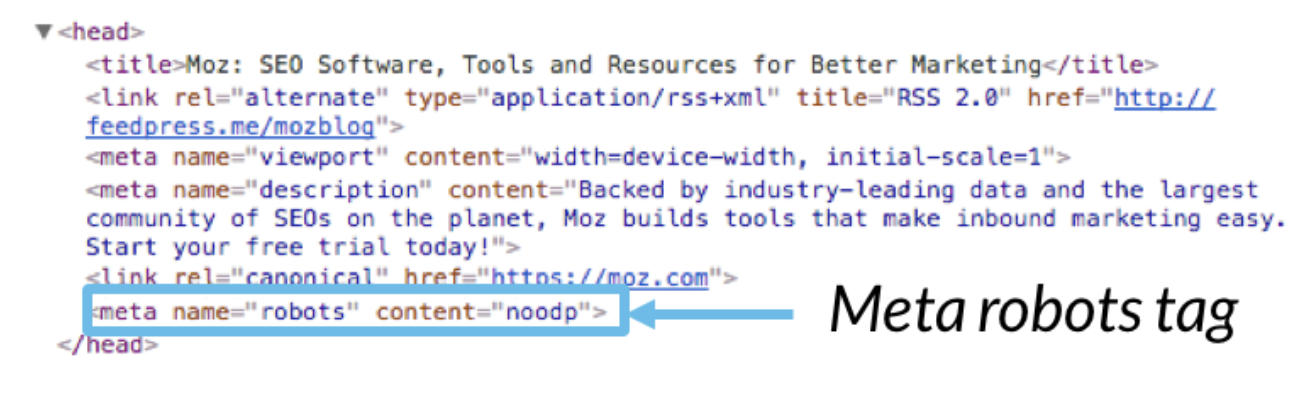
Here is how the Robots meta tag looks in the HTML Markup
Understanding the Parameters for Robots Meta Directives
Robots meta directives are instructions that tell search engine crawlers how they should treat a specific webpage.
These directives are placed inside the <meta name="robots"> tag and can be combined
to control indexing, link following, snippet visibility, caching, and more.
Understanding what each parameter does is essential to ensure search engines handle your content the way you intend.
| Directive | What it does |
|---|---|
| index | Allows the page to be indexed and shown in search engine results. This is the default behavior if no directive is specified.
Note - This directive is not required to be added if you want the page to be indexed. |
| noindex | Prevents the page from indexing and thus appearing in search results. The page can still be crawled unless combined with other directives or unless blocked through the robots.txt file of your website.
Note - Use this directive with caution, since this controls whether you want the page to appear in search results or not.
|
| follow | Allows search engines to follow and pass link equity through the links found on the page. If you do not add this directive, the default behavior is still "follow all links and pass link equity", so adding this directive does not make much difference. |
| nofollow | Prevents crawlers from following the links on the page, meaning no link equity is passed to the linked URLs. This is a much useful directive which can be used to control the flow of "page-rank" and "link-equity", especially when you are linking to external websites from your webpage and do not want to pass "page-rank" to external domains.
Note - Use this directive sparingly and when it makes sense.
Don't add "nofollow" directives site wide thinking you are "preserving page-rank" or "improving your link equity". Search engines evaluate your website differently when you are linking to high quality websites from your content, compared to when you have added "nofollow" meta tag to every other page on your website. |
| noarchive | Stops search engines from storing a cached version of the page. |
| nosnippet | Prevents search engines from showing a text snippet or video preview beneath the page’s title in search results. |
| notranslate | Blocks search engines from offering a translated version of the page in search results. |
| noimageindex | Prevents images on the page from being indexed in image search results. |
| max-snippet | Sets the maximum number of characters a search engine can use in the search result snippet. |
| max-image-preview | Controls the size of image preview that may appear (for example: none, standard, or large). |
| max-video-preview | Controls how many seconds of video preview may be shown in search results. |
These parameters can be combined in a single robots meta tag. This lets you fine-tune how each page should be handled in search results - for example, allowing link equity to flow while preventing the page itself from being indexed.
Let us now see some examples of how to combine multiple directives in the Robots meta tag
| Directive combination | What it does | When to use it |
|---|---|---|
| index, follow | The page can be indexed and its links can be crawled and pass authority. | Default for most pages you want search engines to index and rank in search results. At the same time, you are okay to share link equity and pass page rank through all the links included in the page.
Note - This directive is not required since by default search engines will index the page and follow all the links, if you do not have a robots meta tag included in the page to begin with.
|
| noindex, follow | Keeps the page out of search results, but still allows crawlers to follow links and pass link equity. | When you do not want a specific page to be indexed and shown in search results, but you want the search engines to follow all the links included in the page and pass link equity or "page-rank". This directive is useful for thank-you pages, paid campaign landing pages, login pages with no content or low-value pages with little or no content but still link to important URLs.
Note - extra caution is required with this directive, since this directly controls the visibility of the page in search results, which could impact traffic and business outcomes.
|
| noindex, nofollow | Prevents the page from appearing in search results and also instructs search engines from "not following" any links on that page. | This is exactly the same as the previous directive, with the added instruction to not follow any links on that page, thereby presering "Link equity" or "Page rank". Use cautiously for pages you don’t want indexed or associated with other URLs, such as temporary or highly sensitive content.
Note - This will be your "go to" directive to ensure any unwanted page on your website does not show up in search engine result pages. You will be using this frequently on specific pages, but don't use it on important pages of your website.
|
| index, noarchive | Allows the page to appear in search results but blocks cached versions from being stored. | Good for time-sensitive, frequently updated, or compliance-sensitive content where old cached copies could be misleading.
Note - Use this directive if your website's content changes frequently, and you do not want search engines to store an outdated version of the page's content in it's archive. You need not use this site-wide, you can use this directive on a specific page of the website and leave the other pages to be archived. |
| index, nosnippet | Shows the page in search results but hides text snippets and rich previews. | Useful when you want visibility but need tight control over what appears in the SERP snippet. |
| noindex, noimageindex | Prevents the page and its images from appearing in web and image search results. | Suitable for confidential, restricted, paywalled, or private visual content you don’t want exposed via search. |
When Can Robots Meta Directives Be Ignored by Search Engines?
Robots meta directives are powerful, but they are not absolute rules.
Search engines generally respect them, yet they treat them as strong suggestions rather than unbreakable commands. In certain cases such as security concerns, legal obligations, or conflicting signals search engines may choose to override or ignore these instructions to protect users and maintain the quality of their results. Less reputable or malicious crawlers might ignore robots meta directives entirely.
Below are some situations when search engines may override or ignore robots meta directives:
- When the page is involved in malware, phishing, or security risks and needs to be flagged for user safety.
- When there are legal or policy-related reasons, such as abuse reports, DMCA requests, or regulatory requirements.
- When there are directive mismatches between robots.txt, robots meta tags, HTTP headers and XML sitemaps.
- When search engines need to maintain quality search results, such as overriding directives on extremely spammy or manipulative pages.
If your website is not among the above, most of the times your directives will be honored. But it is good to understand that Robots meta directives are directives only. Which means, these are directions and not absolute rules whih Search engines must adhere to. In specific situations, search engines can decide to ignore your directives and do what it thinks is best for users.
Do's and Don'ts of Robots Meta tags
Do's
- Use robots meta tags on specific pages only: Apply them on specific pages and not site wide.
- Understand the directives: Before adding a directive, completely understand what it does.
- Use them on duplicate, thin, or utility pages: Prevent low value pages from getting indexed.
- Combine directives thoughtfully.: Pair parameters when your specific use case required more control.
- Use robots meta in combination with canonical tags: Canonicals help guide indexing, robots meta tags help enforce it..
- Ensure proper formatting: Use correct spelling, commas, and attribute structure so search engines can interpret them properly.
Don’ts
- Don’t block essential pages from indexing: Be careful, qccidental noindex tag is a very common SEO error.
- Noindex won't hide information: Noindex will not secure pages from accessing it, use authentication to control access instead.
- Don’t combine conflicting directives: Avoid contradictory rules like index, noindex or follow, nofollow, which creates ambiguity.
- Don’t rely solely on Robots meta for handling duplicate content: Depending on the use case, you may have to use a combination of canonicals, robots meta and redirects to address duplicate content issues on your website.
- Don’t forget Robots.txt directives: If your robots.txt blocks search engines from crawling a page, robots meta directives on that page won’t be seen so it doesn't matter what content you set for Robots meta tag for a page that is blocked from crawling through Robots.txt.
Good vs Bad Robots Meta Tag Examples
Understanding how to use robots meta tags correctly is essential for controlling what search engines index, follow, or display. Good implementations provide clear instructions and prevent indexing mistakes. Bad implementations can accidentally block important content, confuse crawlers, or expose sensitive pages to search engines.
Examples of Good Robots Meta Tag Usage
| Robots Meta Tag | Why this is good |
|---|---|
| <meta name="robots" content="noindex, follow"> | This directive clearly instructs search engines to not index the page and not follow any links on that page. This is useful for thank-you pages or internal utility pages that shouldn’t appear in search results but should still pass link equity. |
| <meta name="robots" content="noindex, noarchive"> | Prevents a page from being indexed and also blocks cached versions. This is ideal for pages with frequently changing or time-sensitive content or if you are not comfortable with search engines storing a cached version, you can use this directive. |
| <meta name="robots" content="index, nosnippet"> | This directive allows the page to appear in results but hides SERP snippets, allowing visibility while restricting the preview of sensitive content through SERP snippets (if you require so for a specific use case). |
| <meta name="robots" content="index, max-image-preview:large"> | This directive is useful when you want to help improve image visibility and CTR by explicitly allowing larger preview images in search engine result pages. |
| <meta name="robots" content="noindex, noimageindex"> | This directive is useful when there are pages on your website containing private or sensitive visuals that shouldn’t appear in image search results. |
Examples of Bad Robots Meta Tag Usage
| Robots Meta Tag | Why this is bad |
|---|---|
| <meta name="robots" content="noindex"> | This is not the ideal implementation since you are not mentioning the "follow" or the "nofollow" directive after the "noindex" directive. Search engines will default to follow, which may not be intended in some situations.
Noindex controls indexing, not link behavior. If you don’t specify link behavior, Google assumes follow because that is the default. Search engines only change the default behavior if you explicitly tell them to. |
| <meta name="robots" content="index, noindex"> | Contradictory directives confuse crawlers and may lead to unpredictable behavior. |
| <meta name="robots" content="nofollow"> | This is not necessarily a mistake, you may have a specific reason to apply the singular "nofollow" directive. But in 99% of the cases, this isn't intended and mostly happens by mistake or an oversight. This directive stops link equity from flowing and if the page is valuable, this can harm internal linking and SEO. |
| <meta name="robots" content="noindex, follow, max-image-preview:none, nosnippet, noarchive, noimageindex"> | This usage is an overkill. Stacking directives one after another that restricts almost everything - is often unnecessary and risky unless intentionally done for a reason. |
| <meta name="robots" content="noindex" on home page, product pages and other important pages | Accidental usage of noindex tag on important pages is one of the biggest SEO errors and can remove large sections of a site from search. |
When configuring robots meta tags, always review the page’s purpose, confirm the directives align with your indexing strategy, and test carefully to avoid accidental deindexing or visibility loss.
FAQs on Robots Meta Tag
Insert the tag <meta name="robots" content="directive"> within the <head> section of your webpage's HTML, replacing "directive" with the desired instruction (e.g., "noindex").
A blocked robots meta tag, typically with the "noindex" directive, means that search engines are instructed not to index that specific page, preventing it from appearing in search results.
Robots.txt provides guidelines on which parts of a website search crawlers can or can't access, while robots meta tags offer instructions on which pages should be indexed and which pages should not be indexed. Robots.txt is about crawling, while Robots meta tag is about indexation.