
Bad Content Type
A Bad Content Type Test checks whether your pages and files are being served with the correct "Content Type (MIME type)"" header.
- "Content Type" tells browsers and bots what a URL actually is (HTML, CSS, JS, image, PDF, JSON, etc).
- If the "Content Type" is wrong, browsers may download files instead of rendering them, or render the files incorrectly.
- Search engines can struggle to understand and index pages served with incorrect content types or MIME types.
- Incorrect Content-Type can also create security risks, especially when combined with missing protections like "X-Content-Type-Options: nosniff".
- Fixing content-type issues improves user experience, crawlability, and website security.
What Is a Content Type (MIME Type)?
"Content-Type" is an HTTP response header that tells a browser and search engines what kind of content a URL is returning, so it knows how to handle it. For example - render the file as a webpage, apply it as a stylesheet, execute it as a script, display it as an image, or download it as a file in the user's computer.
This header is also commonly referred to as a "MIME type":. MIME stands for "Multipurpose Internet Mail Extensions". While MIME was originally created for email attachments, the same standardized format is now used across the web to describe content types in HTTP responses.
Here are some common Content Type (MIME type) examples:
- text/html - This signifies a HTML web page.
- text/css → This signifies that the file is a CSS stylesheet and hence to be used for styling the elements of the webpage.
- application/javascript → This MIME type signifies that the file is a JavaScript file and should be executed on the webpage.
- image/png → This signifies that the file is a PNG image, and should be displayed as an image on the webpage.
- application/pdf → This signifies that the file is a PDF document and should be opened with a PDF application when clicked. Depending on which PDF application is set to default in the user's computer, the browser will complete the request once the link is clicked in the user's computer.
- application/json → This signifies that the file is a JSON API response, and should be used by other files in the webpage which may need that response.
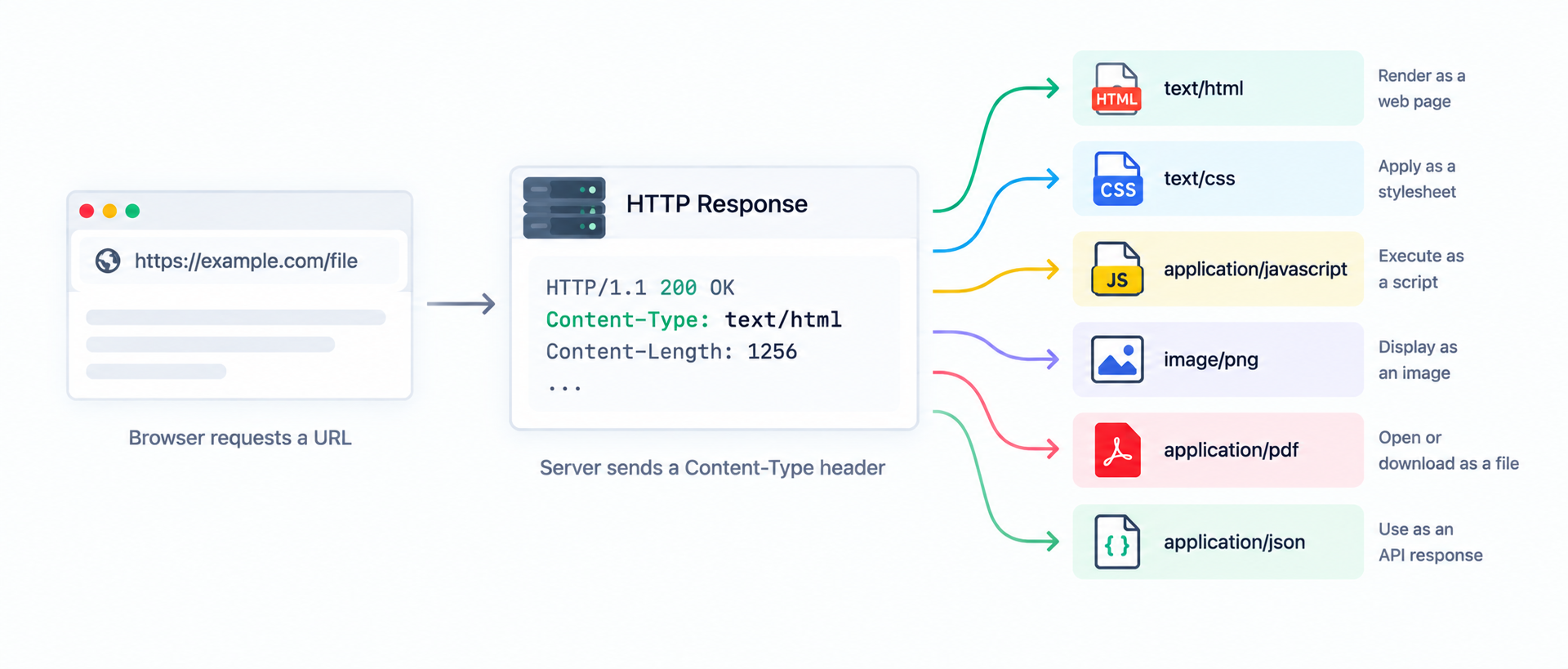
If the "Content Type" is missing or incorrect, browsers and bots may interpret the response incorrectly. This could lead to broken layouts, blocked scripts, unexpected downloads, or indexing issues.
What Is a “Bad Content Type”?
A “bad content type” usually means the Content-Type (MIME type) header sent by the server does not match the actual content being returned. When this happens, browsers and search engines may handle the URL incorrectly - causing broken pages, blocked resources, or indexing issues.
Here are the most common types of bad Content Type issues with a suitable example included for better understanding:
-
Content Type doesn’t match the real content
Example: Your webpage returns actual HTML, but the server sends "Content Type: text/plain".
Result: The browser may display raw HTML code instead of rendering the page. -
Invalid or non standard MIME types:
Example: The server sends something malformed like "Content Type: text/htm" or "Content-Type: application/x-javascript".
Result: Some browsers, tools, or crawlers may not interpret this consistently. -
Wrong Content Type for critical resources
Example: your stylesheet URL "/assets/styles.css" is served as "Content Type: text/html".
Result: the browser treats it as HTML, so CSS won’t load and the site may appear unstyled or completely broken. -
Mismatch between file extension and response headers
Example: A specific JavaScript file such as "/app.js" returns "Content Type: text/html" because the server is actually returning a 404 page, a login page, or a redirect response.
Result: The script fails to load because the browser does not understand that it is JavaScript. So it never executes it and the website features breaks.
In many cases, a “bad content type” is a symptom of a deeper issue like redirects, blocked files, caching problems, or a server returning an HTML error page instead of the intended resource or file.
Common Causes of Bad Content Type Issues
Bad Content Type issues rarely happen in isolation.
In most cases, they are symptoms of deeper configuration or application level problems. Understanding the root cause of content type issues makes it much easier to fix content type issues on your website.
- Server misconfiguration: Web servers like Apache, Nginx, or IIS may be missing proper MIME type mappings. When this happens, files such as CSS, JavaScript, images, or fonts may be served with incorrect or generic Content-Type headers.
- CDN or caching layer problems: Content Delivery Networks (CDNs) or reverse proxies can sometimes cache the wrong response headers or rewrite them incorrectly, causing multiple URLs to return an unexpected Content-Type.
- Redirects and rewrite rules: Improper redirect or rewrite rules can cause asset URLs to return HTML pages instead of the intended resource, leading to Content-Type mismatches like "text/html" on CSS or JS files.
- Error pages served for assets: When access to a file is blocked (403) or missing (404), the server may return a custom HTML error page while keeping the original URL. This is a very common reason why non-HTML URLs report "text/html" as an incorrect Content-Type.
- CMS or plugin output issues: Content management systems and plugins may intercept requests and return dynamic HTML responses for asset URLs, especially when authentication, permission checks, or security plugins are involved.
- Application level responses: APIs or dynamically generated files may not explicitly set a Content-Type header, causing the server or framework to fall back to a default or incorrect content type.
- Hosting or security restrictions: Firewalls, WAFs, or web hosting security rules can block certain file types and return HTML warning pages instead of the expected resource.
Because many of these issues happen behind the scenes, a Bad Content Type Test is useful for quickly identifying URLs where the response doesn’t match what browsers and search engines expect.
Good vs Bad Content-Type Examples
Content-Type issues are easiest to understand with real examples. A good Content-Type header correctly describes the content being returned, so browsers can render it properly and search engines can interpret it reliably. A bad Content-Type header often causes broken pages, missing styles/scripts, unexpected downloads, or indexing problems.
Examples of Good Content Type headers
| URL type and Content type | Why this is good |
|---|---|
| URL Type - Web page (HTML) Content type - text/html |
Browsers render the page correctly and search engines understand the content structure. |
| URL Type - CSS file Content type - text/css |
Styles load properly, preventing layout issues and unstyled pages. |
| URL Type - JavaScript file Content type - application/javascript |
Scripts run as expected and are less likely to be blocked by strict browsers. |
| URL Type - PNG image Content type - image/png |
Images display correctly instead of triggering downloads or errors. |
| URL Type - JSON API response Content type - application/json |
Clients and tools can parse the response reliably as structured data. |
| URL Type - PDF document Content type - application/pdf |
Browsers open the PDF viewer correctly or offer a consistent download experience. |
Examples of Bad Content Type headers
| URL type and Content type | Why this is bad |
|---|---|
| URL Type - Web page (HTML) Content type - text/plain |
The browser may show raw HTML code instead of rendering the page. |
| URL Type - CSS file Content type - text/html |
Often means an HTML error/login page is being served, so styles fail to load. |
| URL Type - JavaScript file Content type - text/html or text/plain |
Scripts may not run, can be blocked by browsers, and site functionality may break. |
| URL Type - Image URL Content type - text/html |
Usually indicates a redirect/error page is returned instead of an image. |
| URL Type - JSON API response Content type - text/html |
The API may be returning an HTML error page, breaking integrations and parsing. |
| URL Type - Font file (e.g., .woff2) Content type - text/plain or application/octet-stream |
Fonts may fail to load in some browsers, causing typography and layout issues. |
As a rule, if you see text/html being returned for CSS/JS/images/fonts, it often means the server is responding with an HTML page (error, redirect, or login) instead of the file you expected.
How to Fix Bad Content Type Issues
If this test flags a URL, it usually means either the server is sending the wrong Content-Type header, or the URL is returning the wrong content altogether (like an HTML error page instead of a CSS/JS/image file). Use the steps below to diagnose and fix the issue.
- Confirm what the URL is supposed to be: Identify whether the URL should return HTML, CSS, JavaScript, an image, a PDF, or JSON. The expected file type determines the correct MIME type.
- Check what the server is actually returning: Many “bad content type” errors happen because the response is really a 404 page, 403 blocked page, a page that redirects, or a login page. These responses are commonly served as text/html, even when the URL looks like a CSS/JS/image file.
- Fix MIME type mappings on the server: Ensure your web server (Apache/Nginx/IIS) is configured to send the correct Content-Type for each file extension. This is especially important for CSS, JS, fonts (woff2), SVG, and JSON.
- Review redirects, rewrites, and routing rules: Bad rewrite rules can send asset URLs to HTML pages without you realizing it. Check your CDN rules, .htaccess, Nginx config, framework routing, and any security layer that may intercept requests.
- Clear CDN and cache issues: If a CDN or cache layer stored a response with incorrect headers, the problem can persist even after fixing the origin server. Purge cache and re-test to confirm headers are updated.
- Add X-Content-Type-Options: nosniff(recommended): This security header tells browsers not to guess content types. It helps reduce security risks, but it also makes correct MIME types even more important - so fix mismatches first, then enable nosniff.
Once you apply the fix, re-run the test to confirm that each URL returns the correct Content-Type and the right response body.
FAQs on Bad Content Type
It usually means the server is sending a Content-Type (MIME type) header that doesn’t match the actual content being delivered. This can cause browsers and search engines to handle the page or file incorrectly.
Yes. If search engines can’t correctly interpret what a URL returns (for example, an HTML page served as plain text), it can reduce indexing quality and make it harder for crawlers to understand the page.
This commonly happens when the server returns an HTML error page, redirect page, or login page instead of the actual CSS/JS file. The URL looks like an asset, but the response is really HTML.
No. A file extension is part of the URL (like .css or .js), while Content-Type is the HTTP header that tells browsers what the response actually is. They should match, but they can mismatch due to errors or misconfiguration.
MIME stands for Multipurpose Internet Mail Extensions. A MIME type (used in the Content-Type header) tells browsers and bots what kind of content is being returned, using a “type/subtype” format like text/html or application/json.
It’s a security header that tells browsers not to guess the Content-Type. This improves security, but it also means incorrect MIME types can cause scripts, styles, or other resources to be blocked.
In general: HTML pages should return text/html, CSS should return text/css, JavaScript should return application/javascript, images should return image/*, PDFs should return application/pdf, and APIs commonly return application/json.
First, check whether the URL is returning the correct content (not a 404/403/login page). Then fix server/CDN MIME mappings, review redirects/rewrites, clear caches, and re-test to confirm the correct Content-Type is served.