
Nested Tables
A nested table is an HTML table placed inside a cell of another table. Nested tables are valid HTML, but they should be used carefully and primarily when the data itself has a genuinely nested or hierarchical structure.
- A nested table is created by placing a complete <table> element inside a <td> or <th> element.
- Nested tables can be useful for presenting complex relationships within tabular data.
- Using tables for page layout can make responsive design, accessibility, and maintenance more difficult.
- Excessive table nesting can make HTML more complex and harder to understand and maintain.
- CSS layout techniques such as Flexbox and Grid are generally better suited for designing webpage layouts.
What Are Nested Tables?
A nested table is an HTML table placed inside a cell of another table. In other words, one table becomes part of the content of another table.
HTML tables are designed to represent relationships between rows and columns of data. In some situations, that data can contain another logical table or a more detailed set of information. A nested table allows that secondary structure to be placed within a cell of the primary table.
For example, a main table might contain information about different departments, while a cell for each department contains a smaller table listing its employees or related records.
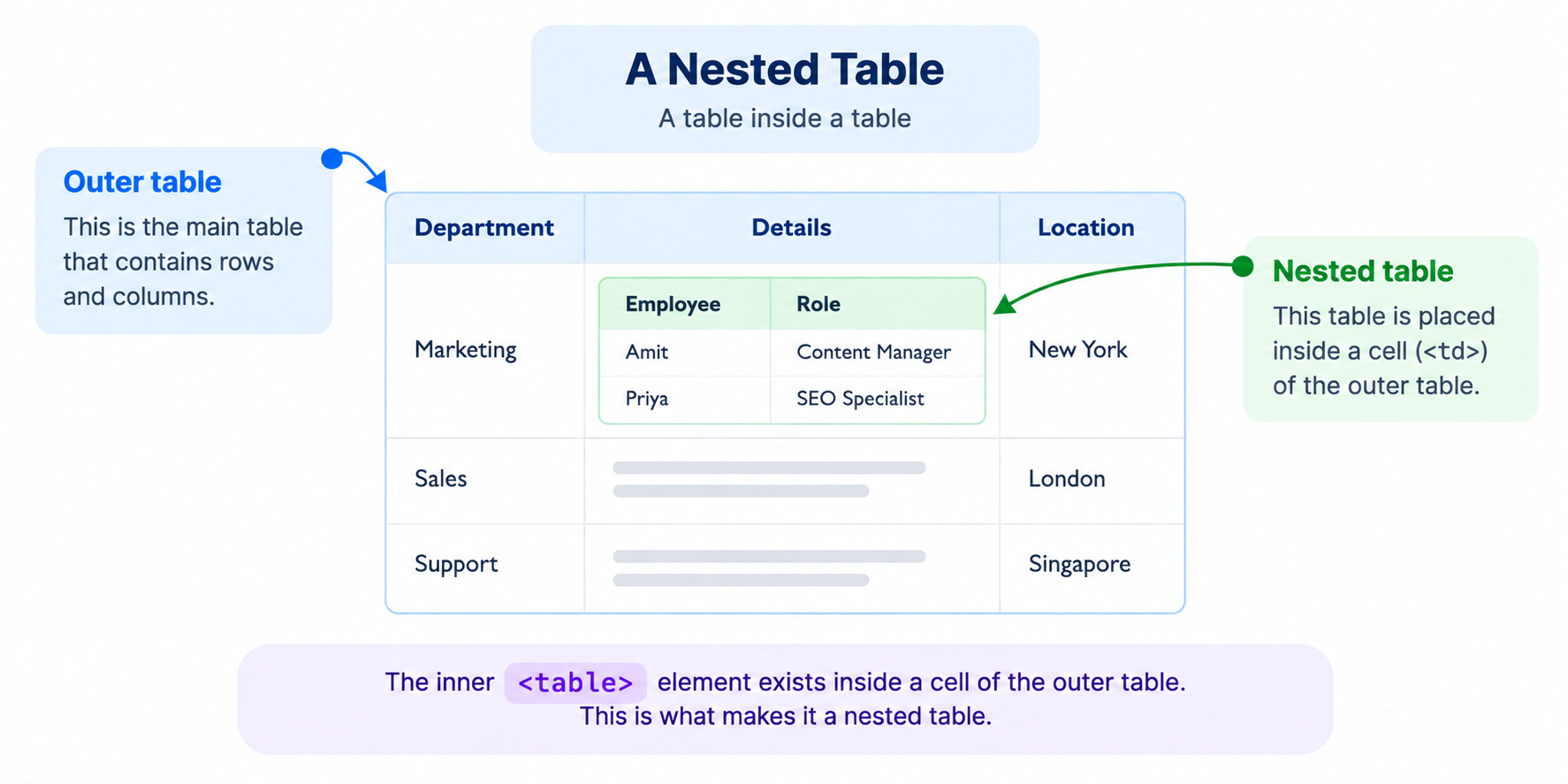
A nested table is different from simply having multiple tables on the same page. The defining characteristic is that the inner <table> element exists inside a cell of the outer table.
How Does a Nested Table Work in HTML?
HTML tables are built using a small set of structural elements. The <table> element defines the table, <tr> defines a row, and <td> or <th> defines cells.
To create a nested table, the inner table is placed inside one of the cells of the outer table.
Conceptually, the structure looks like this:
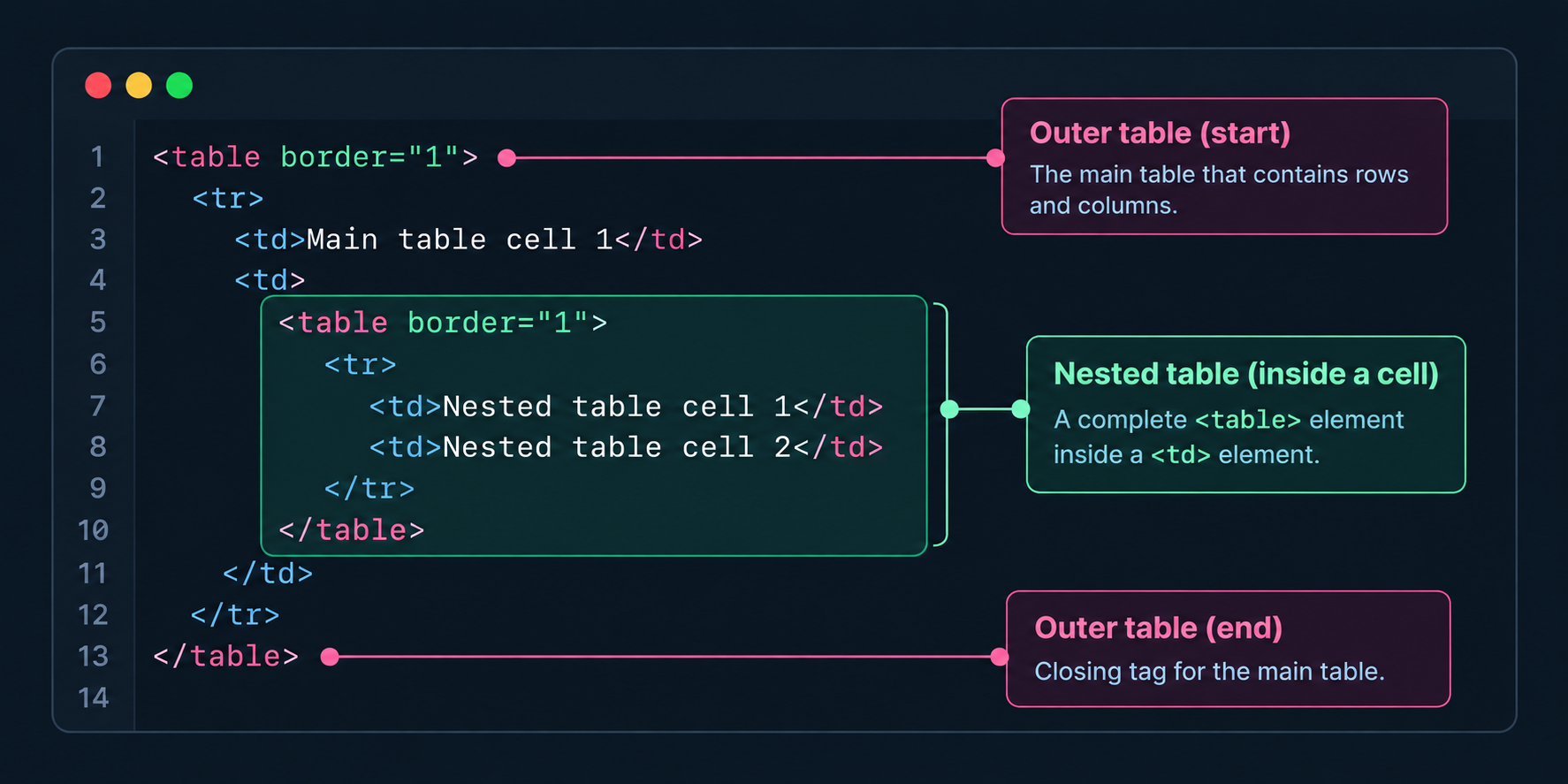
<table>— The outer table.<tr>— A row within the outer table.<td>— A cell containing the nested table.<table>— The inner or nested table.
The nested table must be placed within a valid table cell. It should not be inserted directly between table rows or other table elements where the HTML structure becomes invalid.
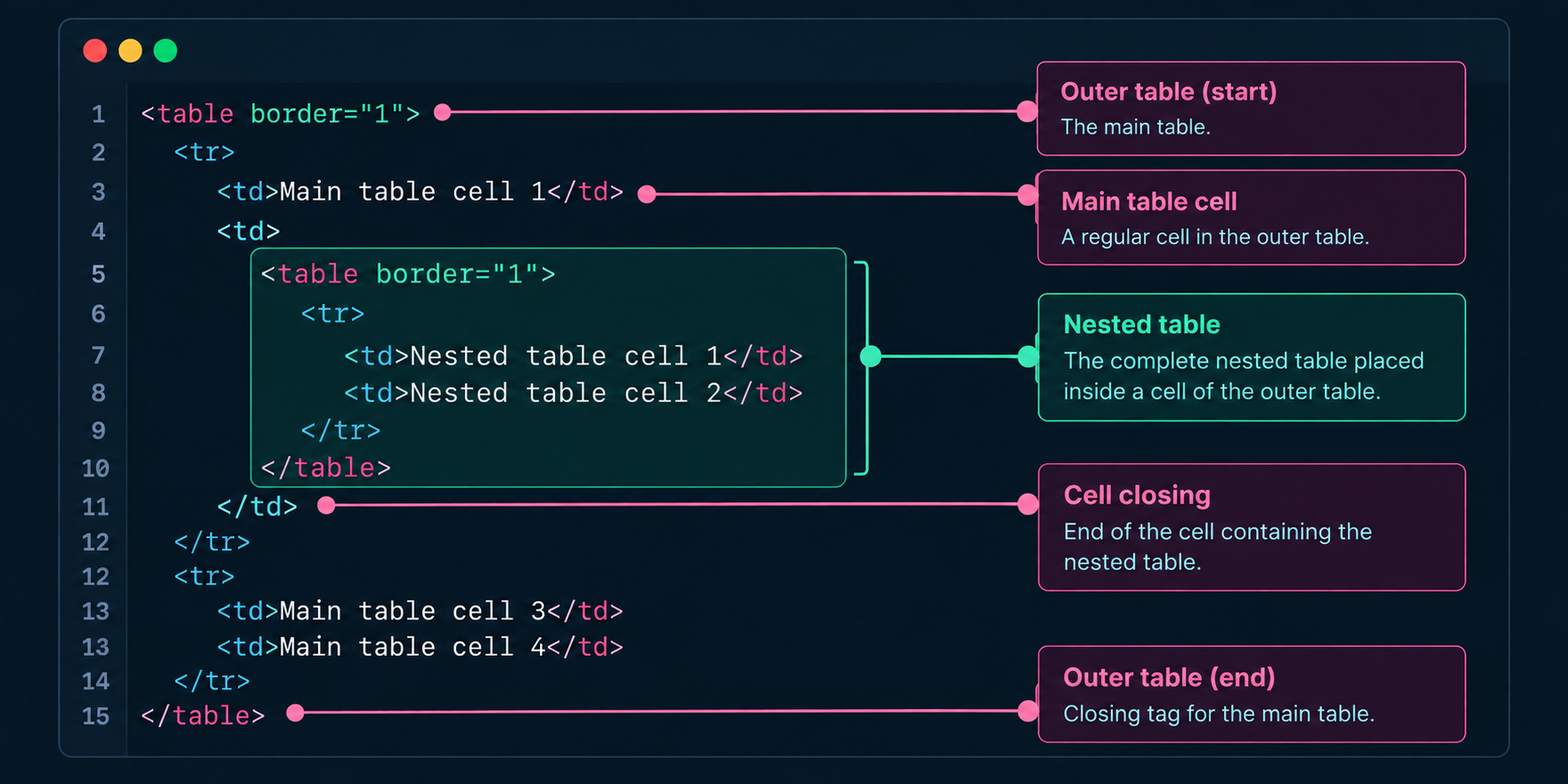
Example of a Nested Table in HTML
The following example shows a simple outer table containing another table inside one of its cells:
How to Create a Nested Table: A Step-by-Step Guide
Creating a nested table uses the same basic HTML table elements as a regular table. The difference is that the second table is placed inside a cell of the first table.
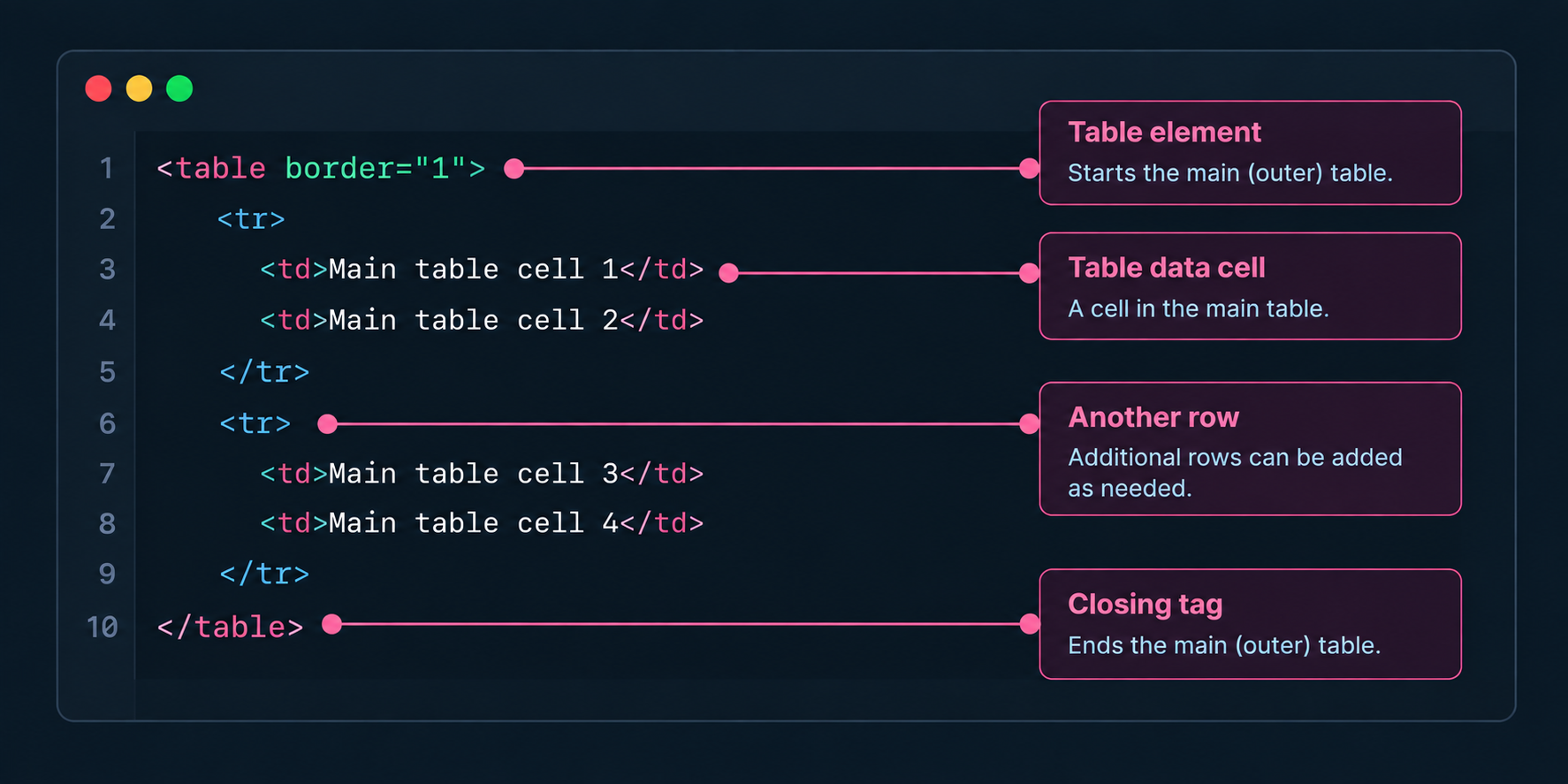
Step 1: Create the main table.
Start by creating the outer table and adding its rows and cells. This table provides the primary structure for the information.
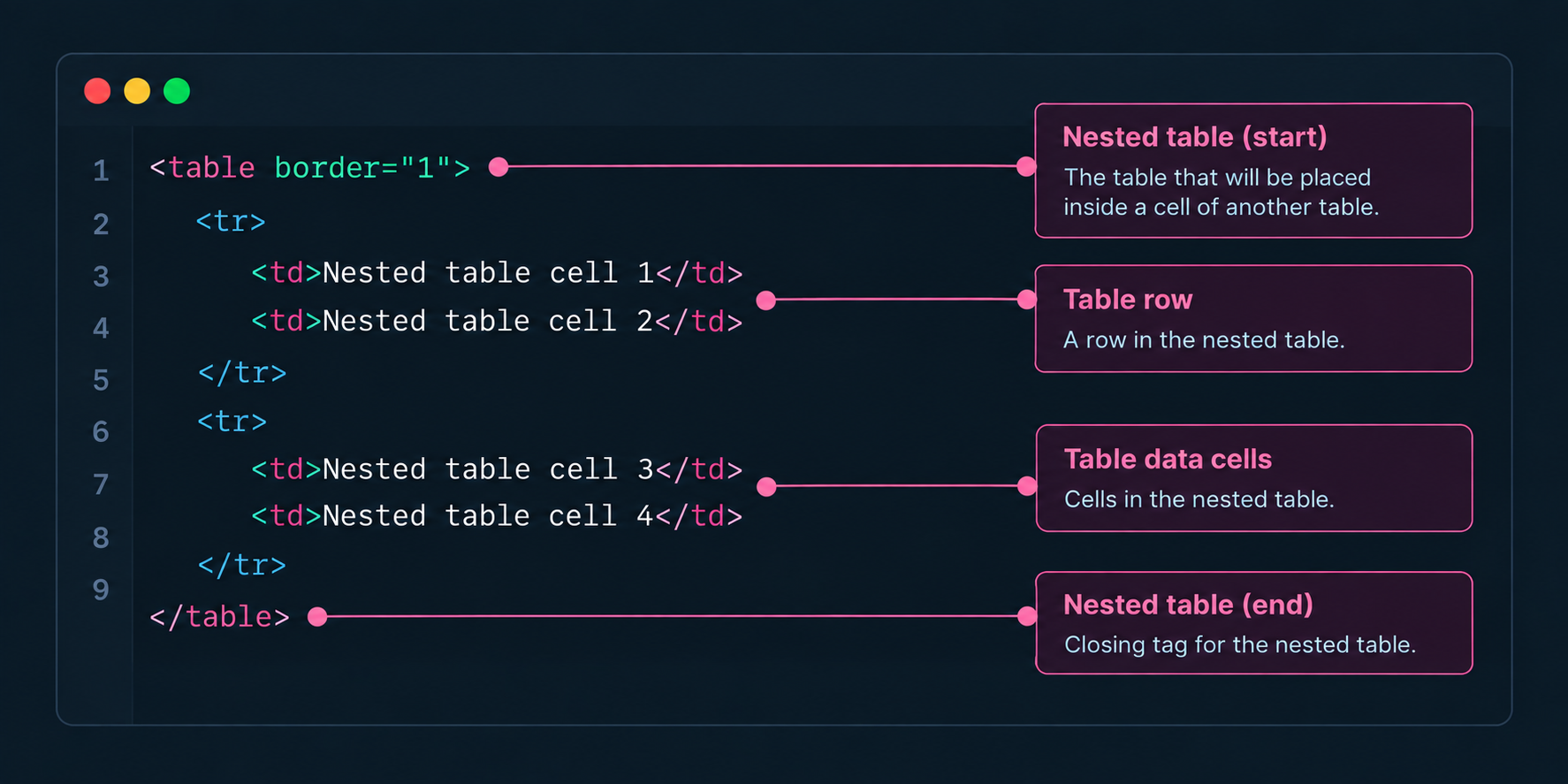
Step 2: Create the nested table.
Create a second table containing the additional rows and columns you want to display. This table will eventually be placed inside a cell of the outer table.
Step 3: Place the nested table inside a cell.
Insert the complete nested <table> element inside a valid <td> or <th> element of the outer table.
When Are Nested Tables Useful?
Nested tables are not automatically bad HTML. They can be appropriate when the information being represented genuinely contains a second level of tabular data.
Examples can include:
- Hierarchical data: A primary table contains categories with additional tabular information inside individual cells.
- Detailed records: A row represents a main entity while a cell contains related records that are themselves naturally tabular.
- Complex data relationships: An inner table provides additional rows and columns that cannot be represented clearly within the outer table.
- Specialized data presentation: A small secondary table is required to represent a distinct dataset within a larger dataset.
The important consideration is whether the nested table represents a meaningful data relationship. If the table is being used only to position elements visually, a CSS-based layout is usually more appropriate.
Potential Problems With Nested Tables
Although nested tables are valid HTML, excessive or inappropriate nesting can make a webpage more difficult to develop, maintain, and adapt.
- Complex HTML: Multiple levels of tables can make the document structure harder for developers to read and maintain.
- Responsive design challenges: Complex table structures can be difficult to adapt to narrow screens, particularly when tables are being used for layout rather than data.
- Accessibility complexity: Tables require appropriate semantic structure so assistive technologies can understand the relationships between headers, cells, and datasets. Nested tables can make those relationships more difficult to interpret when implemented poorly.
- Maintenance overhead: Changing a deeply nested table structure can require modifications across multiple levels of markup.
- Layout limitations: Using tables to control the visual layout of a webpage can make modern responsive design techniques more difficult to implement.
These issues do not mean that every nested table should be removed. The correct approach is to evaluate whether the nested structure represents meaningful tabular data and whether it has been implemented with appropriate semantics.
Nested Tables vs. CSS Layout
One of the most common reasons nested tables appear in HTML is because tables were historically used to create webpage layouts. Modern CSS provides more flexible layout systems that are generally better suited to this purpose.
| Nested Tables | CSS Layout |
|---|---|
| Designed primarily for representing tabular relationships. | Designed for controlling the layout and presentation of webpage elements. |
| Can become complex when multiple tables are nested. | Flexbox and Grid provide flexible layout structures without additional table markup. |
| Can be difficult to adapt when used for page layout. | CSS provides responsive layout capabilities for different screen sizes. |
| Should be reserved for situations where the data itself is naturally tabular. | Better suited for page sections, cards, navigation, columns, and other visual layouts. |
Nested Tables and Accessibility
Accessibility should be considered whenever tables are used to present information. A table should represent data with meaningful relationships between rows and columns rather than simply being used as a visual layout mechanism.
For data tables, appropriate table headers, captions, and semantic markup can help assistive technologies understand the structure of the information.
Nested tables introduce another level of structure that can make the relationship between the outer and inner datasets more complicated. If the nesting does not represent a meaningful data relationship, simplifying the markup is usually preferable.
The goal should not be to eliminate tables altogether. Tables remain an appropriate HTML element when the content is genuinely tabular. The goal is to use them for the purpose they were designed for.
Nested Tables and Responsive Design
Tables naturally organize information into rows and columns, but those columns may not fit comfortably on smaller screens. Nesting additional tables can make responsive behavior even more difficult to manage.
If a nested table contains genuinely tabular data, it can still be used with appropriate responsive techniques. Depending on the content, this might include horizontal scrolling, reorganizing the presentation for smaller screens, or providing an alternative mobile-friendly representation.
If the nested table exists only to position content on the page, replacing it with CSS Grid, Flexbox, or another appropriate layout technique is generally a better solution.
Nested Tables and SEO
Nested tables are not inherently an SEO problem, and there is no general rule that search engines penalize pages simply because they contain nested tables.
However, using complex table structures for page layout can make HTML harder to maintain and can contribute to less flexible page structures. Poorly implemented tables can also create accessibility and usability issues.
For SEO, the more important consideration is to use semantic HTML appropriately and ensure that important content is clearly structured and accessible to users and search engines.
Good vs. Bad Nested Table Practices
| Good Practice | Bad Practice |
|---|---|
| Use nested tables when the inner content represents a genuine secondary dataset. | Use nested tables simply to position or align elements on a webpage. |
| Keep table structures as simple as the data allows. | Create several unnecessary levels of nested tables. |
| Use appropriate table headers and semantic markup for data tables. | Use table cells as generic containers without meaningful tabular relationships. |
| Test complex tables on mobile devices and smaller screens. | Assume a deeply nested table will automatically work well on every screen size. |
| Use CSS Grid or Flexbox for visual page layouts. | Build page columns, cards, navigation, or spacing systems using nested tables. |
| Review nested structures when maintaining or redesigning older websites. | Keep legacy table-based layouts indefinitely without considering simpler modern alternatives. |
How to Reduce Unnecessary Nested Tables
If a webpage contains nested tables that are being used for layout rather than data, they can often be replaced with modern CSS techniques.
- Identify the purpose of each table: Determine whether it represents actual tabular data or is being used only for positioning.
- Separate data from presentation: Keep genuine datasets in semantic HTML tables and move visual layout responsibilities to CSS.
- Replace layout tables: Use CSS Grid, Flexbox, or other appropriate layout techniques where tables are being used for positioning.
- Simplify genuine data tables: Remove unnecessary nesting where the same information can be represented more clearly with a flatter structure.
- Test accessibility and responsiveness: After restructuring the markup, verify that the information remains understandable and usable across devices and assistive technologies.
What Does the Nested Tables Test Check?
The Nested Tables Test scans a webpage's HTML structure to identify cases where one HTML table is placed inside another table cell.
Identifying nested tables can help developers review older or complex markup and determine whether the table structure is necessary for the data being presented.
A detected nested table is not automatically an error. The result should be reviewed in context to determine whether the nesting represents legitimate hierarchical data or whether the structure could be simplified.
FAQs
A nested table is an HTML table placed inside a cell of another table. The inner table becomes part of the content of a cell in the outer table.
Yes. Nested tables are valid HTML when they are placed correctly inside a table cell. They can be appropriate when the content represents genuinely nested or hierarchical tabular data.
Not inherently. Search engines do not generally penalize a page simply because it contains nested tables. However, unnecessarily complex table structures can make pages harder to maintain and may contribute to usability or accessibility problems.
Generally, no. CSS Grid, Flexbox, and other CSS layout techniques are better suited for controlling the visual layout of modern webpages. Tables should primarily be used when the content itself is tabular.
They can make accessibility more complicated, particularly when table semantics and relationships are unclear. Genuine data tables should use appropriate headers and semantic structure, and unnecessary nesting should be avoided.
They can, especially when tables are used for page layout or contain many columns and levels of nesting. Genuine data tables may require responsive techniques such as horizontal scrolling or alternative presentations on smaller screens.
Replace layout-based tables with CSS Grid, Flexbox, or other suitable CSS techniques. Keep tables where they are needed to represent actual tabular data.
The test scans the HTML structure of a webpage and identifies cases where a table is placed inside another table cell. The result can help you review whether the nested structure is necessary or could be simplified.