
Doctype
A DOCTYPE is the first line of an HTML document that tells browsers which HTML standard to expect and helps them render your page in a given Standards Mode. DOCTYPE stands for Document Type Declaration.
- The DOCTYPE is an instruction to the browser, not an HTML tag.
- A correct DOCTYPE helps browsers render pages consistently using Standards Mode instead of Quirks Mode.
- For modern websites, the recommended DOCTYPE is the simple HTML5 declaration:
<!DOCTYPE html>. - Missing or incorrect doctypes can cause layout inconsistencies across browsers (spacing, box model issues, typography, etc.).
- Checking DOCTYPE is a quick, high-impact best practice in technical SEO and QA workflows.
What is a DOCTYPE?
A DOCTYPE declaration tells the browser what type of document it is about to read, so it can choose the right rendering rules.
A doctype declaration is added at the top of the HTML document, an example is shown below:
<!DOCTYPE html>
The DOCTYPE should be the very first thing in your HTML before <html>, before <head>, before <body> and before any comments.
Why Does DOCTYPE HTML tag Matter?
Even if your page “looks fine” today, DOCTYPE can cause subtle problems that turn into bigger QA issues later.
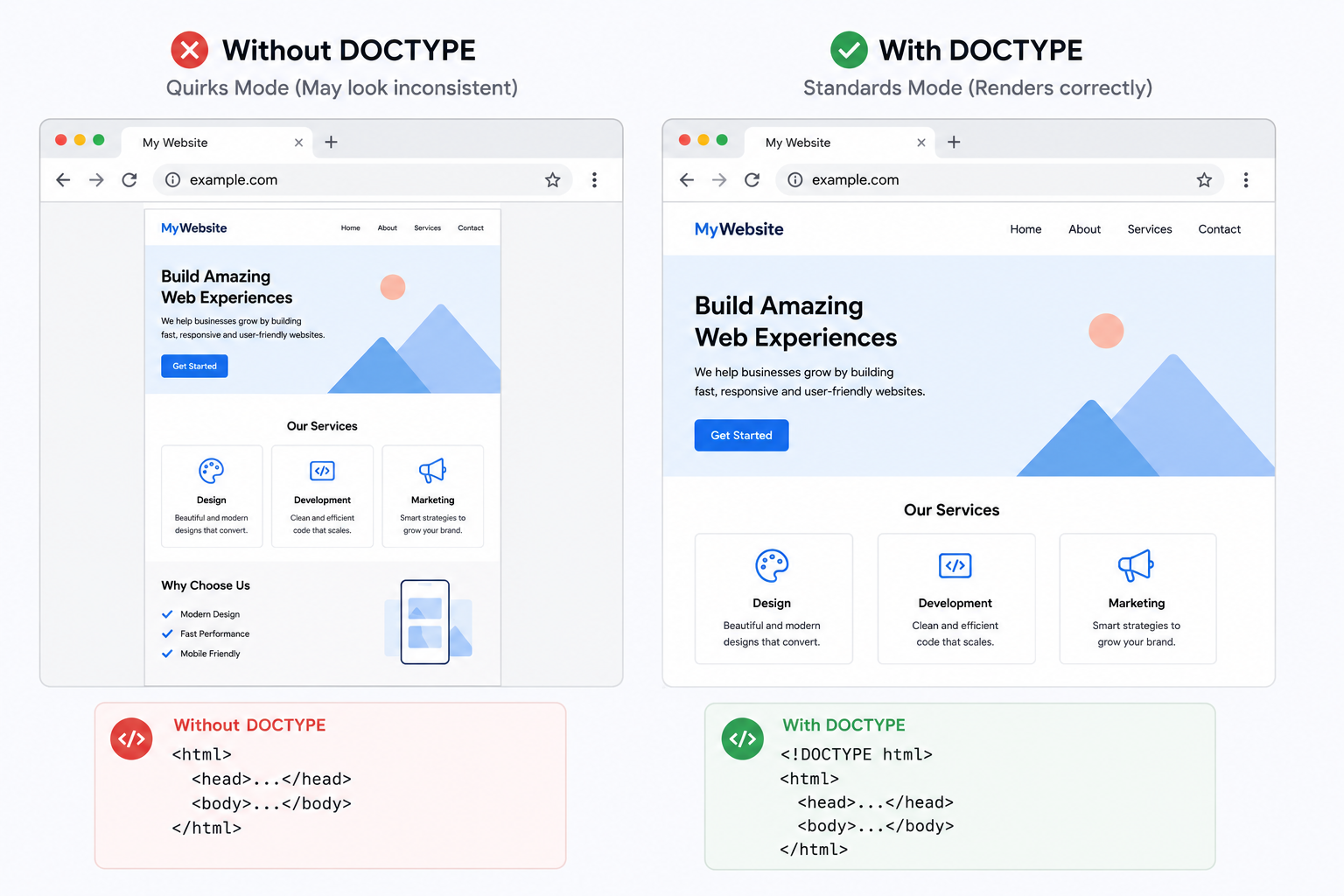
- It helps browsers render the page correctly - With the right DOCTYPE, browsers generally use a modern standards-based rendering approach (Standards Mode). Without it, some browsers may fall back to Quirks Mode behaviors.
- It reduces cross-browser layout surprises - DOCTYPE issues can show up as annoying inconsistencies like unexpected spacing and margins, differences in box sizing behavior, table and form layout weirdness, font sizing differences
Browsers typically choose either between "Standards mode" or "Quirks mode". The standards mode supports modern rendering rules while the quirks mode is legacy behaviors meant to support older web pages.
A correct HTML5 DOCTYPE strongly encourages Standards Mode.
How Browsers Use the DOCTYPE
When a browser receives an HTML document, the first thing it checks is whether a valid DOCTYPE declaration exists. Based on this declaration, it decides which rendering mode to use.
- Standards Mode — The browser follows modern HTML and CSS specifications, producing predictable layouts and consistent behavior across browsers.
- Quirks Mode — The browser emulates legacy rendering behavior for older websites, which can cause inconsistent layouts, CSS bugs, and unexpected element sizing.
- Almost Standards Mode — A compatibility mode used by some browsers for older document types, behaving almost like Standards Mode with a few legacy exceptions.
Using the HTML5 DOCTYPE ensures that modern browsers render your webpage in Standards Mode.
DOCTYPE Best Practices
- Always begin every HTML document with
<!DOCTYPE html>. - Place the DOCTYPE before the opening
<html>tag. - Use the HTML5 DOCTYPE for all modern websites.
- Validate your HTML after major deployments.
- Test pages across multiple browsers when making template changes.
- Avoid legacy HTML4 and XHTML DOCTYPE declarations unless maintaining an older application.
- Ensure your server outputs the complete HTML document without modifying the DOCTYPE.
- Regularly audit important pages to ensure the DOCTYPE has not been accidentally removed.
FAQs
A DOCTYPE declaration tells the browser which version of HTML the document uses and instructs it to render the page in Standards Mode. For modern websites, the HTML5 declaration is simply , making it short, easy to remember, and supported by all major browsers.
Yes. Every HTML5 document should begin with . Although many browsers can still render a page without it, omitting the DOCTYPE may cause the browser to switch to Quirks Mode, resulting in inconsistent rendering and layout issues.
Without a valid DOCTYPE, browsers often enter Quirks Mode, where they emulate the behavior of older browsers for backward compatibility. This can affect CSS layouts, box model calculations, table rendering, font sizing, and many other aspects of the page.
Standards Mode is the rendering mode where browsers follow modern HTML and CSS specifications as closely as possible. Using a valid HTML5 DOCTYPE ensures that your webpage is rendered consistently across modern browsers.
Quirks Mode is a browser compatibility mode designed to support very old websites created before modern web standards existed. Pages rendered in Quirks Mode may display differently across browsers and often experience unexpected CSS and layout behavior.
The DOCTYPE declaration must be the very first line of the HTML document, before the opening tag. There should be no HTML elements before it. Placing comments or other markup before the DOCTYPE may prevent browsers from entering Standards Mode.
No. Every HTML document should contain only one DOCTYPE declaration. Including multiple declarations results in invalid HTML and may cause browsers to ignore the document type or render the page unpredictably.
The DOCTYPE itself is not a direct Google ranking factor. However, it helps browsers render pages correctly, improves standards compliance, and reduces layout issues, all of which contribute to a better user experience that indirectly supports SEO.
XML documents can include a DOCTYPE declaration, but it serves a different purpose than in HTML. In XML, the DOCTYPE is commonly used to reference a Document Type Definition (DTD) that defines the document structure and validates its contents.
While older HTML4 and XHTML DOCTYPE declarations are still recognized by browsers, they are no longer recommended for new websites. Modern websites should always use the simplified HTML5 declaration: .
This tool checks whether a valid HTML5 DOCTYPE declaration exists at the beginning of the HTML document. It verifies that the declaration is present and correctly positioned so browsers can render the page in Standards Mode.
Yes. While the page may still load, missing the DOCTYPE can trigger Quirks Mode in some browsers. This often causes broken layouts, inconsistent spacing, incorrect element sizing, and cross-browser rendering differences that are difficult to debug.