
CSS Compression
CSS compression reduces the size of the external stylesheets used on your website, to ensure they download faster and help pages render sooner.
- CSS compression usually means minifying CSS by removing unnecessary whitespace and comments for production environments.
- Smaller CSS files improves load speed, especially on mobile devices and slower internet connections.
- CSS compression reduces bandwidth usage and can lower hosting or CDN costs for high traffic websites.
- CSS compression works best when combined with Gzip compression and strong file.
- Removing “unused” CSS without proper testing can sometimes break layouts.
What is CSS Compression?
CSS compression usually refers to minification of CSS files - making a CSS file size smaller without changing any styling rules and code on that file. It removes whitespaces, comments and other characters that are helpful for humans to read (e.g extra spaces and line breaks) but unnecessary for browsers to render all the style rules.
In a development environment, CSS is often formatted neatly with indentation, comments and other markup code which developers need for maintenance and technical reasons. In production, that formatting adds extra bytes. Compressing CSS makes stylesheets lighter, so they download faster and the browser can start rendering sooner thereby improving user experience.
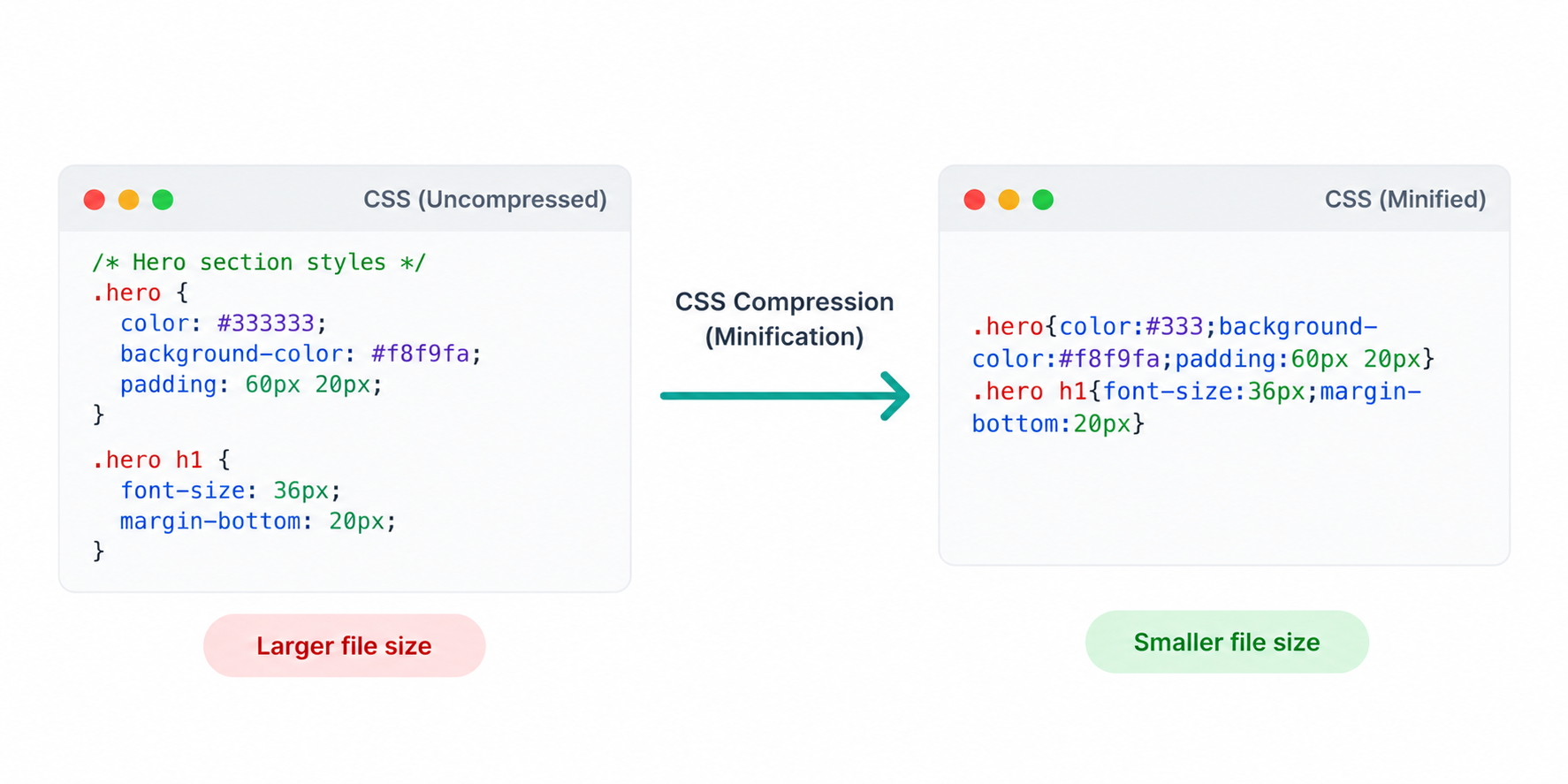
CSS compression commonly includes:
- Removing whitespace - spaces, tabs, and line breaks.
- Removing comments - Comments and notes that aren’t needed on the live website.
- Shortening values - example:
#ffffffto#fff. - Optional optimizations - Merging or reordering rules.
Note: CSS compression is different from Gzip compression. Minification reduces the CSS file size itself, while Gzip compression compresses the file size during transfer from server to browser. It is recommended to use both techniques for maximum performance gains.
How CSS Compression Helps Performance
When you load a webpage on your browser, the browser needs to load essential CSS stylesheets before it can load the page properly. When the CSS files are smaller, it arrives faster in the visitor's computer and that helps the page render faster, leading to an improved user experience.
Here is how CSS compression helps performance:
- Faster CSS downloads: With CSS compression enabled, there is less data to transfer which leads to quicker page loading, especially on slow networks.
- Faster rendering: Faster file transfers leads to faster page rendering at the user's end, leading to a better user experience.
- Improved mobile experience: Mobile connections benefit the most from reduced stylesheet size.
Even small reductions in your main stylesheet can matter—especially if the same CSS is used on every page of your website.
CSS Compression vs. Removing Unused CSS
CSS minification and removing unused CSS are two different optimization techniques. Minification makes an existing stylesheet more compact, while removing unused CSS attempts to eliminate styles that are not required by the website.
- CSS minification: Removes unnecessary whitespace, comments, and other formatting without changing the styling rules.
- Removing unused CSS: Identifies and removes selectors or rules that are not needed by the page or website.
Minification is generally lower risk because the stylesheet's styling rules remain intact. Removing unused CSS can result in larger file-size reductions, but it requires more careful testing because a style that appears unused on one page may be required by another page, component, or interactive element.
For best results, minify your CSS first and then audit unused styles separately. Test important page templates and interactive elements before deploying any CSS that has been removed.
What the CSS Compression Test Checks
When you test a webpage which contains links to external stylesheet files, our tool checks whether your CSS is delivered in an optimized way.This includes verifying if the CSS is minified, whether it’s served with transfer compression (Gzip) and whether there are obvious opportunities to reduce CSS payload.
Here are the main checks we perform:
- Minification: We check for whitespace and line breaks.
- Transfer compression: We check response headers to see if CSS is compressed over the network using "Content-Encoding: gzip".
- Eligible content type: We check if CSS is served with the correct MIME type (typically "text/css"), otherwise compression rules and caching can behave incorrectly.
- CSS file size and opportunity: We review the size of the stylesheet file to identify when it’s unusually largeand likely contains redundant or unnecessary rules.
For best results, we recommend combining CSS compression with strong caching and a cleanup of unused or duplicated styles.
Do’s and Don’ts for CSS Compression
CSS compression is a reliable way to speed up your website, but it works best when paired with good caching and a clean stylesheet.Follow these do’s and don’ts to reduce CSS size without breaking your design.
Do's
- Minify CSS in production: Remove whitespace and comments in live builds to reduce CSS file size.
- Enable Gzip compression for CSS files: Make sure your webserver sends CSS with "Content-Encoding: gzip".
- Use strong caching with versioned filenames: Cache CSS for longer and update it using cache-busting techniques.
- Keep your CSS lean: Remove duplicate rules and avoid shipping multiple frameworks unless absolutely necessary.
- Load critical CSS for key pages: For heavy sites, loading critical "above-the-fold" CSS first can improve perceived speed.
- Audit third-party CSS: Widgets, sliders, and plugins often add extra CSS - remove what you don’t use or need.
- Keep MIME types consistent: Serve stylesheets as "text/css", so compression and caching rules apply properly.
Don’ts
- Don’t remove “unused CSS” without testing: Removing perceived "Unused CSS" can cometimes break pages if it removes styles that are still in use in other areas of your website.
- Don’t use inline CSS: Large inline styles bloat HTML and can hurt caching benefits.
- Don’t ship unminified CSS to production: Readable formatting is great for development, but it adds unnecessary bytes for users.
- Don’t assume checking one template is enough: CSS can load differently across templates - check different page types.
- Don’t rely on compression to fix heavy CSS architecture: If your stylesheet is huge due to bloat, refactoring and cleanup will probably deliver bigger wins.
- Don’t ignore duplicate or conflicting stylesheets: Multiple themes, plugin CSS files can overlap and increase size without adding any value.
Good vs. Bad CSS Compression Practices
| Good Practice | Bad Practice |
|---|---|
| Minify CSS automatically as part of the production build process. | Manually compress CSS and repeat the process whenever styles change. |
| Serve minified CSS with Gzip or Brotli transfer compression. | Assume CSS minification and HTTP compression are the same thing. |
| Remove unused CSS only after testing all relevant page templates. | Delete CSS simply because a selector appears unused on one page. |
| Use browser caching with versioned CSS filenames. | Cache CSS aggressively without a reliable way to serve updated files. |
| Review third-party stylesheets and remove unnecessary dependencies. | Load multiple plugins or frameworks with overlapping CSS rules. |
| Test layouts and interactive elements after CSS optimization. | Deploy CSS changes without checking important pages and components. |
FAQs on CSS Compression
Not exactly. CSS compression usually means minifying the CSS file by removing unnecessary whitespace, comments, and formatting. Gzip compresses the file during transfer from the server to the browser. Using both provides better results.
CSS minification is generally safe, but incorrectly configured optimization tools can sometimes affect layouts or functionality. Always test important page templates after enabling CSS minification.
Minified CSS typically contains very little whitespace and appears as compact code, often across a small number of lines. A CSS compression test can also help identify whether your stylesheet is properly optimized.
Not necessarily. The goal is to reduce unnecessary requests and bytes while allowing CSS to be cached efficiently. Depending on your website and build setup, keeping a small number of optimized stylesheets may be better than combining everything.
Minification removes formatting characters such as whitespace and comments without changing the CSS rules. Removing unused CSS attempts to delete selectors that are not needed, which can produce larger savings but requires more careful testing.
CSS compression is not a direct SEO ranking signal. However, reducing stylesheet size can improve loading efficiency and user experience, which can support overall website performance and technical SEO.
Your server may be configured to compress only HTML responses. CSS may require separate compression rules, and an incorrect Content-Type can also prevent compression from being applied correctly.
Yes. A CDN can improve how CSS is delivered and cached, but minifying the stylesheet still reduces its underlying size. Combining minification, transfer compression, and effective caching provides a more efficient setup.