
Core Web Vitals
Core Web Vitals are Google’s key user experience metrics for measuring how fast a page loads, how quickly it responds and how stable it is while loading.
- Core Web Vitals comprises of three metrics - LCP (Largest Contentful Paint), INP (Interaction to Next Paint) and CLS (Cumulative Layout Shift).
- LCP measures loading performance, INP measures responsiveness and CLS measures visual stability.
- Google uses these metrics as part of its page experience signals. These metrics can influence search visibility and rankings.
- For best experience, strive to keep LCP scores within 2.5 seconds, INP scores within 200 milliseconds and CLS scores less than 0.1
- You’ll see two types of data - Field data (real visitors) and Lab data (simulated test runs). Both are useful.
- A page is generally considered “good” when each metric is good for at least 75% of visits (not just your own single test run).
What are Core Web Vitals?
Core Web Vitals are a set of metrics created by Google to measure real world user experience on the web. Instead of using just a “speed score,” core web vitals focuses on what visitors actually feel when they load and use a page.
Core Web Vitals answers three simple questions:
- Loading experience - Does the main content load quickly? (measured by Largest contentful paint)
- Interactivity - Does the page respond quickly when a user clicks or taps? (measured by Interaction to next paint)
- Visual stability - Does the page layout stay stable while the page loads? (measured by Cumulative Layout Shift)
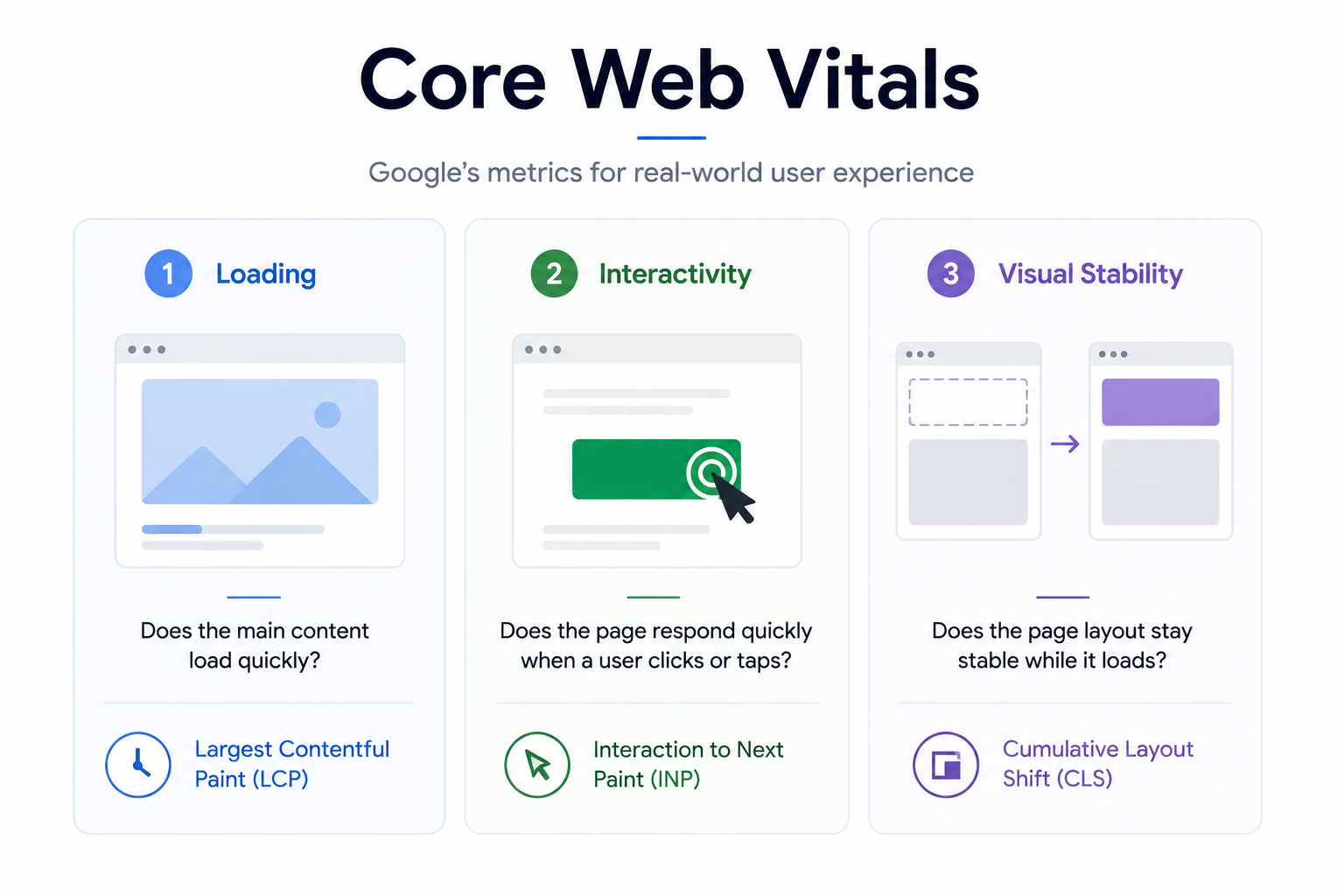
Core web vitals helps you measure your website's page's usability - do they feel fast, responsive and steady? Improving core web vitals scores leads to better user satisfaction which in turn can support improved rankings and more traffic to your website.
The 3 Core Web Vitals - and what “Good Scores” Looks Like
Core Web Vitals are made up of three key metrics that reflect real world user experience:
- how fast your main content loads
- how quickly the page responds to user interactions
- how stable the layout remains during loading
Each metric has clear thresholds for what Google considers “Good.”
Largest Contentful Paint (LCP)
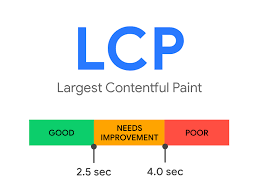
What it measures
LCP measures how long it takes for the largest visible element on the page - usually a hero image, banner, or heading to appear on screen.
Why LCP matters
Visitors judge page speed by how quickly the main content becomes visible. A slow LCP often makes an otherwise fast website feel sluggish.
What usually improves LCP
- ✓Optimize hero images.
- ✓Reduce render-blocking CSS and JavaScript.
- ✓Improve server response time.
- ✓Preload critical assets.
Common mistakes
- ✕Lazy loading the hero image.
- ✕Oversized images above the fold.
- ✕Heavy render-blocking CSS.
- ✕Slow server response times.
Interaction to Next Paint (INP)
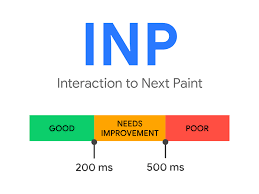
What it measures
INP measures how quickly your webpage responds after a user interaction, such as clicking a button, tapping a link, opening a menu, or typing into a form. It reflects the delay before users see a visual response.
Why INP matters
Even fast loading websites can feel slow if interactions are delayed. A low INP makes your website feel responsive and smooth, while a high INP creates lag and frustration during everyday use.
What usually improves INP
- ✓Reduce the amount of JavaScript running on the page.
- ✓Break long-running tasks into smaller chunks.
- ✓Load third-party scripts only when necessary.
- ✓Optimize event handlers and avoid expensive DOM updates.
Common mistakes
- ✕Shipping large JavaScript bundles to every page.
- ✕Blocking the main thread with long-running JavaScript.
- ✕Loading unnecessary third-party scripts like chat widgets and trackers.
- ✕Triggering expensive rendering and layout calculations after every interaction.
Cumulative Layout Shift (CLS)
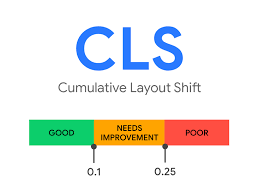
What it measures
CLS measures how much visible content unexpectedly moves while a page is loading. These layout shifts often occur when images, advertisements, fonts, or dynamically inserted elements appear without reserving enough space.
Why CLS matters
Unexpected layout shifts create a frustrating experience and can cause users to click the wrong links or buttons. A low CLS score makes your website feel polished, predictable, and trustworthy.
What usually improves CLS
- ✓Reserve space for images, videos, ads, and embedded content.
- ✓Specify image dimensions or use the CSS aspect-ratio property.
- ✓Preload important fonts and use appropriate font-display settings.
- ✓Avoid inserting banners or UI elements above existing content after the page begins rendering.
Common mistakes
- ✕Not reserving space for images, videos, and advertisements.
- ✕Injecting cookie banners or promotional bars after the page has loaded.
- ✕Loading third-party widgets without allocating layout space.
- ✕Allowing web fonts to swap and shift the page layout after rendering.
Why Core Web Vitals matter beyond “SEO”
Core Web Vitals aren’t just “technical SEO metrics.” They describe how your site "feels" to real people. Whether it "feels" fast, responsive, and stable. When that experience is not optimal, users are more likely to abandon your website, bounce, not complete forms and lose trust - even if your content is excellent.
Here’s why improving Core Web Vitals often pays off in the longer haul
- Higher conversions - Faster websites reduce friction in sign-ups, lead forms, and checkouts(especially on a mobile device).
- Lower bounce rate - When the main content appears quickly and the page doesn’t freeze or feels "laggy", users are more likely to stay and explore.
- Better user trust - Layout shifts (CLS) can cause misclicks and “jerky” behavior, which makes a website feel unreliable or spammy.
- Stronger engagement - Improved responsiveness helps people scroll, filter, search, and interact with your UI without frustration.
- Performance on real devices - Core web vitals issues usually hit hardest on mid range phones and slower networks. Fixing them improves the experience for the majority of users, not just developers on fast laptops.
- Competitive edge - When multiple pages offer similar content, user experience can be a differentiator that helps you win clicks and keep visitors.
Core Web Vitals are a practical way to measure and improve real user experience. Better scores typically mean happier visitors, more completed actions, and fewer people leaving before your page even gets a chance to persuade them.
Additional Performance Metrics
Core Web Vitals measure the three most important aspects of user experience, but they aren't the only metrics available. Google Lighthouse and PageSpeed Insights report several additional metrics that help explain why a page is slow and where improvements should be made.
Speed Index (SI)
Shows how quickly the visible portion of a page becomes populated during loading.
Useful for understanding perceived loading speed, but highly dependent on page design and testing conditions.
First Contentful Paint (FCP)
Measures when the browser first renders any text or image on the page.
A fast FCP doesn't necessarily mean the page feels fast because the main content may still be loading.
Time to First Byte (TTFB)
Measures how quickly the server begins sending data after receiving a request.
Useful for identifying backend, hosting, caching or CDN related performance problems.
Total Blocking Time (TBT)
Measures how long JavaScript blocks the browser before it can respond to user input.
Although not a Core Web Vital, TBT is one of the best indicators for diagnosing poor INP during development.
Time to Interactive (TTI)
Estimates when a page becomes fully interactive and able to respond reliably to user input.
Modern websites become interactive gradually, which is why Google replaced TTI with INP as its preferred responsiveness metric.
FAQs
Core Web Vitals are a set of user experience metrics introduced by Google to measure how users experience a webpage. They focus on three key aspects of page experience: loading speed (Largest Contentful Paint or LCP), responsiveness (Interaction to Next Paint or INP), and visual stability (Cumulative Layout Shift or CLS). Together, these metrics help website owners understand whether their pages feel fast, responsive, and stable for real visitors.
Core Web Vitals directly measure the quality of a visitor’s experience on your website. Faster loading pages, responsive interactions, and stable layouts improve user satisfaction, reduce bounce rates, and often lead to higher engagement and conversions. Google also considers Core Web Vitals as part of its overall page experience signals.
Yes. Google includes Core Web Vitals as part of its Page Experience signals. While high-quality and relevant content remains the most important ranking factor, improving Core Web Vitals can provide a competitive advantage when multiple pages offer similar information.
Google recommends achieving an LCP of 2.5 seconds or less, an INP of 200 milliseconds or less, and a CLS score below 0.1. A page is generally considered to have good Core Web Vitals when these thresholds are met for at least 75% of real user visits.
Largest Contentful Paint (LCP) measures loading performance, Interaction to Next Paint (INP) measures how quickly the page responds after user interactions, and Cumulative Layout Shift (CLS) measures how visually stable the page remains while loading.
Mobile devices usually have slower processors, less memory, and slower internet connections than desktop computers. Google also evaluates websites using mobile-first principles, so performance issues often become more noticeable on mobile devices.
Yes. Third-party JavaScript such as analytics tools, advertising scripts, live chat widgets, social media plugins, and tag managers can significantly affect loading speed, responsiveness, and layout stability. Regularly reviewing and removing unnecessary third-party scripts can improve your Core Web Vitals scores.
You should review Core Web Vitals whenever you make significant website updates, deploy new features, install plugins, change hosting providers, or redesign your website. Regular monitoring helps detect performance regressions before they impact users.
Scores can fluctuate due to changes in server performance, network conditions, website content, advertisements, third-party scripts, browser updates, or differences in user devices. Small variations are normal and expected.
Field Data is collected from real Chrome users through the Chrome User Experience Report (CrUX), reflecting actual visitor experiences. Lab Data is generated in a controlled testing environment using tools such as Lighthouse and PageSpeed Insights. Field Data represents real-world performance, while Lab Data is mainly used for diagnosing issues during development.
Yes. Core Web Vitals measure three specific aspects of user experience, but they do not evaluate every aspect of website performance. Large HTML documents, excessive images, complex animations, or inefficient navigation can still make a website feel slow even when Core Web Vitals pass.
No. Core Web Vitals are measured for both desktop and mobile experiences. However, mobile performance usually receives greater attention because Google primarily uses mobile-first indexing and many visitors browse using smartphones.
Improving Core Web Vitals typically involves optimizing images, reducing unnecessary JavaScript, improving server response times, using browser caching, minimizing layout shifts, reserving space for images and advertisements, and reducing the impact of third-party scripts. The exact improvements depend on which metric is performing poorly.
This tool checks the Core Web Vitals performance of every URL you submit and reports the values for Largest Contentful Paint (LCP), Interaction to Next Paint (INP), and Cumulative Layout Shift (CLS). It helps you quickly identify pages that require optimization so you can improve user experience across your website.