
HTTP Status Codes
HTTP Status Codes are 3-digit responses returned by a web server whenever someone requests a webpage. They tell browsers, search engines, and other software whether the request succeeded, failed, or requires another action.
- 200 status codes indicate successful requests.
- 300 status codes tell browsers or crawlers to the page a redirect.
- 400 status codes indicate problems with the request, such as missing pages.
- 500 status codes indicate server-side problems that prevented the request from being completed.
- Correct status codes are essential for SEO, crawling, indexing, user experience, and website maintenance.
What is an HTTP Status Code?
An HTTP Status Code is like a website’s “response signal.”
Just as a shopkeeper might tell you "We are open," "We have moved," or "Sorry, we are closed,"" a webpage uses status codes to communicate what’s happening behind the scenes. These status codes help browsers, users, and search engines understand if a page is working, redirected, missing, or broken.
Although users rarely see these codes directly, browsers use them to decide what should happen next. A browser may display the requested page, follow a redirect, show a "Page Not Found" message, or display a server error depending on the status code returned by the server.
Search engines rely heavily on HTTP status codes during crawling and indexing. A 200 OK response tells search engines that a page is available, while a 301 Moved Permanently tells them that the page has a new location. Likewise, a 404 Not Found indicates that the page no longer exists, and a 500 Internal Server Error signals that the server encountered a problem while processing the request.
How HTTP Status Codes Work?
Every time someone visits a webpage, the browser sends a request to the server. The server then replies with a status code such as:
- 200 OK - The page loaded successfully.
- 301 Moved Permanently - The page has a new permanent location.
- 404 Not Found - The page doesn't exist.
- 500 Internal Server Error - Something went wrong on the server.
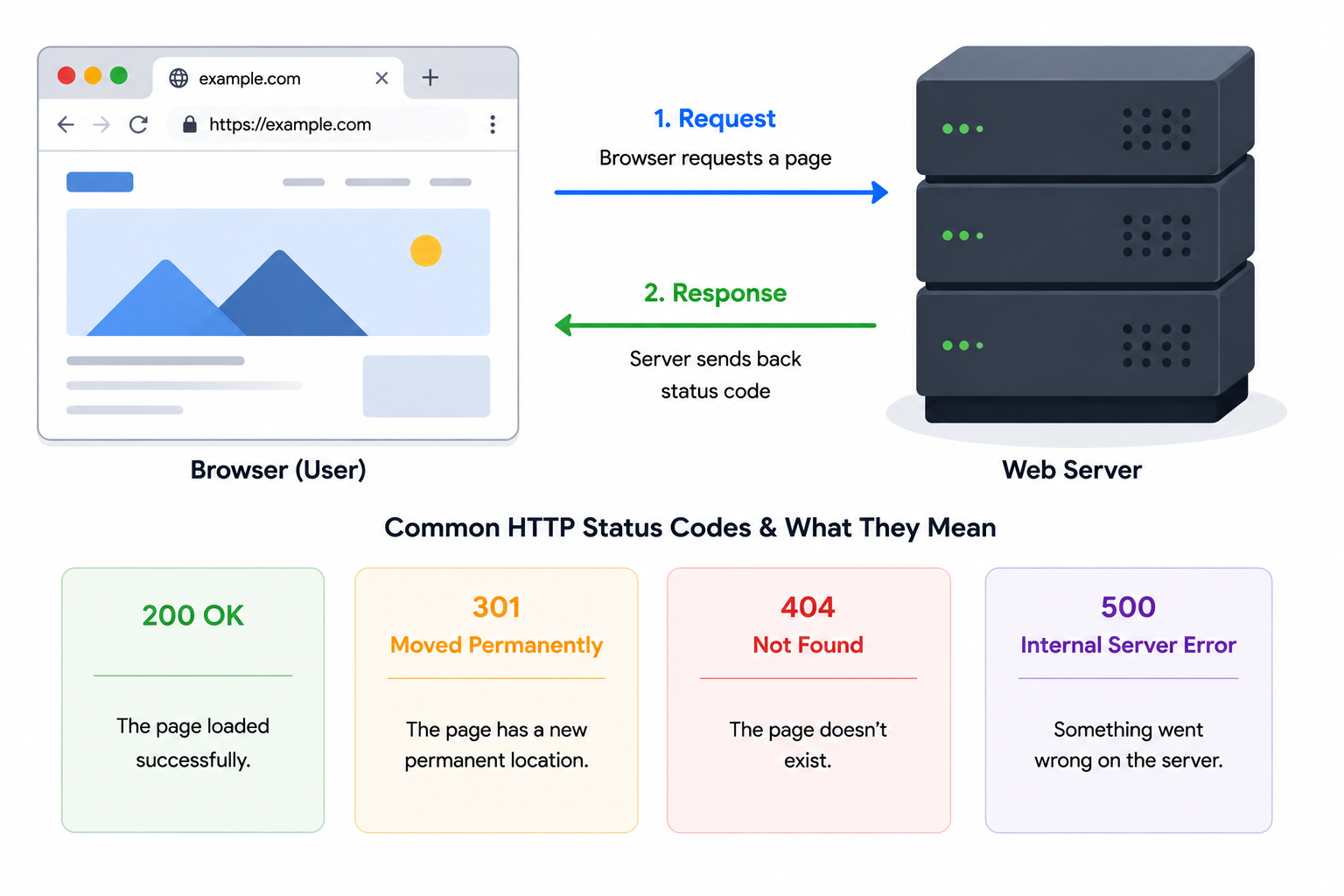
Think of it as a short, coded conversation between your browser and the website. And this is also applicable to other user-agents who may try to fetch the page, for example - Googlebot, Yahoo bot, ChatGPT bot and other software who pay request to fetch your webpage at their end.
Why Do HTTP Status Codes Matter?
HTTP Status codes are important because they guide search engines. Search engines use http status codes to decide which pages can be crawled and indexed, which pages cannot be crawled and indexed and when the redirects of specific pages needs to be updated.
HTTP Status code also affects user experience since if many pages on your website are not returning the "200 OK" HTTP status code - it is either broken or not loading at the user's end properly. This will eventually lead to a poor user experience, user frustration, which in turn will affect your search rankings. Broken pages or endless redirect loop frustrates users and is not good for your website's reputation and branding in the long run.
Moreover, incorrect status codes (like using 302 instead of 301) can cause traffic loss, bad indexing, and duplicate content issues.
Do's and Don'ts of HTTP Status Codes
Using the correct HTTP status codes helps browsers, search engines, and users understand exactly what is happening with your webpages. Following established best practices improves crawlability, user experience, and long-term SEO performance, while incorrect implementations can lead to indexing problems, traffic loss, and unnecessary server load.
Do's
- Return "200 OK" for all pages that are live, accessible, and intended to be indexed.
- Use 301 Moved Permanently when a page has been permanently moved to a new URL.
- Use 302 or 307 redirects only when the redirect is temporary.
- Return 404 Not Found or 410 Gone for pages that no longer exist.
- Keep redirect chains and redirect loops to an absolute minimum.
- Monitor your website regularly for 4xx and 5xx errors.
- Update internal links after changing or removing URLs.
- Test HTTP status codes after website migrations or major deployments.
Don'ts
- Don't use 302 redirects for permanent URL changes.
- Don't return 200 OK for pages that display "Page Not Found" messages (soft 404s).
- Don't redirect every deleted page to your homepage.
- Don't create long redirect chains or redirect loops.
- Don't leave broken internal links pointing to 404 pages.
- Don't ignore intermittent 500, 502, or 503 server errors.
- Don't remove pages without considering redirects or appropriate status codes.
- Don't assume all status codes are harmless—incorrect responses can affect crawling, indexing, and user experience.
Good vs. Bad HTTP Status Code Practices
The examples below demonstrate common scenarios where HTTP status codes are used correctly—and mistakes that can negatively impact user experience, crawling, and SEO.
| Good Practice | Bad Practice |
|---|---|
| Page moved from /blog/old-post to /blog/new-post using a 301 Moved Permanently redirect. | Using a 302 Temporary Redirect for a URL that has permanently moved. |
| Deleted content returning a 410 Gone status to indicate it has been intentionally removed. | Returning 200 OK for a page that only displays a "Page Not Found" message (Soft 404). |
| Active product, service, and landing pages consistently returning 200 OK. | Allowing important pages to return 404 Not Found because of broken internal links. |
| Using a 302 or 307 redirect only during temporary maintenance or testing. | Leaving temporary redirects in place for months after a permanent website migration. |
| Redirecting visitors directly to the final destination with a single redirect. | Creating redirect chains such as Page A → Page B → Page C → Final Page. |
| Returning a 503 Service Unavailable response during scheduled server maintenance. | Allowing recurring 500 Internal Server Error responses to remain unresolved. |
An HTTP Status Code is more than just a technical detail. It is the backbone of how webpages communicate with different user-agents such as browsers, crawlers, bots, scrapers and so on. When implemented correctly, status codes help search engines crawl efficiently, ensure users reach the right content, and maintain the overall health of your website. Monitoring and optimizing status codes is a fundamental part of any robust SEO and site maintenance strategy.
FAQs on HTTP Status Codes
An HTTP status code is a three-digit response sent by a web server whenever a browser, search engine, or application requests a webpage or other resource. It tells the requester whether the request was successful, redirected, rejected, or encountered an error.
The most common HTTP status code is 200 OK. It indicates that the request was successful and the requested page or resource was returned correctly. Every page that should be accessible and indexable is expected to return a 200 OK response.
A 404 Not Found status code means the requested URL could not be found on the server. This may happen because the page has been deleted, moved without a redirect, or the URL was entered incorrectly. Occasional 404 errors are normal, but important pages should not return this status code.
Both status codes indicate that a page is unavailable. A 404 means the page cannot be found, while a 410 Gone explicitly tells browsers and search engines that the page has been permanently removed and is not expected to return.
A 301 redirect indicates that a page has permanently moved to a new location, whereas a 302 redirect indicates that the move is temporary. Permanent URL changes should generally use a 301 redirect so browsers and search engines can update their records.
Yes. Search engines use HTTP status codes to determine whether pages should be crawled, indexed, redirected, or removed from search results. Incorrect status codes can lead to crawling issues, indexing problems, duplicate content, and a poor user experience.
A 500 Internal Server Error indicates that the server encountered an unexpected problem while processing the request. This usually points to a server-side issue rather than a problem with the browser or user.
A redirect chain occurs when one URL redirects to another, which then redirects to another before reaching the final destination. Redirect chains increase page load time, waste crawl budget, and should be minimized whenever possible.
A redirect loop occurs when two or more URLs continuously redirect to one another, preventing the browser from reaching the final page. Most browsers eventually stop following the redirects and display an error message.
A soft 404 occurs when a webpage returns a <strong>200 OK</strong> status code but displays an error message such as "Page Not Found." This confuses search engines because the response says the page exists even though no useful content is available.
No. Only pages that are live, accessible, and intended to be viewed should return a 200 OK response. Redirected pages should return the appropriate 3xx status code, removed pages should return a 404 or 410, and server problems should return the appropriate 5xx status code.
The tool sends an HTTP request to each URL you provide and records the server response. It identifies the returned HTTP status code, detects redirects, highlights client and server errors, and helps you quickly identify URLs that may require attention.