
Google PageSpeed Overall Score
Google PageSpeed Insights analyzes how quickly a webpage loads and performs on both mobile and desktop devices. It evaluates your page using Lighthouse audits and real-world user experience data to identify performance bottlenecks and recommend improvements.
- PageSpeed scores range from 0 to 100, with 90–100 considered good performance.
- The report includes Core Web Vitals, performance metrics, diagnostics, and optimization opportunities.
- A faster website provides a better user experience, improves engagement, and can indirectly support SEO.
- PageSpeed evaluates factors such as loading speed, responsiveness, visual stability, JavaScript execution, and resource optimization.
- This tool lets you bulk check Google PageSpeed scores across multiple URLs, helping you quickly identify pages that need performance improvements.
What is Google PageSpeed Overall Score?
Google PageSpeed Insights Score is a performance score that measures how efficiently a webpage loads and responds on both mobile and desktop devices. It is generated using Google's Lighthouse auditing tool, which analyzes various aspects of a webpage including loading speed, responsiveness, visual stability, accessibility, and resource optimization.
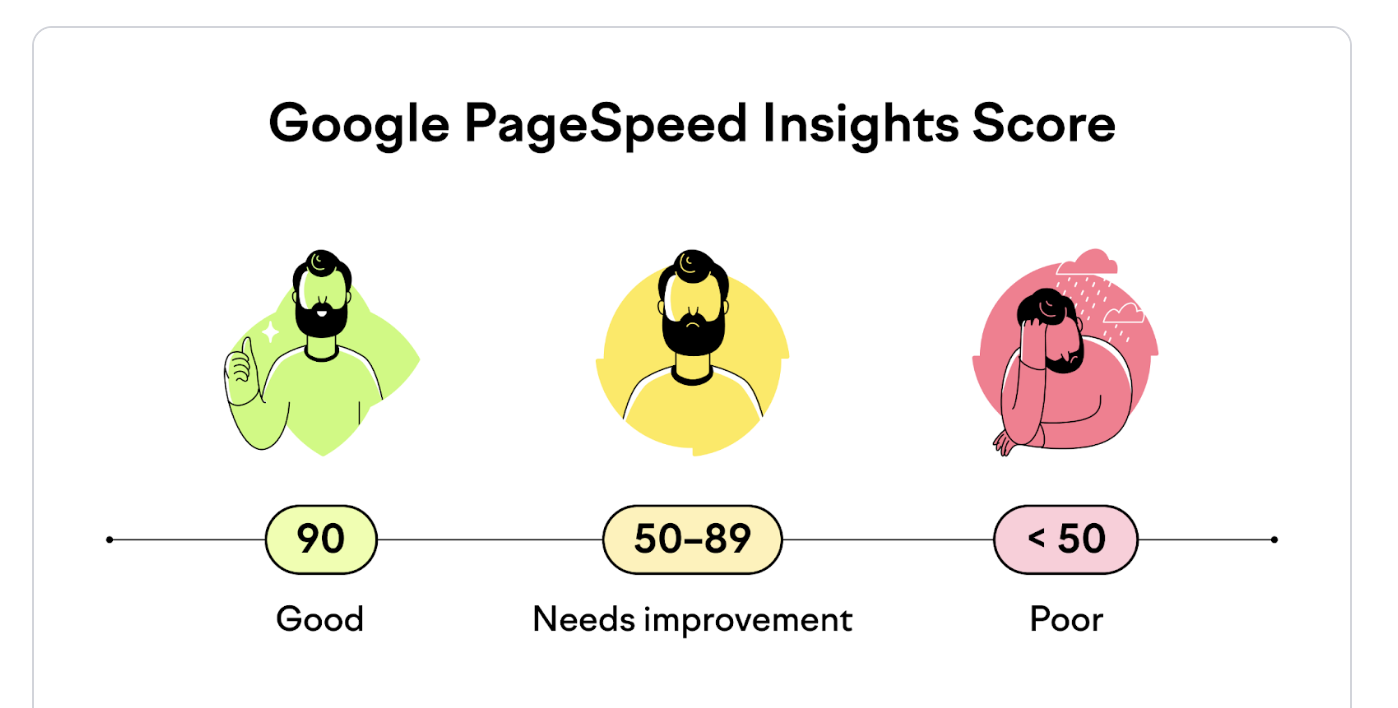
The score ranges from 0 to 100, with higher scores indicating better overall performance. Google groups the scores into three categories:
- 90–100: Good – The page performs well and meets most performance best practices.
- 50–89: Needs Improvement – The page is usable but has opportunities for optimization.
- 0–49: Poor – The page has significant performance issues that should be addressed.
The overall score is calculated using multiple performance metrics collected during a Lighthouse audit. These include metrics such as First Contentful Paint (FCP), Largest Contentful Paint (LCP), Interaction to Next Paint (INP), Cumulative Layout Shift (CLS), Speed Index, and Total Blocking Time (TBT). Together, these metrics provide a comprehensive picture of how quickly a page loads, becomes interactive, and remains visually stable for users.
Google PageSpeed Insights also combines laboratory testing with real-world user experience data (when available) from the Chrome User Experience Report (CrUX). This allows website owners to understand not only how a page performs under controlled conditions but also how it performs for actual visitors using different devices and network conditions.
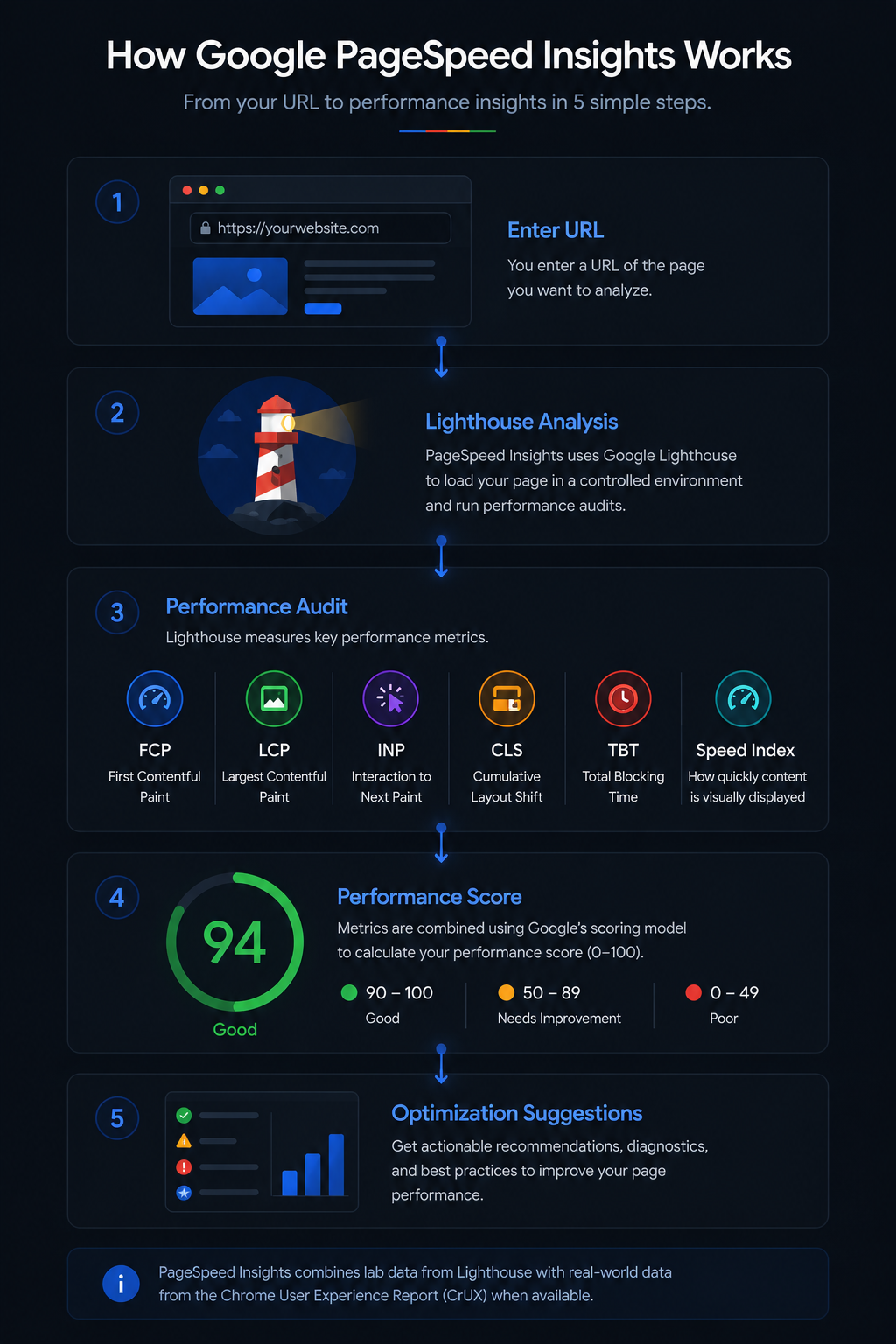
How Google PageSpeed Insights Works
Google PageSpeed Insights analyzes the performance of a webpage by fetching the URL, loading it in a controlled browser environment using Lighthouse, and measuring various performance metrics. It evaluates how quickly the page loads, becomes interactive, and remains visually stable before generating an overall performance score and a detailed optimization report.
During the analysis, Lighthouse simulates how users experience your webpage on both mobile and desktop devices. It measures important metrics such as First Contentful Paint (FCP), Largest Contentful Paint (LCP), Interaction to Next Paint (INP), Cumulative Layout Shift (CLS), Speed Index, and Total Blocking Time (TBT). These metrics are then combined using Google's scoring model to calculate the final PageSpeed score.
Whenever possible, Google also supplements the Lighthouse audit with real-world user experience data from the Chrome User Experience Report (CrUX). This field data helps website owners understand how actual visitors experience the page across different devices, browsers, and network conditions.
After completing the analysis, PageSpeed Insights categorizes the performance score as Good (90–100), Needs Improvement (50–89), or Poor (0–49). It also highlights opportunities, diagnostics, and best practices that can help improve your website's loading speed and overall user experience.
PageSpeed Optimization Practices - The Good and the Bad
Improving your PageSpeed score is not about chasing a perfect score—it's about delivering a faster, smoother experience for your visitors. The following examples highlight common optimization techniques alongside practices that can significantly slow down your website.
| Good Examples | Bad Examples |
|---|---|
| Compressing and serving images in modern formats like WebP or AVIF. | Uploading large, uncompressed JPEG or PNG images directly from a camera or design tool. |
| Lazy loading images and videos that appear below the fold. | Loading every image, video, and iframe immediately when the page opens. |
| Minifying CSS and JavaScript files before deployment. | Serving large, unminified CSS and JavaScript files with unnecessary whitespace and comments. |
| Using browser caching and a CDN to serve static assets quickly. | Serving every request directly from the origin server without caching. |
| Reducing unused JavaScript and loading only the code required for the current page. | Loading large JavaScript libraries that are never used by the page. |
| Optimizing server response time with efficient hosting and caching. | Allowing slow server response times that delay page rendering. |
Loading custom fonts efficiently using modern formats and font-display: swap. |
Loading multiple large font families that block page rendering. |
| Regularly monitoring PageSpeed Insights after major website updates. | Ignoring performance issues until users start complaining about slow pages. |
FAQs
Google PageSpeed Insights is a free performance analysis tool developed by Google. It evaluates how quickly a webpage loads on both mobile and desktop devices, identifies performance bottlenecks, and provides actionable recommendations for improving speed, user experience, and Core Web Vitals.
Google categorizes PageSpeed scores into three ranges: <strong>90–100 (Good)</strong>, <strong>50–89 (Needs Improvement)</strong>, and <strong>0–49 (Poor)</strong>. While achieving a perfect score of 100 is ideal, maintaining a score above 90 is generally considered excellent for most websites.
PageSpeed Insights itself is not a ranking factor. However, many of the metrics it measures—such as loading performance and Core Web Vitals—contribute to page experience, which Google considers when evaluating search results. Faster websites also tend to provide better user experiences, lower bounce rates, and higher engagement.
Mobile devices generally have slower processors, less memory, and slower network connections than desktop computers. Google also simulates realistic mobile network conditions during testing, making mobile performance more challenging and often resulting in lower scores.
You should test your website after major design changes, CMS updates, plugin installations, server migrations, or whenever you notice slower loading speeds. Regular monitoring helps identify performance regressions before they affect visitors.
PageSpeed scores can vary because of changes in website content, third-party scripts, advertising, server performance, network conditions, browser updates, and improvements to Lighthouse itself. Small fluctuations between tests are completely normal.
Core Web Vitals are a set of user experience metrics that measure loading performance, interactivity, and visual stability. They currently include Largest Contentful Paint (LCP), Interaction to Next Paint (INP), and Cumulative Layout Shift (CLS), all of which are reported within PageSpeed Insights.
No. A perfect score is not required for a fast website or strong SEO performance. Many high-performing websites score between 90 and 99. Focus on delivering a fast, stable user experience rather than chasing a perfect score.
Common causes include oversized images, render-blocking CSS and JavaScript, excessive third-party scripts, slow server response times, lack of browser caching, large font files, unused CSS or JavaScript, and poor hosting performance.
Yes. Slow hosting, overloaded servers, high server response times, and poor infrastructure can significantly affect your PageSpeed score. Using quality hosting, caching, and a Content Delivery Network (CDN) can often improve website performance.
Lab data is generated by Lighthouse during a controlled performance test, allowing developers to diagnose issues consistently. Field data comes from the Chrome User Experience Report (CrUX) and reflects how real users experience your website under actual browsing conditions.
This tool analyzes the PageSpeed Insights performance score for each URL you provide and reports the mobile and desktop performance scores. It allows you to quickly identify slow pages across your website so you can prioritize optimization efforts.