
Directory Browsing
Directory browsing, sometimes also referred to as "directory listing", happens when a web server shows a public list of files and folders kept in a directory of a website, instead of serving a webpage when that folder URL is requested in a visitor's browser.
-
If directory browsing is enabled, anyone can visit URLs like
/images/or/uploads/and see what files are stored in that folder. - This can expose sensitive files and reveal your website's server structure to attackers.
- Disabling directory listing is a common baseline security best practice for most websites.
What is Directory Browsing?
Directory browsing is a server behavior where requesting a folder path displays an automatically generated "index" of the content of that folder.
Here is how it looks in a web browser when directory browsing is enabled on a website.
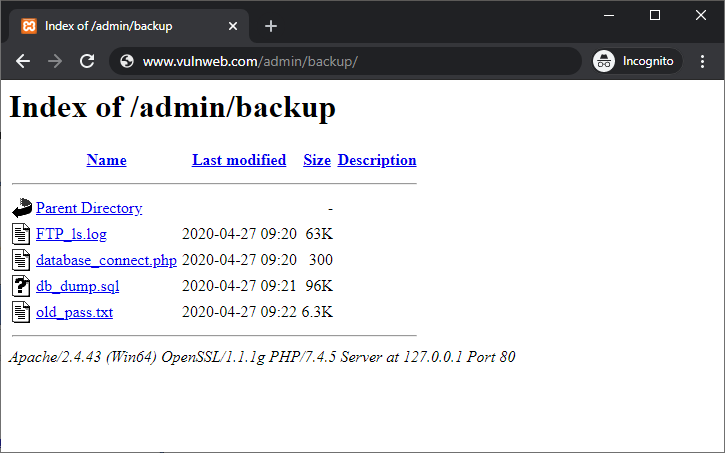
For example, if someone visits
https://example.com/back-up/ and there is no
index.html, index.php, or another default
document present, the web server may show the entire content of the
folder to the user in the browser.
The content of the folder would usually start with a heading such as "Index of /path-of-folder", below which the files and folders residing in that directory are displayed.
Even if you never intended to show the files and folders publicly, they can still be discoverable because directory listing is enabled on the web server and has not been disabled.
On the other hand, if the website returns a 403 Forbidden
response or serves a proper page instead of a file listing, directory
browsing is likely disabled for that directory.
In addition to revealing the files and folders of a website, directory listing may also allow people to download files through clickable links. Depending on the server, visitors may also see information such as file sizes and last-modified dates.
Why Directory Browsing is a Security Risk
Directory listings can create real problems even if the files appear harmless. An exposed directory gives visitors a convenient map of files that were never intended to be publicly browsable.
Given below are the top reasons why directory browsing or directory listing is considered a significant security risk for websites.
- Exposure of your website's file structure - Directory browsing exposes the directory structure of your website and allows anyone to browse through different directories. In some situations, visitors may see important folders such as backups, logs, or exports, which can create a significant security risk.
- Easier attacks - Attackers can quickly discover upload folders, scripts, configuration files, or outdated assets. This gives them additional information that may help them identify other weaknesses.
- Unintended downloads - Private documents, temporary files, backups, or exports can become publicly accessible if they are stored inside a browsable directory.
- Compliance and privacy risk - Accidental exposure of sensitive information may create privacy, contractual, or regulatory problems.
Do’s and Don’ts
Do’s
- Disable directory listing - Disable directory browsing site-wide unless you have a specific reason to expose a directory listing.
- Allow browsing only when intended - If directory listing is genuinely required, enable it only for a dedicated directory containing files that are intentionally public.
-
Add index files where appropriate -
An
index.html,index.php, or other default document can prevent a directory from displaying an automatically generated listing on many server configurations. - Re-test after migrations - Server moves, CDN changes, hosting changes, and configuration updates can accidentally re-enable directory listing.
Don’ts
- Don’t assume no one will find it - People can guess common folder paths and check what is inside if directory browsing is enabled.
- Don't keep sensitive files in public directories - Avoid storing backups, logs, exports, configuration files, or other sensitive material inside web-accessible directories.
- Don’t forget subdomains and staging - Check subdomains, development environments, and staging websites as well, not just the main production environment.
FAQs on Directory Browsing
No. A file can be publicly accessible even when directory browsing is disabled if someone knows or discovers its exact URL. Directory browsing makes discovery easier by automatically displaying a list of files and folders within a directory.
An exposed directory can reveal filenames, folder structures, backups, logs, exports, scripts, and other resources that were not intended to be browsed publicly. This information can help attackers understand the website and locate potentially sensitive files.
Visit a directory URL that does not contain a default index document. If the server displays an automatically generated file listing, directory browsing is enabled for that directory. A 403 response or a normal application page generally indicates that the listing is not being displayed.
Not necessarily. Directory listing can be intentionally enabled for a controlled public download directory. However, for most websites, exposing arbitrary server directories is unnecessary and increases the risk of unintentionally revealing files or information.
Yes. If a directory listing is publicly accessible and discoverable, search engines may be able to crawl the directory URL and potentially discover individual files linked from it. Preventing unwanted public access is preferable to relying only on search-engine directives.
It can prevent an automatic directory listing when the web server is configured to serve index.html as the default document. However, the more reliable long-term approach is to disable directory listing at the server or hosting configuration level unless it is intentionally required.
Disable directory listing for the affected directory or, preferably, configure the server so unintended directories cannot be browsed. Then review the exposed files and remove or restrict anything sensitive, such as backups, logs, exports, temporary files, or configuration data.
Yes. Staging environments, development servers, upload directories, backup folders, and less frequently used subdomains can be overlooked during security reviews. Check them as well, particularly if they are publicly reachable.