
HSTS Header
HTTP Strict Transport Security (HSTS) is a browser security mechanism that tells browsers to use HTTPS when connecting to a website instead of allowing insecure HTTP connections.
- HSTS (HTTP Strict Transport Security) is enabled through the Strict Transport Security HTTP response header.
- The max-age directive tells the browser how long the HSTS policy should remain active.
- includeSubDomains extends the HSTS policy to subdomains of the host.
- preload is used when a domain is intended to meet the requirements for inclusion in browser HSTS preload lists.
- HSTS helps protect against downgrade and SSL stripping attacks by preventing the browser from making insecure HTTP connections once the policy is known.
- HSTS must be delivered over HTTPS. A browser does not trust an HSTS policy received over an insecure HTTP connection.
- This test checks whether the HSTS header is present and helps identify missing or potentially incomplete configurations.
What Is HSTS and How Does the Strict Transport Security Header Work?
HSTS stands for HTTP Strict Transport Security. It is a browser security mechanism that allows a website to tell browsers that it should only be accessed using HTTPS.
HSTS is enabled by sending the Strict Transport Security response header from the website over a secure HTTPS connection.
When a browser receives a valid HSTS policy, it stores the policy for the period specified by the max-age directive. During that period, the browser treats the host as HTTPS-only.
For example, a website might send:
        Strict Transport Security:
        max-age=31536000
This tells the browser to remember the HTTPS-only policy for 31,536,000 seconds, or one year.
Once the HSTS policy is active, the browser can:
- Automatically upgrade HTTP URLs for the HSTS host to HTTPS before making the connection.
- Prevent insecure HTTP connections from being used for that host.
- Refuse to let users bypass certain TLS certificate errors for an HSTS host.
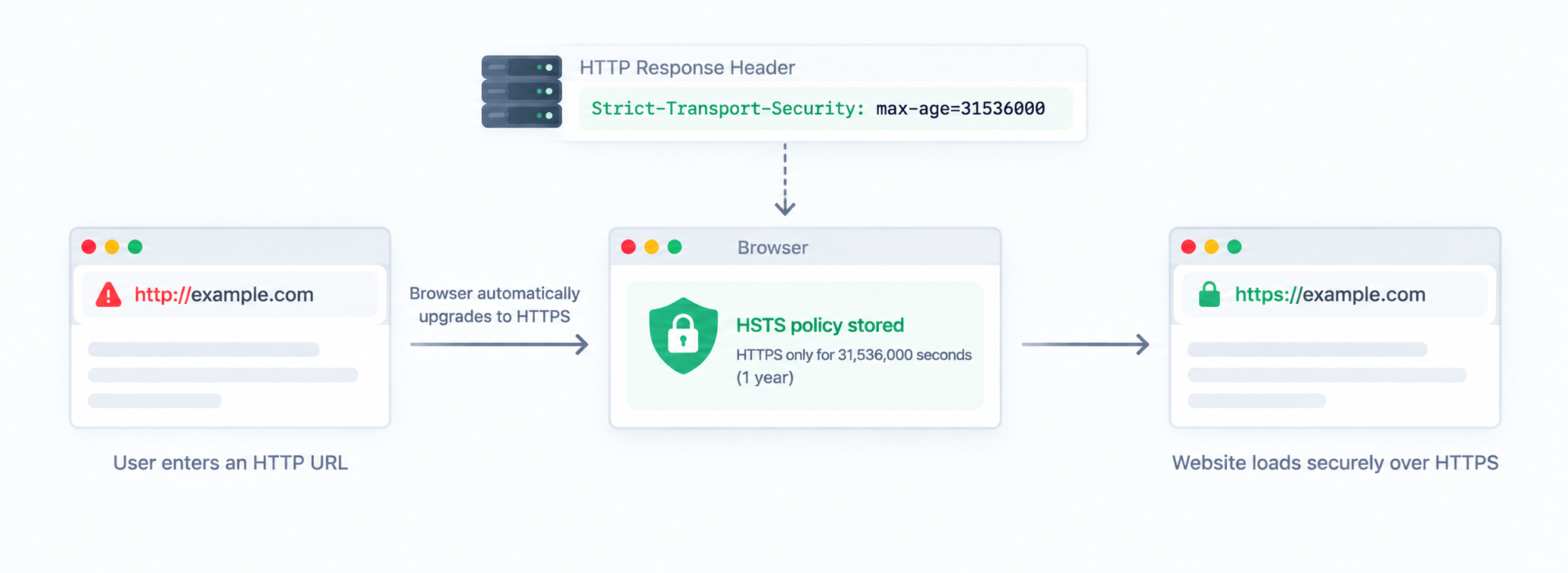
This behavior is especially important when visitors use public or otherwise untrusted networks, where an attacker may attempt to interfere with an insecure HTTP connection.
HSTS vs HTTP to HTTPS Redirects
HSTS and HTTP-to-HTTPS redirects both help move visitors toward secure connections, but they work at different stages.
| HTTP Redirect | HSTS |
|---|---|
| Server receives an HTTP request first. | Browser can upgrade the request to HTTPS before making the HTTP connection. |
| Typically uses a 301 or 308 response. | Uses the Strict Transport Security response header. |
| Useful when the browser does not already know the HSTS policy. | Applies after the browser has learned the HSTS policy. |
| Does not by itself prevent the initial HTTP connection. | Helps prevent insecure HTTP connections for known HSTS hosts. |
For a modern HTTPS website, server-side HTTP-to-HTTPS redirects and HSTS generally complement each other rather than replace each other.
How Does HSTS Prevent SSL Stripping Attacks?
An SSL-stripping attack attempts to keep a visitor on an insecure HTTP connection even though the website supports HTTPS. This can be particularly dangerous when a visitor is using an untrusted network.
Without HSTS, a visitor may initially request:
The server could then redirect the visitor to:
The problem is that the initial HTTP connection occurred before the browser knew that the website required HTTPS.
Once HSTS is active, the browser can upgrade the HTTP URL to HTTPS itself, avoiding that initial insecure connection.
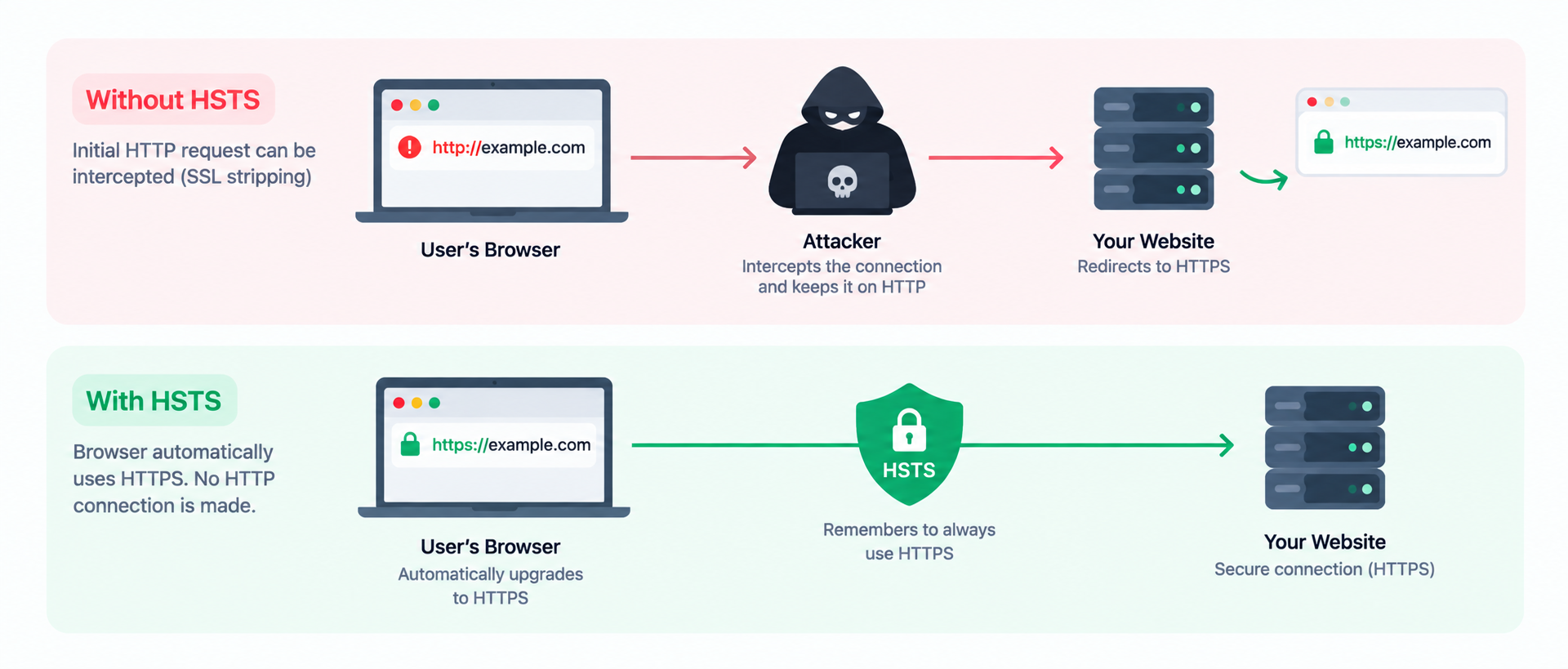
In simple terms:
HTTP redirect: Browser → HTTP → Server → HTTPS redirect
HSTS: Browser → HTTPS → Server
What Happens Before the Browser Knows About HSTS?
HSTS is not automatically known by every browser. A browser normally learns a website's HSTS policy after receiving the Strict Transport Security header over HTTPS.
This means there can be a protection gap on the very first connection if the browser has never previously received an HSTS policy for the host.
This is one reason HSTS preload lists exist. A domain included in a browser's preload data can be treated as HTTPS-only before the browser has received the site's HSTS header.
Preloading is therefore a separate mechanism from simply sending the HSTS header and should be approached carefully because changes to a preload list are not instantaneous.
Key HSTS Directives
The Strict Transport Security header is made up of directives that control how browsers enforce HTTPS for your domain. The most common directives are max-age, includeSubDomains, and preload.
1. max-age
The max-age directive specifies how many seconds the browser should remember that the host must only be accessed using HTTPS.
        Strict Transport Security:
        max-age=31536000
- 31536000 = 1 year
- 63072000 = 2 years
During this period, the browser enforces the HTTPS-only policy for the host. When the browser receives the HSTS header again, the policy's expiration is refreshed according to the current max-age value.
2. includeSubDomains
includeSubDomains extends the HSTS policy to subdomains of the host.
        Strict Transport Security:
        max-age=31536000; includeSubDomains
For example, an HSTS policy for example.com with includeSubDomains can also apply to hosts such as:
- www.example.com
- app.example.com
- blog.example.com
- admin.example.com
Only use includeSubDomains when all relevant subdomains are ready to operate correctly over HTTPS. Otherwise, HSTS can prevent users from accessing HTTP-only subdomains.
3. preload
preload is an optional token associated with HSTS preload lists. It indicates that a site intends to meet the requirements for preload inclusion.
Preloading allows participating browsers to know that a domain should be treated as HTTPS-only before the browser has received the site's HSTS response.
Adding preload to the header does not by itself place your domain on a browser's preload list. The domain must satisfy the relevant requirements and be submitted through the appropriate preload service.
What Does a Strong HSTS Configuration Look Like?
A common HSTS configuration for a mature HTTPS-only website is:
        Strict Transport Security:
        max-age=63072000; includeSubDomains; preload
This configuration represents a two-year HSTS policy, applies the policy to subdomains, and indicates that the site intends to qualify for HSTS preloading.
However, this should not be copied blindly. A long HSTS duration, includeSubDomains, and preload can create significant operational consequences if any hostname in the covered domain is not ready for HTTPS.
How Does HSTS Affect Subdomains?
HSTS policies are applied to hosts, and the includeSubDomains directive can extend the policy to subdomains.
For example, if example.com sends:
        Strict Transport Security:
        max-age=31536000; includeSubDomains
browsers can apply the policy to subdomains such as app.example.com and blog.example.com.
This makes HSTS stronger, but it also increases the scope of the policy. Before enabling includeSubDomains, review old, forgotten, staging, development, API, mail, and third-party-managed subdomains that may still exist under the domain.
What Happens If HSTS Is Misconfigured?
HSTS is powerful because browsers enforce the policy rather than merely displaying it as a recommendation. That also means configuration mistakes can have real consequences.
- Expired or invalid TLS certificates: browsers may refuse access rather than allowing users to bypass the certificate warning.
- HTTP-only subdomains: includeSubDomains can make those services inaccessible.
- Premature preload: once a domain is distributed through preload lists, removing or changing the policy is not instantaneous.
- Incomplete HTTPS migration: legacy endpoints may stop working when browsers enforce HTTPS.
For this reason, HSTS should generally be introduced after the website's HTTPS configuration has been thoroughly tested.
How to Roll Out HSTS Safely
HSTS is best introduced gradually on websites that are migrating from HTTP to HTTPS or that have a large number of subdomains.
- Make the entire website HTTPS-ready. Check pages, assets, APIs, redirects, cookies, forms, and third-party integrations.
- Verify HTTP-to-HTTPS redirects. HTTP requests should consistently reach their HTTPS equivalents.
- Start with a shorter max-age. This allows the configuration to be tested before committing browsers to a long policy period.
- Increase max-age gradually. Once HTTPS is stable, move toward a longer HSTS duration.
- Test subdomains. Do this before enabling includeSubDomains.
- Consider preload only when ready. Preload should be treated as a deliberate long-term commitment rather than simply another header setting.
What Does the HSTS Header Test Check?
The HSTS Header Test examines the HTTP response from a webpage and checks whether it includes the Strict Transport Security response header.
The test can help identify:
- Whether the HSTS header is present.
- The configured max-age value.
- Whether includeSubDomains is enabled.
- Whether the preload token is present.
- Whether the header appears to follow common HSTS configuration practices.
A missing HSTS header does not necessarily mean that HTTPS itself is unavailable or incorrectly configured. It means that the browser is not being given an HSTS policy through that response.
Likewise, the presence of HSTS does not replace proper TLS configuration, HTTPS redirects, certificate management, or other security controls.
HSTS vs. HTTPS: What's the Difference?
| HTTPS | HSTS |
|---|---|
| Encrypts the connection between the browser and server. | Tells the browser to use HTTPS for the host. |
| Requires a valid TLS certificate. | Relies on HTTPS being correctly configured. |
| Protects data in transit. | Helps prevent insecure HTTP connections and downgrade attacks. |
| Can be used without HSTS. | Requires HTTPS to work correctly. |
HSTS does not replace HTTPS. Instead, it strengthens an HTTPS deployment by telling compatible browsers to consistently use the secure protocol.
Does HSTS Affect SEO?
HSTS is primarily a security mechanism rather than a direct search ranking factor.
Its purpose is to enforce HTTPS usage in browsers and reduce the risk of downgrade and interception attacks. It does not directly tell search engines how a page should rank.
However, maintaining a consistent HTTPS implementation is important for website reliability and technical quality. HSTS should therefore be viewed as a security improvement rather than a direct SEO optimization.
Good vs. Bad HSTS Practices
| Good Practice | Bad Practice |
|---|---|
| Serve HSTS over HTTPS. | Expect browsers to trust HSTS sent over HTTP. |
| Use a meaningful max-age after HTTPS is stable. | Immediately use a very long policy without testing HTTPS. |
| Test all subdomains before using includeSubDomains. | Enable includeSubDomains without checking legacy subdomains. |
| Use preload only when the domain is ready for its requirements. | Add preload simply because it appears more secure. |
| Maintain valid TLS certificates across covered hosts. | Assume HSTS will compensate for certificate problems. |
| Verify the actual production response header. | Assume a server configuration change automatically reached every request. |
Common HSTS Configuration Mistakes
- Sending HSTS over HTTP: browsers ignore the policy when it is received over an insecure connection.
- Using a very short max-age indefinitely: this limits the period during which browsers enforce HTTPS.
- Enabling includeSubDomains too early: HTTP-only subdomains can become inaccessible.
- Adding preload without preparation: preload requires a much more complete HTTPS deployment.
- Assuming HSTS replaces redirects: redirects remain useful for browsers that have not yet learned the HSTS policy.
- Forgetting certificates: HSTS makes browsers less tolerant of TLS certificate problems because certificate errors cannot simply be bypassed.
When Should You Run an HSTS Header Test?
HSTS is generally a configuration-level setting, but it is worth checking whenever your HTTPS infrastructure changes.
- After migrating a website from HTTP to HTTPS.
- After changing your web server or CDN configuration.
- After changing HTTPS or TLS settings.
- After renewing or replacing certificates.
- After adding or changing subdomains.
- Before enabling includeSubDomains.
- Before submitting a domain for HSTS preloading.
- During periodic security-header audits.
Conclusion
HTTP Strict Transport Security is an important part of a modern HTTPS security strategy. By sending the Strict Transport Security response header, a website can tell compatible browsers to use HTTPS for future connections and avoid insecure HTTP access.
The max-age directive controls how long the policy is remembered, while includeSubDomains extends the policy to subdomains. preload can be used as part of a deliberate HSTS preload strategy when the website meets the necessary requirements.
HSTS should be implemented carefully because an overly aggressive policy can affect subdomains and make certificate or HTTPS configuration problems more difficult for users to bypass.
The WebQA HSTS Header Test helps you verify whether the Strict Transport Security header is present and review its configuration so you can identify missing or potentially misconfigured HSTS policies.
FAQs on HSTS Header Test
The HSTS header is called Strict Transport Security. It tells compatible browsers that a website should only be accessed using HTTPS for the period specified by the max-age directive.
Not exactly. A server can redirect HTTP requests to HTTPS, but HSTS allows the browser to upgrade HTTP URLs to HTTPS before making the insecure HTTP connection once the browser already knows the HSTS policy.
There is no single value that is correct for every website. Many mature HTTPS deployments use a long duration such as one or two years. A staged rollout with a shorter duration can be safer while HTTPS configuration is being validated.
Use includeSubDomains only when the relevant subdomains are ready to operate correctly over HTTPS. Otherwise, HSTS can make HTTP-only subdomains inaccessible.
The preload token indicates that the site intends to meet the requirements for HSTS preload inclusion. Preloading allows participating browsers to know that a domain should use HTTPS even before they have received its HSTS header.
No. Adding preload to the response header does not by itself place a domain on browser preload lists. The domain must satisfy the relevant requirements and be submitted through the appropriate preload service.
Yes. HSTS can prevent users from accessing HTTP-only services, and browsers do not allow users to simply bypass certain TLS certificate errors for HSTS hosts. This is why HTTPS and all covered subdomains should be tested before applying a long HSTS policy.
Run the test after enabling HTTPS, changing web server or CDN settings, modifying TLS configuration, adding subdomains, or preparing for HSTS preloading. Periodic security-header audits can also help confirm that the policy remains present.