
Protocol Relative Resource Links
Protocol relative resource links are URLs that omit the "Protocol". They do not include "http:" or "https:" and the URL starts with "//". This system was once common, but modern web developement best practices generally recommend using explicit protocalls like "https://" URLs instead.
- Protocol relative URLs inherit the protocol (HTTP or HTTPS) of the page they’re loaded on.
- They were widely used to avoid mixed content warnings during HTTP to HTTPS migrations.
- In today’s "HTTPS everywhere" web environment, they can create ambiguity and potential security risks if a page is accessed over HTTP.
- Explicit "https://" links are clearer, more secure, and align better with modern SEO and browser expectations.
- This test finds protocol relative resource links on your page so you can replace them with safer, explicit URLs.
What Are Protocol Relative Resource Links?
Protocol relative resource links are URLs that do not explicitly specify a protocol such as http:// or https://. Instead, they begin with // and automatically inherit the protocol of the page on which they are loaded.
This means that when a page is served over HTTPS, the resource will also be requested over HTTPS. If the same page is accessed over HTTP, the resource will load over HTTP as well.
Below is a simple example of a protocol-relative resource link used to load a JavaScript file:
    <script
     src="//cdn.example.com/library.js"
    ></script>
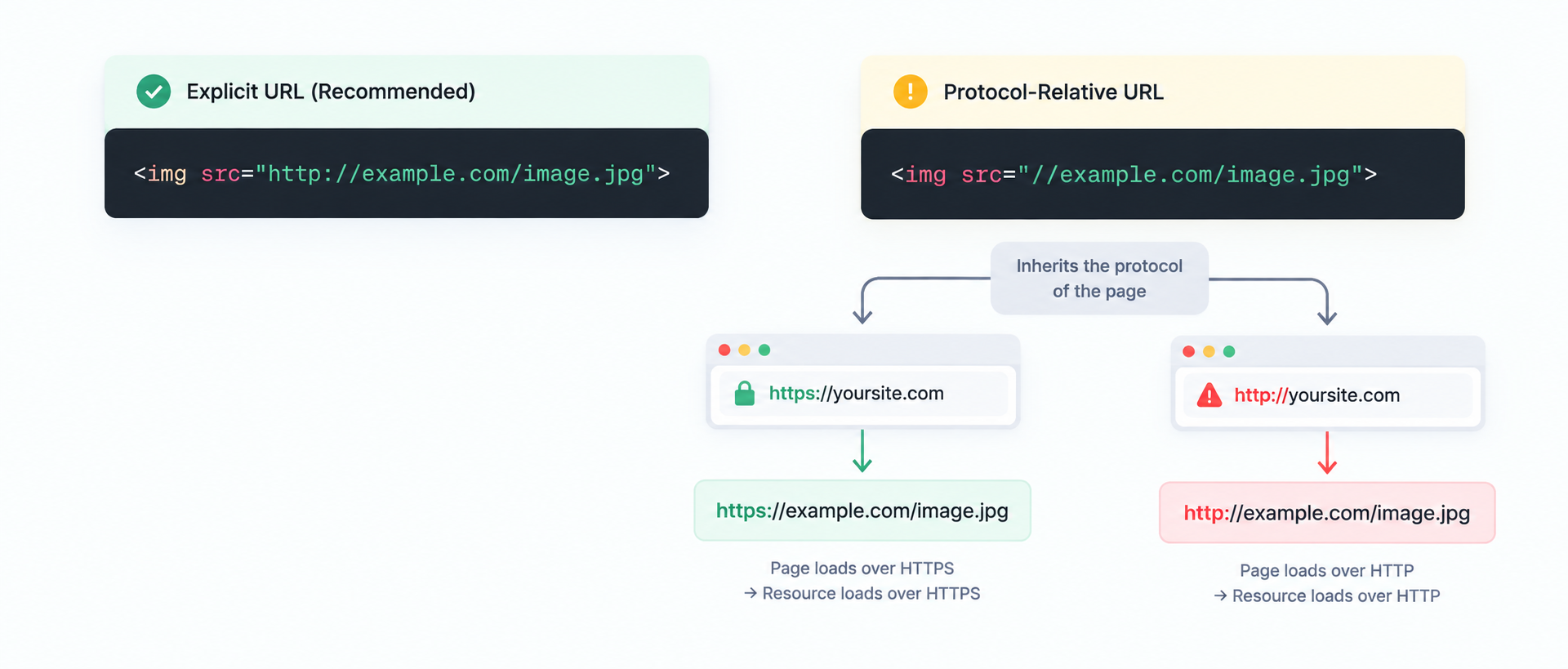
While this approach was designed to provide flexibility across different protocols, it also introduces uncertainty and potential security issues on modern websites where HTTPS is the expected default.
Why Were Protocol Relative URLs Used Historically?
Protocol-relative URLs became popular when many websites were transitioning from HTTP to HTTPS.During that time, it was common for websites to support both versions, and hardcoding "http://" in resource links could trigger mixed content warnings on secure pages.
By using "//" instead of an explicit protocol, developers could ensure that resources such as scripts, stylesheets, and images would load using the same protocol as the page itself without maintaining two separate versions of the markup.
Protocol Relative URLs were primarily used to:
- Avoid mixed content warnings when HTTPS pages attempted to load HTTP resources.
- Support both HTTP and HTTPS versions of a website during migrations.
- Reduce duplicate code in templates by keeping a single protocol for flexible reference.
While this was a practical solution in the early days of HTTPS adoption, modern "HTTPS first" standards and stronger browser security policies have made protocol relative URLs largely unnecessary today.
Why Fixing Protocol Relative Links Matters
Fixing protocol relative URLs is a small technical cleanup that can deliver meaningful improvements in security, consistency, and long term maintainability of your website. On modern websites, explicit and predictable resourceloading is the safest approach.
Here’s why replacing "//" links with "https://" matters:
- Improves website security by ensuring resources always load over HTTPS, even if a page is accessed over HTTP (intentionally or accidentally).
- Strengthens SEO and trust signals by removing ambiguity and reinforcing HTTPS consistency across your website.
- Reduces the risk of mixed content issues and related browser warnings that can break scripts, styling, or page functionality.
- Increases reliability because many content delivery networks and third party services are "HTTPS only" and may block HTTP requests.
- Keeps your codebase in adherance to modern HTML standards by removing legacy patterns that are no longer needed on today’s "HTTPS-first" web.
In most cases, the best fix is simply to replace protocol relative resource links with explicit "https://" URLs so your pages load securely and consistently in every environment (production and staging).
Protocol-Relative vs. Explicit HTTPS URLs
Both URL formats can request the same resource when the page itself is served over HTTPS. The important difference is that an explicit HTTPS URL clearly defines how the resource should be requested.
| Protocol Relative URL | Explicit HTTPS URL |
|---|---|
| //cdn.example.com/app.js | https://cdn.example.com/app.js |
| Protocol is inherited from the page. | HTTPS is explicitly specified. |
| Can behave differently when the page is accessed over HTTP. | Always requests the resource over HTTPS. |
| Useful historically during HTTP/HTTPS transitions. | Preferred for modern HTTPS-first websites. |
Where Are Protocol Relative URLs Commonly Found?
Protocol relative URLs can remain in a website for years, particularly after migrations, redesigns, CMS changes, or the introduction of third-party resources.
- JavaScript files loaded from external CDNs.
- CSS stylesheets hosted on third-party domains.
- Images referenced from external asset servers.
- Web fonts loaded from external providers.
- Analytics and tracking scripts.
- Embedded media and widgets.
- CMS themes and plugins.
- Legacy website templates created before HTTPS became the default.
Good vs Bad Examples OF URLs Using Different Protocols
Reviewing real world examples makes it easier to understand why protocol relative URLs are discouraged on modern websites. Good examples use explicit, secure protocols, while bad examples rely on outdated patterns that introduce ambiguity and potential risk.
Good Examples of Resource Linking
| Example | Why this is good |
|---|---|
| https://cdn.example.com/app.js | Uses an explicit HTTPS protocol, ensuring secure and predictable resource loading. |
| https://fonts.googleapis.com/css?family=Roboto | Follows modern web standards and works reliably across all browsers. |
| https://images.example.com/banner.webp | Clear, secure, and optimized for performance on HTTPS pages. |
Bad Examples of Resource Linking
| Example | Why this is bad |
|---|---|
| //cdn.example.com/app.js | Relies on protocol inheritance, which can lead to insecure page loading if the page is accessed over HTTP. |
| //analytics.example.com/script.js | Can expose users to security risks and may break if the service enforces "HTTPS only" access. |
| //fonts.example.com/font.css | An outdated pattern that offers no benefits over explicitly using HTTPS. |
When reviewing your website, aim to replace all protocol relative URLs with explicit https:// links. This ensures better security, cleaner code, and alignment with modern SEO best practices.
FAQs on Protocol Relative Resource Links
A protocol-relative URL starts with // instead of http:// or https://. It inherits the protocol of the page it’s loaded on.
In most cases, no. Modern best practices recommend using explicit https:// URLs to ensure secure, predictable loading and to avoid ambiguity.
They can. If a page is accessed over HTTP, protocol-relative resources may load over HTTP as well. This can create mixed content problems when parts of the experience expect HTTPS.
Yes, browsers still support them. But support doesn’t mean it’s a best practice. Explicit HTTPS is typically safer and clearer.
Yes, especially if your site is intended to be HTTPS-only. Replacing // with https:// improves security and reduces the risk of accidental insecure loading.
They are not a direct ranking penalty, but they can weaken HTTPS consistency and create avoidable technical ambiguity. Using explicit HTTPS URLs aligns better with modern SEO and security expectations.
This test scans a page and identifies resource URLs that start with // so you can update them to explicit https:// links.
The most common fix is simple: replace protocol-relative URLs with explicit https:// URLs and ensure your site enforces HTTPS site-wide.