
Content Security Policy Header
A Content Security Policy Header Test checks whether your website sends a "Content Security Policy (CSP)" header and whether it’s configured securely.
- CSP (Content Security Policy) tells browsers which sources are allowed to load scripts, styles, images, frames, and other resources.
- It’s one of the most effective defenses against cross-site scripting (XSS) by reducing what malicious code is allowed to execute.
- CSP can also help mitigate clickjacking when you use the "frame-ancestors" directive.
- You can deploy CSP safely using "Report-Only mode" to collect violations before enforcing a strict policy.
- This tool helps you validate whether CSP is present, readable, and aligned with best practices.
What is Content Security Policy (CSP)?
Content Security Policy (CSP) is a browser security feature delivered via an HTTP response header (and in some cases, a meta tag). It provides a set of rules that instructs the browser what the page is allowed to load and execute.
Think of CSP as a whitelist of trusted sources for your website. It helps you control:
- Where scripts can run from
- Where styles can load from
- Which images, fonts, and media are allowed to be rendered
- Which domains can embed your website in frames
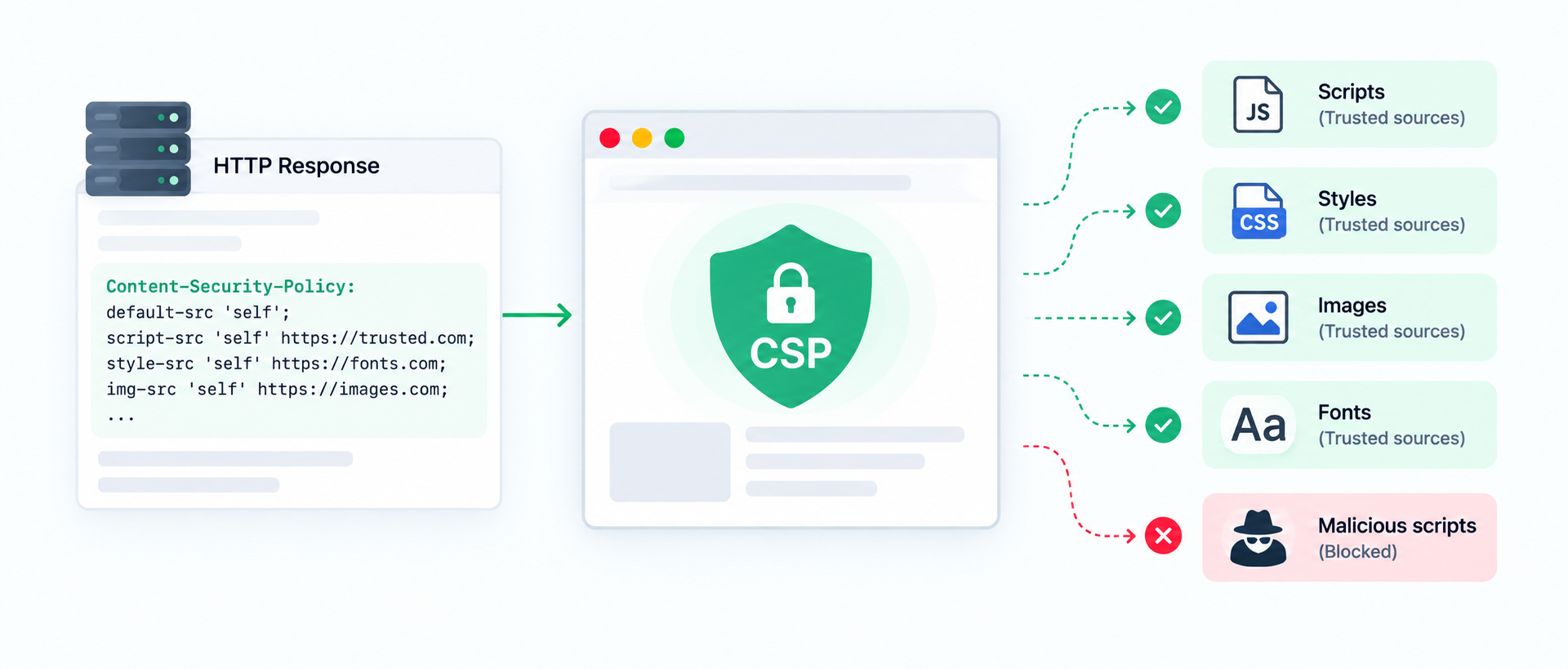
CSP is most commonly used to control JavaScript execution. Because many cyber attacks rely on injecting or running malicious scripts, CSP is widely recommended as a strong mitigation against "cross site scripting (XSS) attacks".
Why a Content Security Policy Headers Matters For Your Website
Content Security Policy (CSP) is one of the most practical security controls you can add to a website. It works at the browser level and helps reduce the impact of common web attacks, especially those involving malicious scripts.
- Strong protection against XSS:Cross site scripting (XSS) attacks often work by injecting malicious JavaScript into a webpage. CSP helps reduce this risk by limiting which scripts are allowed to load and which types of script execution are permitted.
- Limits damage from third party scripts: Many websites use analytics, tag managers, ads, chat widgets, and other third party tools for different purposes. A Content Security Policy Header helps ensure those resources load only from trusted sources, reducing the risk of unexpected script injection.
- Clickjacking defense with frame ancestors:CSP can also protect against "framing based" attacks by using the frame-ancestors directive, which controls which websites are allowed to embed your pages in an iframe.
- Safer rollout with Report Only mode:CSP can break websites if it blocks required scripts, styles, or API calls that are essential for the loading and functioning of a website. A safer approach is to start with "Report-Only" mode to monitor violations, fix issues, and then enforce the policy once you’re confident that nothing will break once a CSP header is enforced.
Common Content Security Policy Directives
A Content Security Policy header is made up of directives separated by semicolons. Each directive controls what the browser is allowed to load or execute for a specific type of resource.
Here are the most commonly used CSP directives:
- default-src – The fallback rule for most resource types when a more specific directive is not defined.
- script-src – Controls where JavaScript can load from and how scripts are allowed to run. This is often the most important directive for XSS protection.
- style-src – Controls where CSS stylesheets can load from (and whether inline styles are allowed).
- img-src – Defines which sources images can be loaded from.
- font-src – Defines which sources fonts can be loaded from.
- connect-src – Controls which endpoints the page can connect to using fetch/XHR/WebSockets (APIs, analytics endpoints, etc.).
- object-src – Controls plugin content (historically used for Flash). Many secure policies set this to none.
- base-uri – Restricts what can be used in the HTML base tag, which helps prevent certain types of URL manipulation.
- frame-ancestors – Controls which sites are allowed to embed your pages in frames/iframes (modern clickjacking protection).
- upgrade-insecure-requests – Automatically upgrades HTTP resource requests to HTTPS (useful during HTTPS migration).
A well-configured CSP typically focuses first on locking down scripts (script-src), then expands to cover other resource types without breaking website functionality.
How to Implement Common CSP Directives
Given below are some practical examples of common CSP directive implementations. These examples are meant to help you understand the structure of a policy and how directives work together to achieve a desired outcome
Basic CSP Header Policy
This policy allows content only from your own domain. It’s a simple baseline for many websites and acts as a good starting point.
Content-Security-Policy: default-src 'self';
Allow scripts from self + a trusted CDN
Useful when you host most files yourself but load scripts from a trusted CDN (Content delivery network)
Content-Security-Policy: default-src 'self'; script-src 'self' https://cdn.example.com;
Common website policy (scripts, styles, images, fonts, API calls)
This is a more realistic setup for modern sites that use a CDN, analytics code, and API endpoints.
Content-Security-Policy: default-src 'self'; script-src 'self' https://cdn.example.com; style-src 'self' https://cdn.example.com; img-src 'self' data: https:; font-src 'self' https://cdn.example.com; connect-src 'self' https://api.example.com;
Clickjacking protection using frame-ancestors
This blocks other sites from embedding your pages in iframes (modern alternative to X-Frame-Options).
Content-Security-Policy: frame-ancestors 'self';
Allow embedding only on trusted partner domains
If you need to allow framing on specific trusted domains, define them explicitly.
Content-Security-Policy: frame-ancestors 'self' https://partner1.com https://partner2.com;
Report-Only mode (safe rollout)
Use Report-Only to collect violations without breaking your site. This helps you refine the policy before enforcing it.
Content-Security-Policy-Report-Only: default-src 'self'; script-src 'self' https://cdn.example.com;
Good vs Bad CSP Examples
A “good” CSP policy limits where scripts and resources can load from without breaking the site. A “bad” CSP policy is usually too permissive offering little protection or too strict without testing - breaking important functionality.
Examples of Good CSP setups
| CSP example and intent | Why this is good |
|---|---|
|
CSP Example - default-src 'self'; Intent - Allow resources only from your own site by default |
A strong baseline that reduces exposure to unexpected third-party resources. |
|
CSP Example - default-src 'self'; script-src 'self' https://cdn.example.com; Intent - Allow scripts only from your site and a trusted CDN |
Locks down script execution (a major XSS control) while still supporting common CDN usage. |
|
CSP Example - object-src 'none'; base-uri 'none'; Intent - Block plugin content and restrict base URL manipulation |
Reduces attack surface by disabling risky legacy mechanisms and preventing certain URL-based attacks. |
|
CSP Example - frame-ancestors 'self'; Intent - Prevent unwanted embedding in iframes |
Helps mitigate clickjacking by allowing framing only within your own site. |
|
CSP Example - Content-Security-Policy-Report-Only: default-src 'self'; script-src 'self' https://cdn.example.com; Intent - Test the policy safely before enforcing |
Lets you collect CSP violations and fix issues without breaking site functionality during rollout. |
Examples of Bad CSP setups
| CSP example and issue | Why this is bad |
|---|---|
|
CSP Example - default-src *; Issue - Allows resources from anywhere |
This is overly permissive and provides little real protection because any domain can serve content. |
|
CSP Example - script-src * 'unsafe-inline' 'unsafe-eval'; Issue - Allows unsafe script execution patterns |
Weakens XSS protection by allowing inline scripts and eval-like behavior, which attackers often abuse. |
|
CSP Example - script-src 'self'; (but site relies on third-party tools) Issue - Too strict without testing |
Can break analytics, tag managers, payment scripts, chat widgets, or CDNs if not included and tested first. |
|
CSP Example - Missing frame-ancestors and no X-Frame-Options Issue - No framing protection |
If your pages can be framed freely, you may be exposed to clickjacking risks depending on page functionality. |
A good CSP balances security and functionality: start in Report-Only mode, tighten scripts first, and then expand the policy to cover other resource types without breaking critical site features.
FAQs on Content Security Policy Header
A CSP header is a browser security mechanism that defines which sources are allowed to load scripts, styles, images, fonts, frames, and other resources on a page.
CSP helps reduce the risk of cross site scripting (XSS) by preventing malicious scripts from loading or executing unless they come from trusted sources.
Yes. If CSP blocks required scripts, stylesheets, fonts, or API calls, some parts of your website may stop working. That’s why it’s recommended to start with Report-Only mode before enforcing a strict CSP policy.
Report-Only mode monitors CSP violations without blocking content. It allows you to see what would break and adjust the policy safely before enforcement.
X-Frame-Options provides basic framing protection, while CSP’s frame-ancestors directive offers more flexible and modern control over which domains can embed your pages.
While CSP itself isn’t a ranking factor, a broken CSP can block scripts or resources required for rendering, which can impact page experience and indexing.
These weaken CSP’s protection and should generally be avoided. They are sometimes used temporarily during migrations but should be removed for stronger security.
A strict CSP typically uses nonces or hashes for scripts, avoids unsafe-inline and unsafe-eval, and locks down high-risk directives like script-src, object-src, and base-uri.
Test your CSP after adding new scripts, third-party tools, CDNs, framework updates, or hosting/CDN changes and periodically to ensure it hasn’t been removed or weakened.
It checks whether a CSP header is present, whether it’s enforced or report-only, and whether it follows common best practices or appears overly permissive.