
Safe Browsing Test
Google Safe Browsing helps protect users from websites and resources associated with threats such as malware, phishing, social engineering, and unwanted software.
- A Safe Browsing test checks whether a URL is identified on Google's lists of unsafe web resources.
- Threats can include malware, phishing and other social-engineering attacks, and unwanted software.
- A site can use HTTPS and still be flagged as unsafe if its content or behavior is associated with a security threat.
- If a website is flagged, browsers and search experiences may display warnings to users.
- Finding a Safe Browsing warning does not replace a full security audit or malware investigation.
What Is Google Safe Browsing?
Google Safe Browsing is a security service designed to help protect users from unsafe websites and web resources. It maintains regularly updated information about URLs associated with threats such as malware, social engineering, phishing, and unwanted software.
Applications and services can check URLs against Google's Safe Browsing data to determine whether a resource is associated with a known threat. Google provides Safe Browsing APIs that allow clients to check web resources against its threat lists.
For website owners, a Safe Browsing check provides an important signal about whether their website or a particular URL may currently be identified as unsafe.
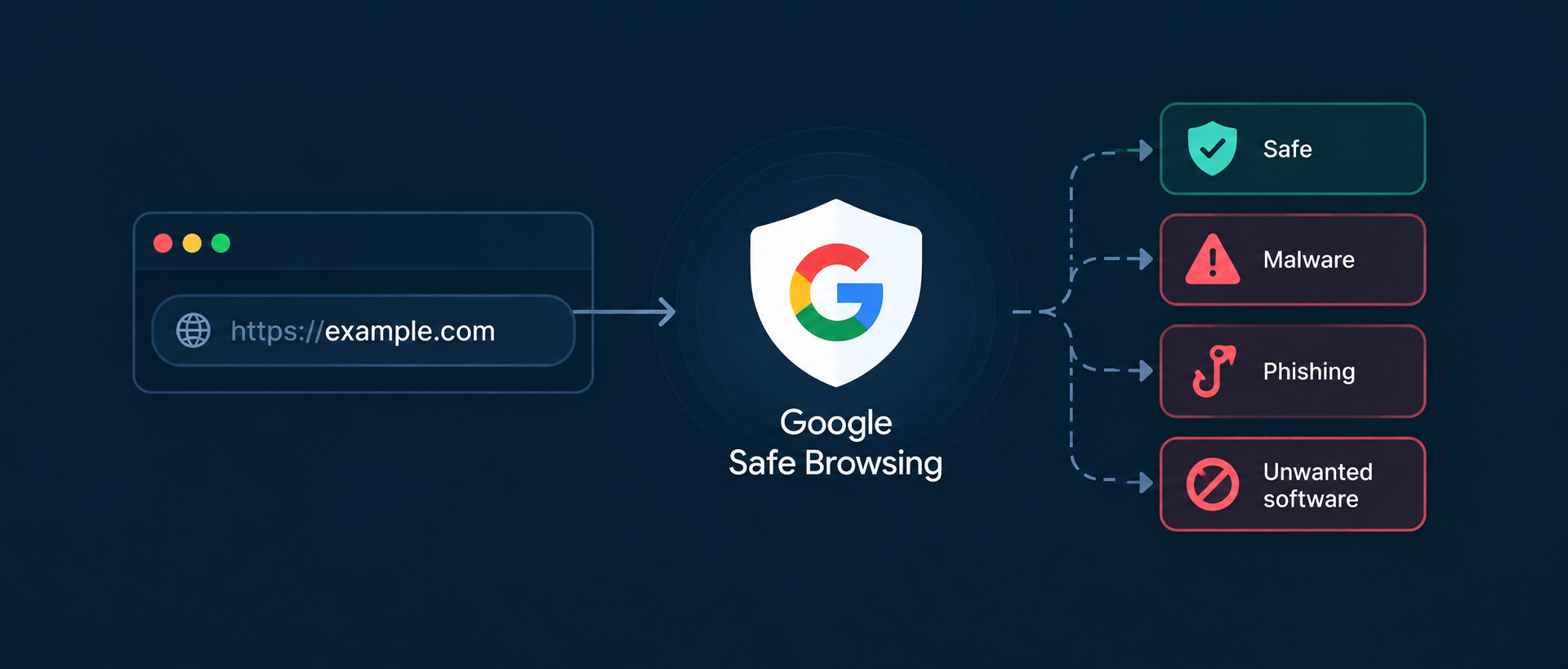
What Does Google Safe Browsing Detect?
Safe Browsing covers several categories of potentially harmful web resources. The exact threat categories available depend on the Safe Browsing service and API version being used.
- Malware: Web resources associated with malicious software or behavior intended to harm users or their devices.
- Social engineering: Pages designed to deceive users into taking actions that may compromise their information or security.
- Phishing: A type of social engineering in which a page attempts to trick users into providing sensitive information such as login credentials.
- Unwanted software: Software associated with deceptive, unexpected, or harmful behavior that negatively affects the user's browsing or computing experience.
Google Search also identifies security issues such as hacked content, malware, unwanted software, and social engineering.
How Does a Safe Browsing Test Work?
A Safe Browsing test checks a URL against the relevant Safe Browsing threat data and determines whether the URL matches a known unsafe resource.
- Enter the URL: Provide the webpage or URL you want to check.
- Check the URL: The test evaluates the URL against the applicable Safe Browsing threat information.
- Look for a threat match: If the URL matches a known unsafe resource, the response can identify a corresponding threat classification.
- Display the result: The tool reports whether the URL was identified as unsafe or whether no matching threat was detected.
Google's Safe Browsing APIs are specifically designed to check URLs and other web resources against Google's lists of unsafe resources.
Understanding Safe Browsing Test Results
A Safe Browsing test should distinguish between a URL for which a threat was detected and one for which no matching threat was found.
| Result | What It Means |
|---|---|
| Safe / No Threat Detected | The URL was not identified as a known unsafe resource in the Safe Browsing data checked by the test. |
| Unsafe / Threat Detected | The URL matched information associated with a known threat category and requires investigation. |
| Unable to Check | The test could not complete the check successfully. This should not be interpreted as proof that the website is safe or unsafe. |
A “safe” result means that no matching threat was detected by the check. It should not be interpreted as a guarantee that the website is completely secure or free from every possible vulnerability.
Why Is Safe Browsing Important?
A website can be compromised without the owner immediately noticing. Attackers may inject malicious code, create deceptive pages, add unwanted downloads, or redirect visitors to harmful destinations.
Google's Search documentation notes that hacked websites can contain malicious code, injected pages, hidden content, or redirects to harmful or spammy destinations.
Checking Safe Browsing status can help with:
- Visitor protection: Identify whether your website may currently be associated with known unsafe resources.
- Early detection: Spot potential security issues before they remain unnoticed for an extended period.
- Reputation: Avoid situations where visitors encounter security warnings when attempting to access your website.
- Website maintenance: Include Safe Browsing checks as part of a broader website security monitoring process.
Safe Browsing vs HTTPS - Two Aspects of Website Security
Safe Browsing and HTTPS address different aspects of website security. Having HTTPS does not automatically mean that a website is safe.
| HTTPS | Safe Browsing |
|---|---|
| Encrypts data exchanged between the browser and the website. | Checks web resources against information about known unsafe resources. |
| Uses TLS to protect data in transit. | Helps identify threats such as malware and social engineering. |
| Does not prove that the website itself is trustworthy. | Does not replace HTTPS, vulnerability scanning, or a complete security audit. |
| A malicious or compromised website can still use HTTPS. | A website can have a valid SSL/TLS certificate and still be associated with unsafe content. |
HTTPS is an essential part of modern website security, but it should be treated as one layer of protection rather than a guarantee that a website is free from malicious content.
Common Reasons a Website May Be Flagged
A Safe Browsing warning can occur for different reasons. Some security issues are introduced intentionally, while others may result from a compromised website.
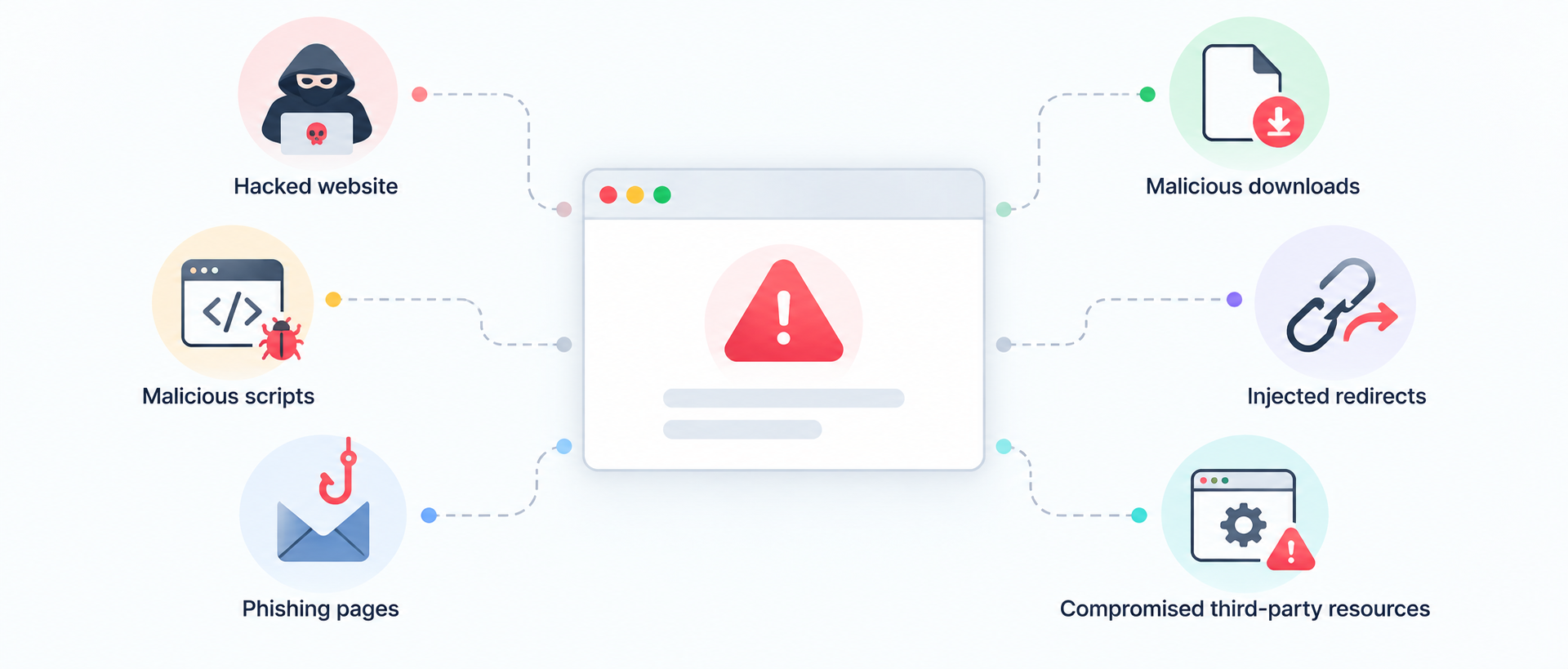
- Hacked website: An attacker gains access to the website and injects malicious code or content.
- Malicious scripts: Compromised pages contain code that attempts to perform harmful actions.
- Phishing pages: A page attempts to impersonate a trusted entity or trick visitors into revealing sensitive information.
- Malicious downloads: A website hosts or distributes software identified as harmful or unwanted.
- Injected redirects: Compromised code redirects visitors toward harmful or deceptive destinations.
- Compromised third-party resources: External scripts or resources used by a website may introduce unexpected security risks.
Google specifically notes that hacked sites can be used to inject malicious code, create harmful pages, manipulate content, or redirect visitors to suspicious destinations.
What to Do If Your Website Is Flagged
If a Safe Browsing or Google security warning indicates that your website may be unsafe, the priority should be identifying and removing the underlying problem rather than simply trying to remove the warning.
- Confirm the issue: Check the affected URL and review available security information in Google Search Console.
- Inspect the website: Look for unauthorized files, scripts, pages, redirects, downloads, or other unexpected changes.
- Remove the threat: Clean compromised files and content and address the vulnerability that allowed the problem to occur.
- Update software: Update your CMS, plugins, themes, libraries, and other software involved in the compromise.
- Review credentials: Change compromised passwords and strengthen account security where necessary.
- Request a security review: After fixing a reported Google security issue, use the appropriate Google Search Console process to request a review.
Google recommends using the Security Issues report in Search Console to investigate detected security problems and request a review after the issues have been fixed.
Good vs. Bad Website Security Practices
| Good Practice | Bad Practice |
|---|---|
| Keep your CMS, plugins, themes, libraries, and server software updated. | Continue using outdated software with known security vulnerabilities. |
| Use strong, unique credentials and multi-factor authentication where available. | Reuse weak passwords across administrative accounts. |
| Regularly review website files, users, scripts, and integrations for unexpected changes. | Assume that a website is secure simply because it looks normal in the browser. |
| Monitor Safe Browsing and Google Search Console security information. | Ignore security warnings because the website still loads normally for you. |
| Maintain reliable backups that can be used during recovery. | Rely on a single copy of the website without a tested recovery process. |
| Review third-party scripts and integrations before adding them to important pages. | Install unverified or outdated scripts, plugins, or themes. |
Is Safe Browsing a Google Ranking Factor?
Safe Browsing itself should not be described as a conventional ranking factor. However, security issues can have serious consequences for how users encounter a website in Google Search and in browsers.
Google states that pages affected by security issues can display warning labels in search results or trigger an interstitial warning in the browser.
Google also explains that hacked content can result in poor search experiences and may harm a site's performance in search.
For this reason, website security should be treated as an essential part of maintaining search visibility and user trust rather than as a simple ranking optimization technique.
What Does the Safe Browsing Test Check?
The Safe Browsing Test checks the submitted URL against the applicable Safe Browsing threat information and reports whether a known threat match is detected.
Depending on the underlying Safe Browsing implementation, threat classifications can include malware, social engineering, and unwanted software. Google's Safe Browsing API documentation lists these among its threat types.
The test is designed to provide a quick safety-status check. It is not a replacement for a complete website security audit, vulnerability assessment, malware scan, or server-level investigation.
How Often Should You Check Your Website?
There is no universal testing frequency that applies to every website. The appropriate frequency depends on how frequently the website changes, how many third-party components it uses, and how important the website is to the business.
A Safe Browsing check can be included as part of routine website monitoring, particularly after major deployments, security incidents, CMS changes, or the installation of new third-party software.
Safe Browsing monitoring should complement—not replace—regular software updates, access-control reviews, backups, vulnerability assessments, malware scanning, and security monitoring.
Conclusion
Google Safe Browsing provides an important layer of protection against websites and resources associated with known threats such as malware, phishing, social engineering, and unwanted software.
A Safe Browsing check can help identify whether a URL is currently associated with a known threat, but a clean result should not be interpreted as a guarantee that the website is completely secure.
For website owners, the best approach is to combine Safe Browsing monitoring with secure development practices, regular software updates, strong access controls, reliable backups, and ongoing security checks.
FAQs on Safe Browsing
Google Safe Browsing is a security service that checks web resources against information about known unsafe resources, including websites associated with malware, social engineering, phishing, and unwanted software.
A Safe Browsing Test checks a submitted URL against the applicable Safe Browsing threat information and reports whether a known threat match is detected.
Users may encounter security warnings when accessing affected pages, and the issue may also appear in Google Search Console. You should investigate the cause, remove the security problem, and follow the appropriate review process after fixing it.
No. HTTPS encrypts data between the browser and server, but it does not prove that a website is free from malware, phishing, compromised code, or other security problems.
Yes. HTTPS protects data in transit but does not prevent attackers from compromising the website itself. A compromised website can still contain malicious code or deceptive content while using a valid HTTPS certificate.
Safe Browsing is better understood as a security system rather than a conventional ranking factor. However, security issues can result in browser warnings and search visibility problems, making website security important for maintaining a healthy search presence.
No. A clean Safe Browsing result means that the checked URL was not identified as a known unsafe resource in the data checked. It does not replace vulnerability testing, malware scanning, server security reviews, or a complete security audit.
Identify and remove the underlying security issue, such as malicious code, hacked content, phishing pages, unwanted software, or injected redirects. After fixing the problem, review the relevant Google Search Console security report and request a review where appropriate.