
Unsafe Cross Origin Links
Unsafe cross origin links usually occur when an external link opens in a new tab using "target="_blank"" but does not include rel="noopener" or rel="noreferrer". This can expose your website to a security risk known as reverse tabnabbing.
- Links with target="_blank" can give the new page access to "window.opener" unless protected.
- This can be abused to redirect your original tab to a phishing or malicious page (also known as reverse tabnabbing).
- Adding "rel="noopener" prevents the new page from controlling the original page.
- rel="noreferrer" also blocks referrer data. This is helpful for privacy, but may affect analytics attribution in some cases.
- This test identifies unsafe external target="_blank" links so you can fix them quickly and improve security.
What Are Unsafe Cross Origin Links?
Unsafe cross-origin links are external hyperlinks that open in a new browser tab using target="_blank" but do not include protective rel attributes such as noopener or noreferrer.
When these attributes are missing, the newly opened page can gain access to the original page through the "window.opener" object. This creates a potential security risk, especially when linking to third-party or untrusted domains.
Because the hyperlink points to a different origin (in this case origin refers to the domain name), the risk is referred to as a "cross-origin" issue and can be exploited through techniques like reverse tabnabbing.
Example of an unsafe cross-origin link:
    <a
     href="https://external-site.com"
     target="_blank"
    >
    Visit External Site
    </a>
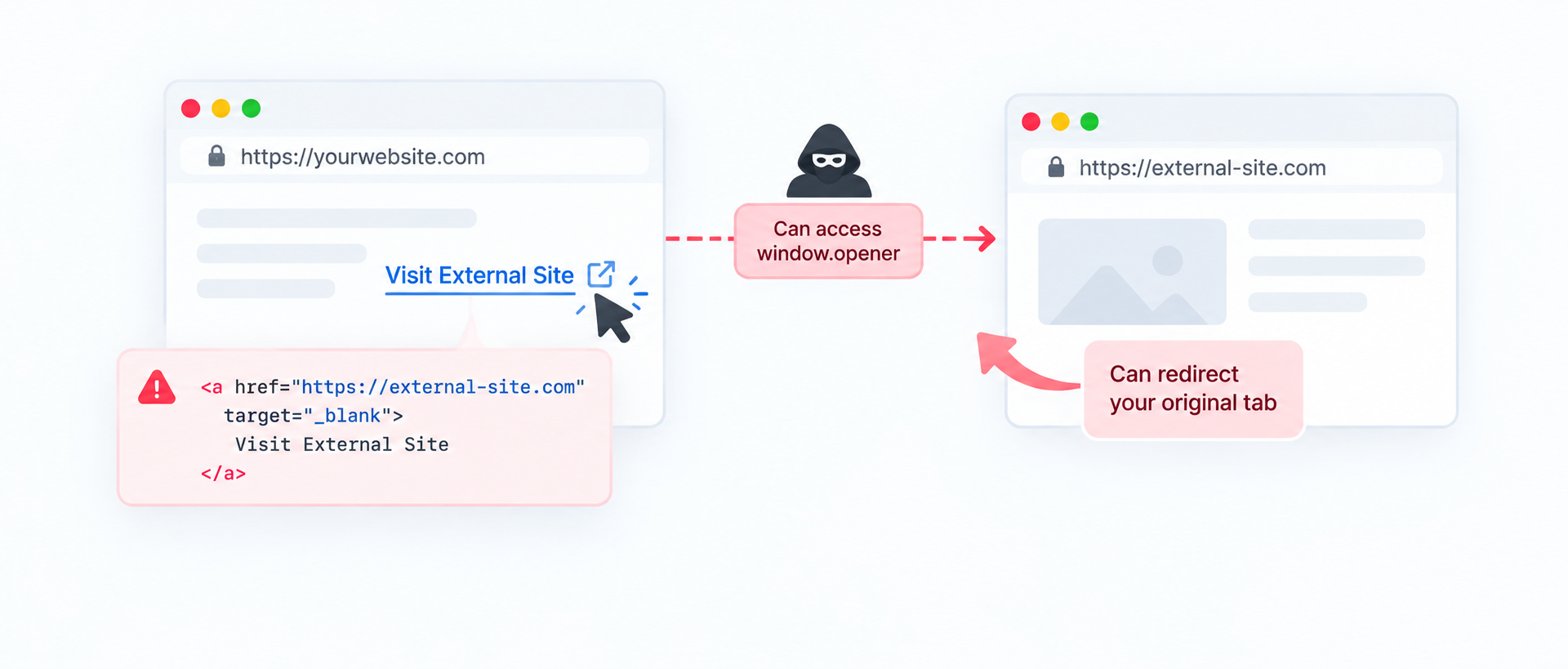
In this example, the external page opens in a new tab and can potentially manipulate the original page because no rel="noopener" or rel="noreferrer" attribute is present.
Safer version of the same link:
    <a
     href="https://external-site.com"
     target="_blank"
     rel="noopener"
    >
    Visit External Site
    </a>
Adding rel="noopener" breaks the connection between the two tabs, preventing the external page from accessing or redirecting the original page.
How Does Reverse Tabnabbing Work?
Reverse tabnabbing takes advantage of the relationship between an original page and a page opened in a new browsing context. If the destination page receives a reference to the original page through window.opener, it may be able to navigate that original page.
Here is how reverse tabnapping works through a sequence -
- A visitor is on your website and clicks an external link.
- The link opens the external destination in a new tab using target="_blank".
- In older or incorrectly configured browsing environments, the new page may have access to window.opener.
- A compromised or malicious destination could attempt to navigate the original tab to a phishing page.
- Because the visitor originally trusted the first website, the redirected page may appear more convincing.
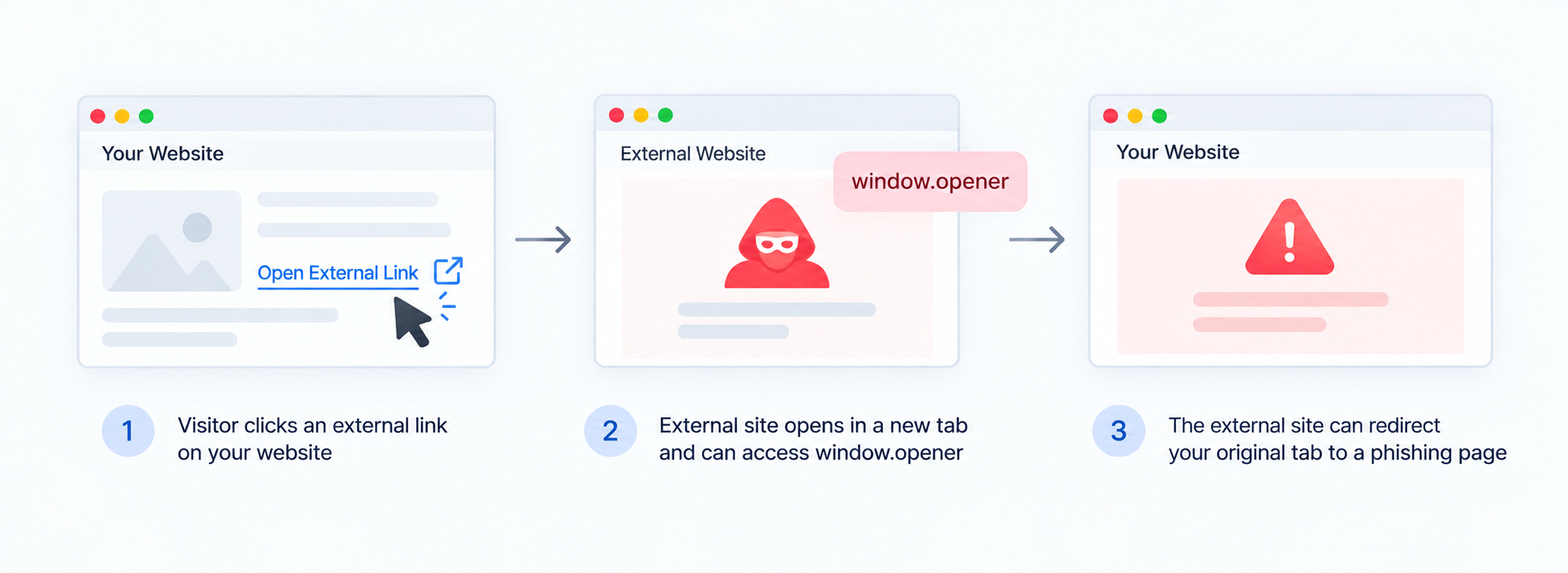
The protection provided by rel="noopener" is designed to prevent the newly opened page from receiving this opener relationship.
Do we "Always" Need to Open External Links in a New Tab?
Not necessarily. Opening a link in a new tab should be a deliberate user experience decision rather than a default rule for every external link.
Standard links normally open in the current browsing context, allowing users to use the browser's Back button to return to the previous page. A new tab can be useful when users need to keep the current page open while consulting another resource.
- Use a new tab when: the user benefits from keeping the current workflow open.
- Use the current tab when: the destination is simply the next step in the user's journey.
- Avoid unnecessary new tabs: especially when many links on the same page open separate tabs.
The goal is to balance security, privacy, accessibility, and user experience rather than opening every external link in a new tab.
Some Situations when Unsafe Cross Origin Links are Generated
Unsafe link patterns often appear because links are generated by different parts of a website rather than through a single reusable component.
- Manually added external links — A developer adds target="_blank" but forgets the appropriate rel attribute. This is the most common reason, and the explanation here is a human oversight or lack of awareness of using the correct rel attributes.
- CMS generated links — Content editors or plugins automatically add new tab behavior without applying the site's preferred security pattern.
- Third party website widgets — Embedded components generate external links independently of the site's normal templates.
- User generated content — Comments, profiles, forums, or other areas allow users to submit external URLs. These systems may not always add the appropriate rel attributes to prevent unsafe cross origin external links.
- Reusable UI components — Buttons, cards, navigation components, or promotional blocks may use different link patterns.
-
JavaScript created windows — Links opened through
window.open()require their own opener handling. If proper rel attributes are not added to Javascript code, sometimes it may result in the creation of unsafe cross origin links.
Best Practices for External Links That Open in a New Tab
Opening external links in a new tab can be helpful in some situations, for example, when you’re sending users to documentation, partner sites, or references and want them to keep your page open. However, using target="_blank" without the right security attributes can expose your site to risks like reverse tabnabbing. The good news: the fix is simple, and the best practices are easy to standardize.
- Always pair target="_blank" with rel="noopener" - This prevents the newly opened page from accessing window.opener and protects the original tab.
- Use rel="noopener noreferrer" when privacy matters - noreferrer also blocks referrer data from being passed to the destination website, which can be useful for login, account, admin, or sensitive pages.
- Don’t open new tabs unnecessarily - Use target="_blank" only when it genuinely improves user experience. Overuse of target="_blank" can feel disruptive and annoying, especially on mobile devices.
- Fix it in website templates and front end components (not page by page) - If your website uses reusable UI components for buttons and links, update the component once so the improvement applies everywhere.
- Be careful with user generated links - If links can be posted by users (comments, forums, profiles), sanitize and automatically enforce safe rel attributes on the server side.
- Re-test after updates - After implementing changes, run this test again to ensure there are no remaining unsafe external links on the page.
A secure external link is still a great user experience. With a consistent approach to rel="noopener"(and noreferrer when needed), you can keep your website safer without changing how users interact with links.
FAQs on Unsafe Cross Origin Links
They are external links that open in a new tab using target="_blank" but do not include rel="noopener" (or rel="noreferrer"). Without these, the new page may access window.opener and potentially manipulate the original tab.
Cross-origin means the link points to a different origin than your site—typically a different domain (and sometimes a different protocol or port). External domains are considered cross-origin.
Reverse tabnabbing is a security issue where a page opened via target="_blank" can use window.openerto redirect the original page to a phishing or malicious URL.
Add rel="noopener" to external links that use target="_blank". For example: <a href="https://example.com" target="_blank" rel="noopener">Example</a>.
noopener is enough to prevent the main security risk by blocking access to window.opener. Add noreferrer when you also want to prevent referrer data from being sent to the destination site (privacy benefit).
No. The link will still open in a new tab as expected. The change is mainly a behind-the-scenes security improvement.
The biggest risk is with cross-origin (external) pages. However, many teams standardize rel="noopener" on all target="_blank" links for consistency.
Because unsafe target="_blank" links are a known security best practice issue. Many audits (including Lighthouse-style checks) detect missing noopener/noreferrer on cross-origin links.