
X Frame Options Header
An X Frame Options Header Test checks whether your website sends the "X-Frame-Options" response header to control if your pages can be embedded inside an iframe.
- X Frame Options helps protects your website from clickjacking attacks by restricting framing.
- The two primary values are "DENY" (block all framing) and "SAMEORIGIN" (allow only same-origin framing).
- The "ALLOW-FROM" directive is obsolete and is generally not recommended to be used.
- Modern best practice is to use "Content-Security-Policy: frame-ancestors" for more flexible control, often alongside X-Frame-Options for ensuring maximum compatibility.
- This tool helps you confirm whether the header is present or not, correctly configured, and aligned with your embedding needs.
What Is the X Frame Options Header and How Does It Work?
The X Frame Options header is a browser security mechanism that controls whether a webpage is allowed to be displayed inside a frame or iframe.
Its primary purpose is to protect websites from clickjacking attacks, where a malicious site embeds your webpage in a hidden or deceptive iframe and tricks users into clicking buttons, links, or controls they didn’t intend to interact with.
When a browser attempts to load a page inside an iframe, it checks the "X Frame Options response header" sent by the embedded page. Based on the directive set in that header, the browser decides whether to allow or block the page from being displayed in the iframe.
If framing is not allowed, the browser prevents the page from rendering inside the iframe entirely. If framing is restricted to the same origin, the browser allows it only when the parent page comes from the same protocol, domain, and port.
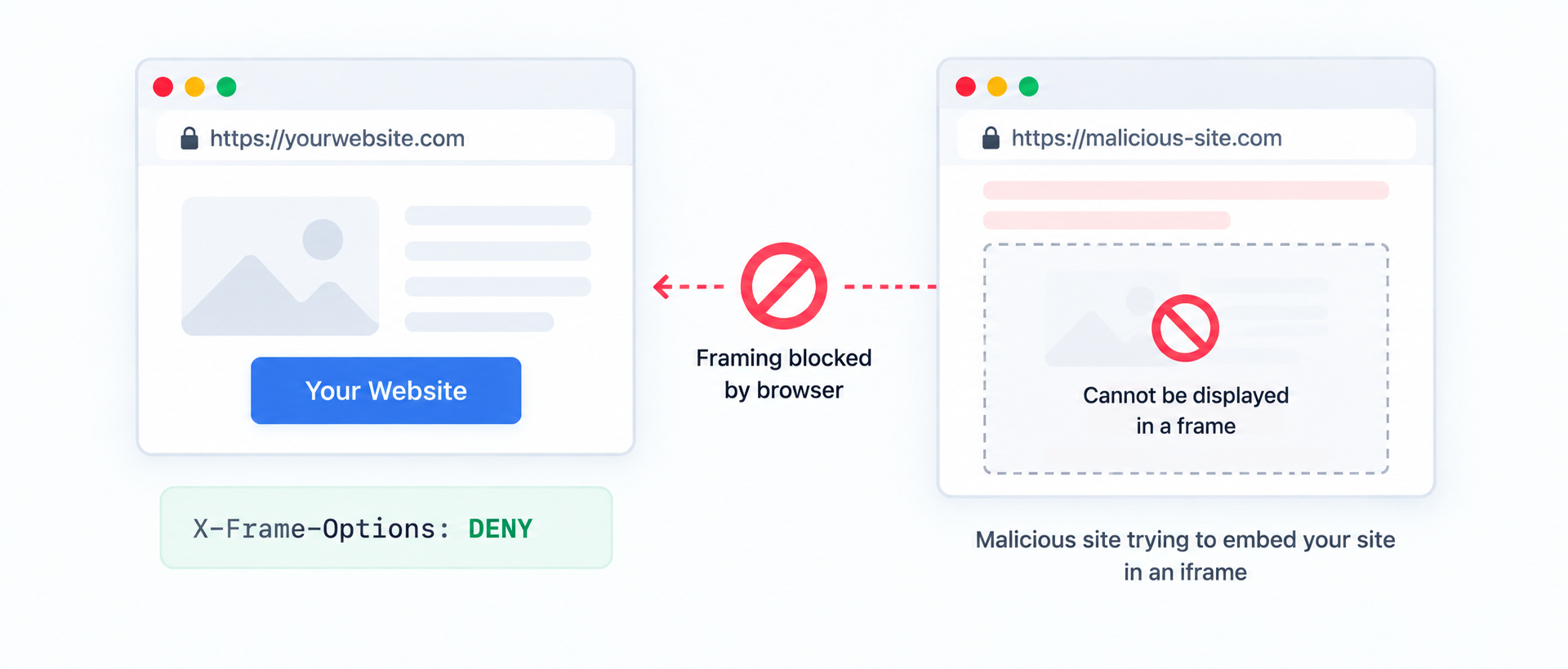
Because this protection is enforced directly by the browser, it remains effective even if an attacker controls the page that is attempting to embed your site. This makes X Frame Options a reliable defense against UI redress and framing based attacks.
X Frame Options Header Directives
The X Frame Options header supports a few directives that determine whether your pages can be embedded inside an iframe. Choosing the right value depends on whether you want to block all framing, allow framing only on your own website, or allow specific external domains to embed your website as an iFrame.
1. DENY
The DENY directive blocks the webpage from being framed by any website, including your own website.
Best for: Login pages, checkout pages, admin panels, account settings, and any page where a user can take sensitive actions.
2. SAMEORIGIN
SAMEORIGIN allows the page to be framed only by pages from the same origin (same protocol, domain, and port).
Best for: Sites that legitimately embed their own webpages within their own domain, such as internal dashboards or embedded sections of the same website on other pages. If you want to retain the absolute control of embedded your own webpages within your website and do not want to allow any other website to be able to embed your webpage, use this directive.
3. ALLOW-FROM
ALLOW-FROM attempts to allow framing only from a specific URL, but browser support is limited and it’s considered obsolete in modern web development implementations.
If you need to allow framing from specific trusted partner domains, the recommended approach is to use "Content-Security-Policy: frame-ancestors", which provides reliable allow listing across modern browsers.
X Frame Options vs CSP frame ancestors
X Frame Options is a widely supported security header that helps prevent clickjacking by restricting whether your pages can be embedded in an iframe. However, it has certain limitations especially if you need to allow framing from specific external domains.
That’s where Content Security Policy (CSP) header comes in. CSP includes a directive called "frame-ancestors", which provides more flexible and modern control over who can embed your pages.
- X Frame Options is simple and commonly used, but it mainly supports DENY and SAMEORIGIN and does not reliably support allowlists across browsers.
- CSP frame ancestors lets you define an allowlist of trusted domains that can frame your content, making it better for partner embeds and complex setups.
It is recommended to use CSP frame ancestors when you need precise control especially allowlisting, and keep X Frame Options as a compatibility layer where appropriate.
FAQs on X-Frame-Options Header Test
X-Frame-Options helps protect against clickjacking attacks, where a malicious website may embed your page in an iframe to trick users into clicking something they didn’t intend to.
DENY is the strongest option because it blocks all framing, even by your own webpages. SAMEORIGIN is useful when your site legitimately needs to embed its own pages within the same domain but you want to restrict embedding from other domains.
ALLOW-FROM was intended to allow framing from a specific URL, but it has limited support and is considered obsolete. If you need to allow specific domains, use Content-Security-Policy (CSP) frame-ancestors instead.
Yes, but X-Frame-Options is not ideal for allowlisting. The recommended approach is to use CSP frame-ancestors, which supports reliable allowlists across modern browsers.
Not always. X-Frame-Options is often enough for basic protection. However, frame-ancestors is more flexible and is considered the modern best practice, especially when you need to allow trusted third-party embeds.
If the embedded page sends X-Frame-Options: DENY, it cannot be framed anywhere. If it sends SAMEORIGIN, it can only be framed by pages from the same origin. In both cases, browsers will block the iframe if the embedding page isn’t allowed.
Most websites should protect sensitive pages like login, account, checkout, and admin areas. For public content that must be embedded (like widgets or docs), use CSP frame-ancestors to allow only trusted domains.
Yes. If you use DENY, even your own site can’t embed the page. If your site requires internal embedding, SAMEORIGIN is usually the better choice.