
Page Size Test
Page size refers to the total amount of data a browser needs to download to load a webpage and its required resources.
- Page weight can include HTML, CSS, JavaScript, images, fonts, videos, and other resources.
- Large or unnecessary resources can increase download time and bandwidth usage.
- Images, JavaScript, video, third-party resources, and large stylesheets are common sources of page bloat.
- Minification, compression, responsive images, caching, and lazy loading can help reduce unnecessary page weight.
- A page-size test helps identify heavy resources that may require further optimization.
What Is Page Size?
Page size, also called page weight, refers to the total amount of data that a browser needs to download to load a webpage and its associated resources.
A webpage is more than its HTML document. When a browser loads a page, it may request stylesheets, JavaScript files, images, fonts, videos, icons, third-party scripts, and other resources. The combined size of these resources contributes to the overall weight of the page.
Page size is commonly measured in bytes, kilobytes (KB), or megabytes (MB). The actual amount of data transferred can vary depending on factors such as HTTP compression, caching, and which resources are requested during the page load.
A smaller page is not automatically a better page. The goal is to remove unnecessary resources and reduce excessive page weight while preserving the content, functionality, design, and user experience visitors need.
What Contributes to Page Size?
Several types of resources can contribute to the total weight of a webpage. Some resources may be essential for the initial page while others may be loaded later as visitors interact with the website.
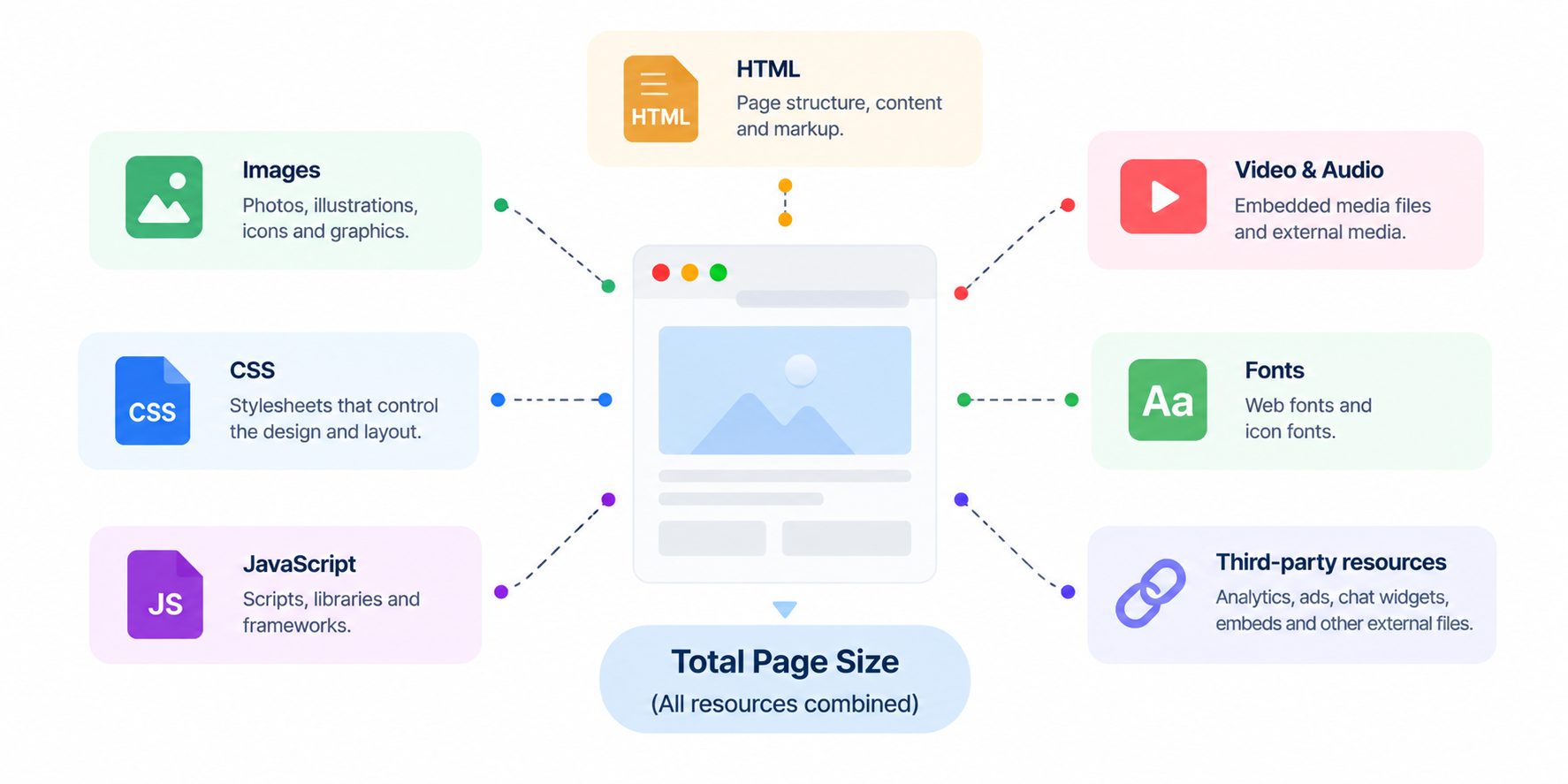
- HTML: The document containing the page's structure and content. Excessive markup, duplicated elements, and unnecessary attributes can increase HTML size.
- Images: Images are often one of the largest contributors to page weight, particularly when they are unnecessarily large, poorly compressed, or served at dimensions much larger than required.
- CSS: Stylesheets control the visual presentation of the page. Large, duplicated, or unused CSS can increase the amount of data required to render the website.
- JavaScript: JavaScript enables interactive functionality but can contribute significant page weight when applications, libraries, frameworks, or third-party scripts are unnecessarily large.
- Fonts: Custom web fonts can add additional requests and file weight, particularly when multiple families, weights, and styles are loaded.
- Video and audio: Media files can be considerably larger than typical HTML, CSS, or JavaScript resources and should be delivered carefully.
- Third-party resources: Analytics, advertising, chat widgets, social integrations, tracking tools, and other external services can add resources to a page.
Page Size vs. HTML Size
Page size and HTML size are related but are not the same thing.
| HTML Size | Total Page Size |
|---|---|
| Measures the size of the HTML document itself. | Considers the resources required to load the webpage. |
| Includes markup, text, attributes, and embedded HTML content. | Can include HTML, CSS, JavaScript, images, fonts, media, and other resources. |
| Can be reduced through HTML minification and removal of unnecessary markup. | Can be reduced by optimizing multiple types of resources. |
| May represent only a small portion of the overall page weight. | Provides a broader view of the resources required to load the page. |
A page with a small HTML document can still be heavy if it loads large images, JavaScript bundles, videos, fonts, or third-party resources.
Why Does Page Size Matter?
Every resource a browser needs to download adds to the amount of data involved in loading a webpage. Larger pages can therefore take longer to transfer, particularly when visitors are using slower or higher-latency connections.
Excessive page weight can also increase bandwidth consumption and may require the browser to process more resources before the page becomes fully usable.
Keeping page weight under control can help with:
- Loading efficiency: Smaller resources generally require less data to transfer.
- Mobile performance: Reducing unnecessary bytes can be especially useful on mobile networks.
- Bandwidth usage: Smaller pages consume less data for visitors and infrastructure.
- Repeat visits: Effective caching can prevent previously downloaded resources from being downloaded again.
- User experience: Reducing unnecessary resource weight can contribute to a more efficient browsing experience.
What the Page Size Test Checks
The Page Size Test analyzes the resources associated with a webpage and helps identify the components contributing to its overall weight.
The test can evaluate:
- HTML size: Measures the size of the webpage's HTML document.
- Stylesheet size: Identifies CSS resources contributing to the page's overall weight.
- JavaScript size: Identifies JavaScript resources and their contribution to page weight.
- Image resources: Identifies images that contribute significantly to the total page size.
- Total page weight: Provides an overall view of the resources detected for the webpage.
- Large resources: Helps identify individual files that may deserve further optimization.
The results can help you determine whether page weight is being driven primarily by images, scripts, stylesheets, HTML, or other resources.
Common Causes of Large Page Size
Page weight tends to increase gradually as websites add content, features, integrations, and design elements. Common causes include:
- Unoptimized images: Large images served at unnecessarily high resolutions can add significant page weight.
- Large JavaScript bundles: Applications and frameworks can ship more JavaScript than a particular page actually needs.
- Unused CSS: Styles left behind by old components, plugins, or design changes can increase stylesheet size.
- Unminified resources: Whitespace, comments, and unnecessary formatting can increase the size of HTML, CSS, and JavaScript files.
- Large media files: Videos and other media can contribute substantial amounts of data when loaded unnecessarily.
- Third-party scripts: Analytics, advertising, chat, tracking, and other external services can add resources to every page.
- Too many web fonts: Loading several font families, weights, and styles can increase both requests and page weight.
- Duplicate resources: Multiple versions of libraries or repeated resources can unnecessarily increase the amount of data loaded.
How to Reduce Page Size
Reducing page weight is usually more effective when you identify the largest contributors first rather than optimizing every resource equally.
- Optimize images: Resize images to appropriate dimensions and use efficient formats and compression.
- Minify HTML, CSS, and JavaScript: Remove unnecessary formatting and other redundant characters from production resources.
- Enable GZIP or Brotli: Compress text-based resources during transfer to reduce the amount of data sent over the network.
- Remove unnecessary JavaScript: Audit unused dependencies, duplicate libraries, and scripts that are not required by the page.
- Remove unnecessary CSS: Review unused or duplicated styles and remove them carefully after testing.
- Lazy-load non-critical resources: Delay images and other resources that are not required for the initial viewport where appropriate.
- Use responsive images: Serve image dimensions appropriate for the visitor's device rather than sending unnecessarily large files.
- Optimize web fonts: Limit unnecessary font families and weights and use appropriate loading strategies.
- Review third-party resources: Remove integrations that provide little value relative to their performance cost.
- Use caching: Configure appropriate caching for static resources so returning visitors can reuse previously downloaded files.
Page Size, Lazy Loading and Caching
Not every resource needs to be downloaded when the page initially loads. Lazy loading can delay non-critical resources until they are closer to being needed.
Images below the initial viewport are a common example. Instead of loading every image immediately, a website can allow suitable images to load as the visitor approaches them.
Lazy loading does not reduce the underlying file size of a resource. Instead, it can reduce the amount of data required during the initial page load by delaying resources that are not immediately necessary.
Caching and page-size optimization solve different problems. Reducing page weight decreases the amount of data that needs to be transferred, while caching allows previously downloaded resources to be reused.
Static resources such as CSS, JavaScript, images, and fonts can often benefit from browser and CDN caching. Effective caching can significantly reduce repeat downloads for returning visitors.
For best results, combine reasonable page weight with appropriate caching, compression, and cache-busting strategies.
Good vs. Bad Page Size Optimization Practices
| Good Practice | Bad Practice |
|---|---|
| Resize images to dimensions appropriate for the device and layout. | Upload very large images and rely on CSS to display them at a smaller size. |
| Minify HTML, CSS, and JavaScript in production. | Serve large unminified production resources unnecessarily. |
| Use GZIP or Brotli to compress text-based resources during transfer. | Assume minification alone replaces HTTP response compression. |
| Audit and remove genuinely unused scripts and styles. | Delete CSS or JavaScript without checking whether other pages or interactions depend on it. |
| Lazy-load suitable below-the-fold images and non-critical resources. | Load every image, video, and resource immediately regardless of when it is needed. |
| Use caching for stable static resources. | Disable caching for resources that could safely be reused. |
| Identify the largest resources before deciding what to optimize. | Spend significant effort optimizing tiny resources while ignoring large images or scripts. |
Does Page Size Affect SEO? And How much Page Weight is considered too much?
Page size is not a standalone search ranking factor with a universal size threshold. However, excessive page weight can affect how efficiently a webpage loads, particularly on slower connections and mobile devices.
Website performance is influenced by many factors, including resource size, network conditions, caching, server response time, rendering work, and JavaScript execution. Reducing unnecessary page weight can therefore support broader performance and user-experience improvements.
Page-size optimization should be treated as one part of technical SEO rather than a guarantee of higher search rankings. The objective is to create pages that deliver the required content and functionality without unnecessary resource weight.
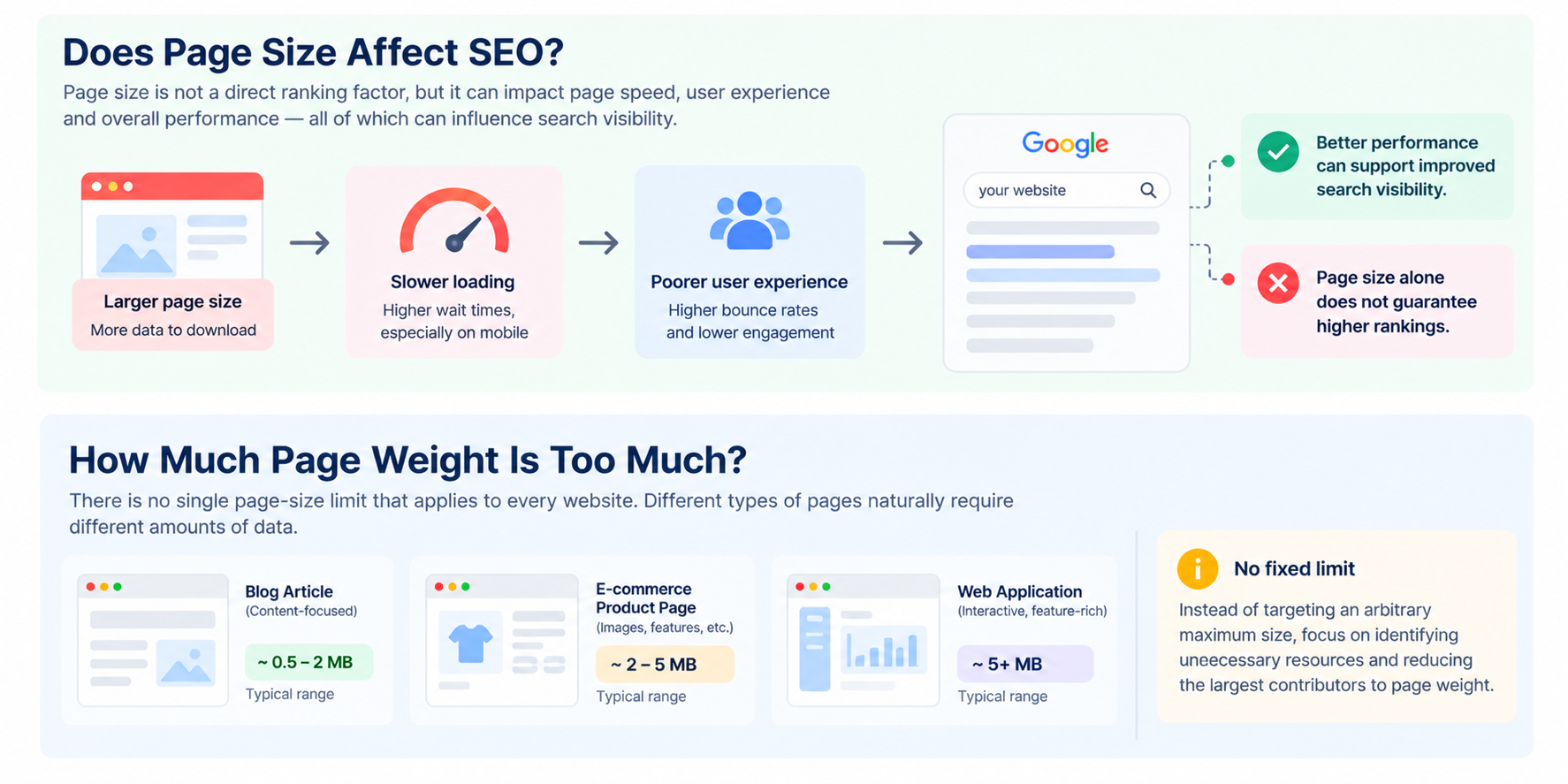
There is no single page-size limit that applies to every website. A content-heavy article, an e-commerce product page, and a web application may naturally require different amounts of data.
Instead of targeting an arbitrary maximum size, focus on identifying unnecessary resources and reducing the largest contributors to page weight. A page that is significantly heavier than comparable pages in the same category may deserve closer investigation.
It is also important to consider how the page is delivered. A large resource that is effectively cached may have a different impact on repeat visits than the same resource downloaded on every request.
Conclusion
Page size is an important part of website performance because every resource required by a webpage contributes to the amount of data that may need to be downloaded and processed.
The most effective approach is not simply to make every page as small as possible. Instead, identify unnecessary or disproportionately large resources, optimize them appropriately, and combine those improvements with compression, caching, responsive delivery, and efficient resource loading.
A Page Size Test provides a useful starting point by showing how much weight a webpage carries and which types of resources are contributing most to that weight.
FAQs
Page size, or page weight, is the total amount of data associated with the resources a browser needs to load a webpage, including HTML, CSS, JavaScript, images, fonts, and other resources.
There is no universal ideal page size. The goal should be to remove unnecessary resources and keep the page as efficient as possible while preserving the content and functionality visitors need.
Large images, JavaScript bundles, videos, fonts, third-party scripts, unoptimized CSS, duplicated resources, and excessive HTML markup are common contributors to large page weight.
Yes. Larger pages generally require more data to be transferred, although actual loading performance also depends on factors such as network conditions, caching, server response time, and browser processing.
Page size is not a standalone ranking factor with a fixed size threshold, but excessive resource weight can contribute to slower loading and a poorer user experience. Optimizing page weight can support broader technical SEO and performance efforts.
Start by identifying the largest resources. Common improvements include optimizing images, minifying HTML, CSS and JavaScript, removing unnecessary resources, enabling GZIP or Brotli, using lazy loading, and implementing effective caching.
Yes. A webpage can load many different resource types, including HTML, stylesheets, JavaScript, images, fonts, videos, and third-party resources. These can all contribute to the overall page weight.
The Page Size Test helps identify the resources contributing to a webpage’s overall weight so you can determine where optimization efforts are likely to have the greatest impact.